
Overview
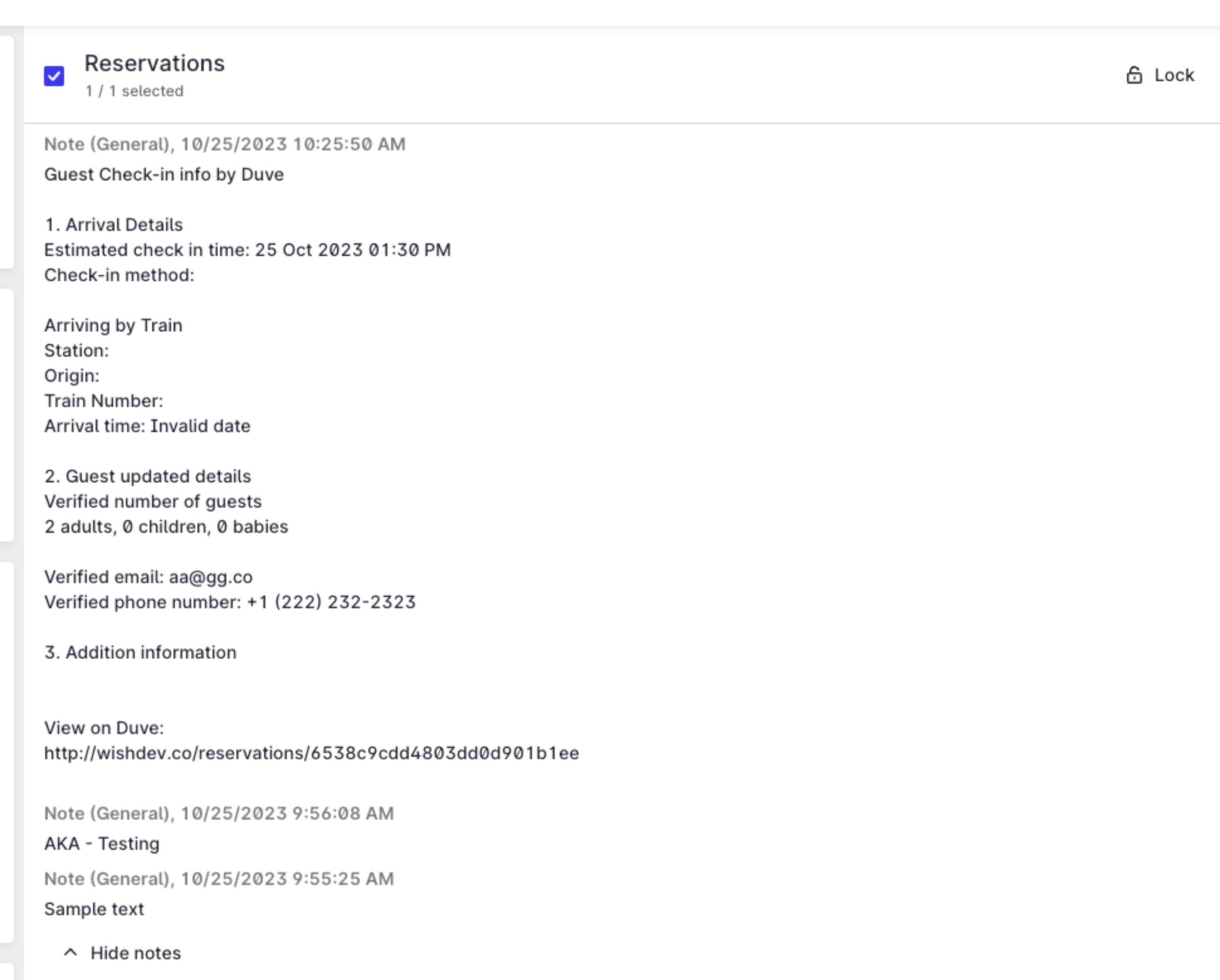
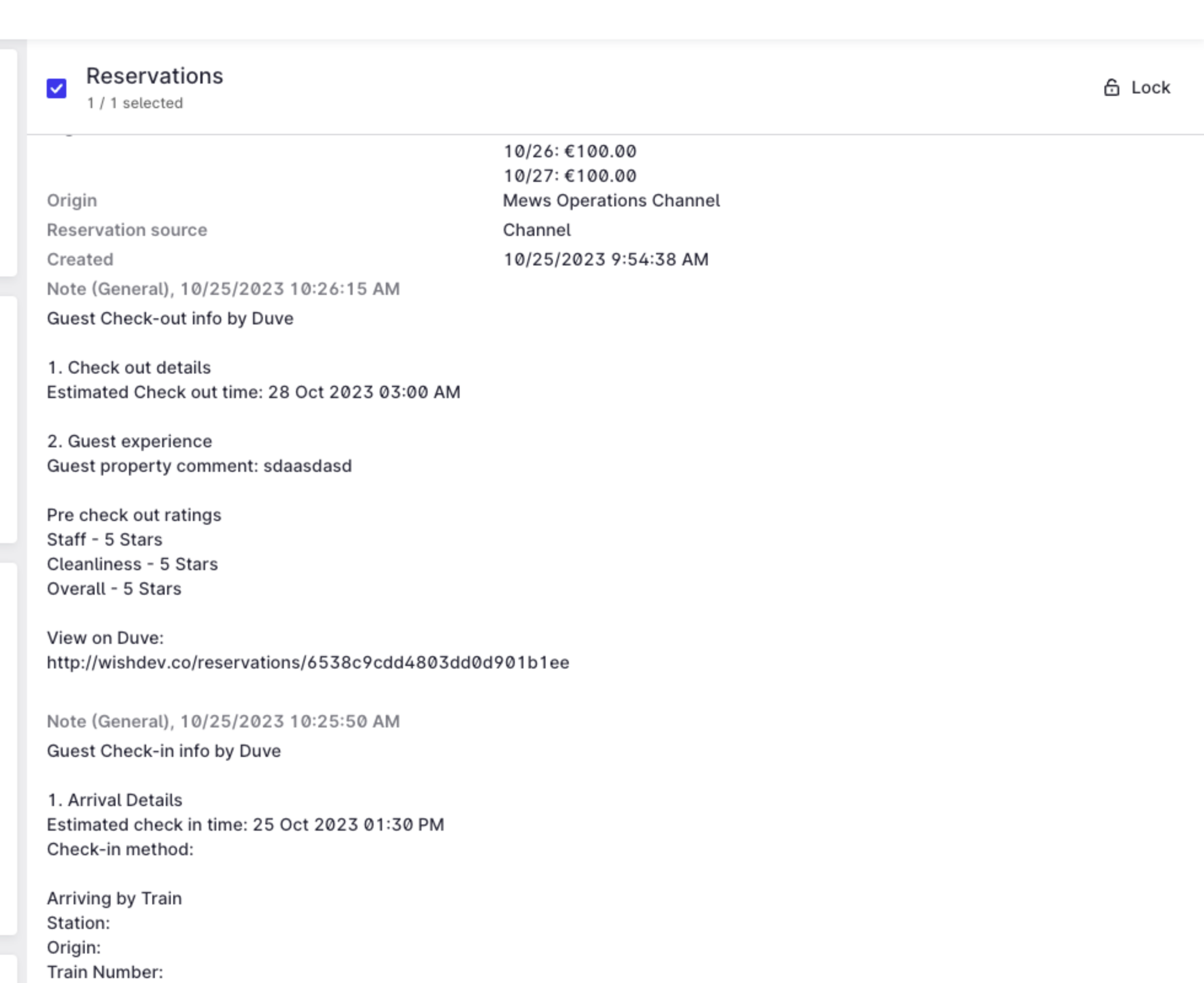
When a guest completes Pre Check-in or Pre Check-out in Duve, Duve sends a summary of everything the guest submitted back to the matching reservation in Mews as a note. Your team sees arrival details, verified guest details, and guest feedback directly in Mews, without needing to open Duve.
There are two separate notes:
- A Pre Check-in summary note, sent once a guest completes Pre Check-in.
- A Pre Check-out summary note, sent once a guest completes Pre Check-out.
Each note is plain text and is added to the reservation in Mews as a new note. Duve always adds a new note, so notes written by your own team are never overwritten.
Who this is for
|
Use cases
- Your front desk opens a reservation in Mews and immediately sees the guest's estimated arrival time and chosen check-in method, so they can prepare the room and the welcome.
- You run airport or station pickups and need the flight or train details the guest submitted, without switching systems.
- You want the verified guest count, email address, and phone number in Mews before arrival, so billing and communication use the correct details.
- Your reception needs to know whether the guest already scanned a passport or credit card during Pre Check-in, so they do not ask for it again.
- You collect custom questions during Pre Check-in (allergies, loyalty numbers, purpose of stay) and want the answers visible to staff who work only in Mews.
- Housekeeping and operations need the estimated check-out time and any issues the guest reported, so departures and turnovers can be planned.
- You want to read the guest's ratings and written review from Pre Check-out while the guest is still on property, so you can resolve problems before they become a public review.
Before you start
- Your Mews account must already be connected to Duve on the Connect & Sync page.
- Pre Check-in must be active for the properties you want notes for. The same applies to Pre Check-out for check-out notes.
- You need permission to edit the connection in Duve.
How to set it up
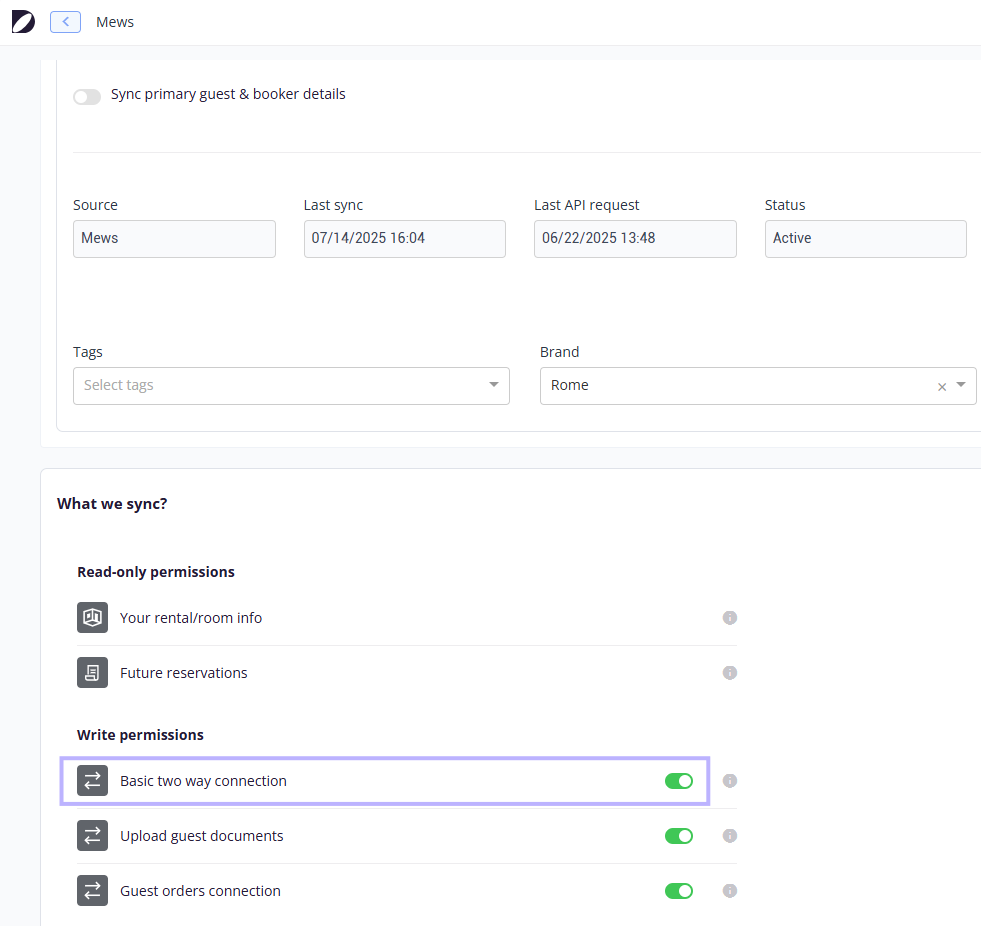
The summary notes are part of the two-way connection with Mews. There is no separate switch for notes, so turning on the two-way connection is all that is required.
- In Duve, go to the Connect & Sync page.
- Open your Mews connection.
- Find the Write Permissions section.
- Turn on the Basic Two-Way toggle.
- Save the connection.
Troubleshooting note: To confirm it works, complete Pre Check-in on a test reservation and open that reservation in Mews. The note appears shortly after the guest finishes.
Guest experience
Guests do not see the note and are not told that anything is sent to Mews. They simply complete the Pre Check-in or Pre Check-out flow in the Guest app as usual. The note is created from the answers they submit at the moment they finish the flow.
Host experience
What the Pre Check-in note contains
- A header line stating that this is guest check-in information collected by Duve.
- Arrival details: the estimated check-in date and time, and the check-in method the guest selected, including its cost when the method has one.
- Arrival method: whether the guest arrives by plane, train, or another way. For a plane, the note adds the landing airport, the flight origin, the flight company and number, and the landing time. For a train, it adds the station, the origin, the train number, and the arrival time.
- Guest updated details: the verified number of adults, children, and babies, the verified email address, and the verified phone number. Verified values are the ones the guest confirmed during Pre Check-in, and they replace the values that came from the booking.
- Additional information: whether the guest scanned a passport, a credit card, or both, plus a prompt to search your email for "Documents received" followed by the guest name.
- A line confirming that the guest booked transportation, and when they did.
- The answers to your custom questions, for the primary guest and for each companion profile.
- A link back to the reservation in Duve.
What the Pre Check-out note contains
- A header line stating that this is guest check-out information collected by Duve.
- Check-out details: the estimated check-out date and time.
- Guest experience: any issues the guest reported about the property.
- The three Pre Check-out rating scores, labeled with the rating names configured in your account's rating settings. A score that the guest did not fill in is shown as not filled.
- The written review the guest left, when there is one.
- A line confirming that the guest booked transportation, when they did.
- A link back to the reservation in Duve.
Troubleshooting
- No note appears in Mews at all: check that the Basic Two Way toggle is on for that Mews connection. Without it, nothing is written back to Mews.
- A note appears for check-in but not for check-out: confirm the guest actually completed Pre Check-out rather than only opening it. The note is created on completion, not on the first screen.
- The guest changed their arrival time after finishing Pre Check-in: the updated time is synced to the reservation in Mews, but a second note is not created. Only the completion of the flow produces a note.
- The note is in English although your team works in another language: see Restrictions and Limitations below.
- If a note fails to send, the rest of the sync with Mews continues normally, and no error is shown in Duve. If notes are consistently missing, contact Support with the reservation ID and the date the guest completed the flow.
Restrictions and limitations
- Notes are written in English or French only. The language follows your account's preferred language, and any other preferred language falls back to English.
- The note layout and wording come from a fixed template. You cannot change which fields appear, reorder them, or add your own text.
- Notes cannot be turned off on their own. They are included with the Basic Two Way connection, so switching the notes off means switching the whole two-way connection off.
- The sync is one-directional for notes. Notes your team writes in Mews are not pulled back into Duve.
- Scanned documents are not attached to the note. The note states only whether a passport or credit card was scanned.
- Only the completion of Pre Check-in and the completion of Pre Check-out create a note. Other updates on the reservation do not.
Tips and tricks
- Use the Duve link at the end of each note when a staff member needs the full picture, including documents and the full guest profile.
- Set clear labels in your rating settings before you rely on the check-out note, because those labels are what identify each of the three scores inside Mews.
- Custom question answers are included in the Pre Check-in note, so questions whose answers matter to the front desk, such as arrival by car or a parking request, are worth adding as custom questions rather than collecting them by message.
FAQs
Q: Do I need to contact Duve Support to turn this on?
A: No. Turning on the Basic Two Way toggle on your Mews connection is all that is needed. Older documentation asked you to contact the Technical Partner Success team, which is no longer required.
Q: Can I get the notes without turning on the rest of the two-way connection?
A: No. The notes are part of the Basic Two-Way connection and cannot be enabled separately.
Q: Will Duve overwrite notes that my team wrote in Mews?
A: No. Each summary is added as a new note on the reservation.
Q: Does the guest see this note?
A: No. The note is only visible to your team inside Mews.
Q: A guest updated their arrival time after finishing Pre Check-in. Will a new note be created?
A: No. The updated time is synced to the reservation in Mews, but only the completion of the flow creates a note.
Q: Can I change what the note says?
A: Not today. The content follows a fixed template. The one part you influence is your custom questions, whose answers are included in the Pre Check-in note.
Q: Can I get the note in a language other than English or French?
A: Not today. Any other preferred language falls back to English.
Q: Where do I see the note in Mews?
A: On the reservation itself, together with the other notes on that reservation.
Q: Does this work for reservations that came from a channel such as Booking.com?
A: Yes. What matters is that the reservation exists in Mews and is synced to Duve, not where the booking originated.
Comments
0 comments
Article is closed for comments.