
Overview
When a guest requests an early check-in (ECI) or a late check-out (LCO) in Duve, Duve writes a note on the reservation in Opera Cloud through the OHIP connection. Previously, that note carried only a static check-in timeline, such as "Check-in time: 15:00", no matter whether the request was still waiting for your approval, already approved, or declined.
With ECI/LCO pending status notes, the note Duve pushes to Opera Cloud is status-aware. It states whether the request is pending approval or approved, the exact time the guest asked for, and the price quoted for the request. Front-desk and operations staff can therefore triage an arrival or departure request from inside Opera Cloud, without opening Duve to check what the guest actually asked for.
Note lines look like this:
- Pending early check-in:
Check-In time: Pending Approval for Early Check-in time: 12:00 at US$417.98 - Approved early check-in:
Check-In time: Approved Early Check-in time: 12:00 at US$417.98 - Pending late check-out:
Check-out time: Pending Approval for Late Check-out time: 14:00 at US$99.00 - Approved late check-out:
Check-out time: Approved Late Check-out time: 14:00 at US$99.00 - No request, or a request that was denied or refunded:
Check-in time: 15:00orCheck-out time: 11:00
Applies to:Properties connected to Oracle Hospitality Opera Cloud through the OHIP integration, using Duve's early check-in and late check-out upsells with the approval flow. The pending-approval push path is supported for accounts whose PSP (payment provider) is Adyen. |
Use cases
- A guest completes online check-in and asks to arrive at 12:00. Reception opens the reservation in Opera Cloud and immediately sees that a paid early check-in is pending approval, at what hour, and for how much, so they can decide whether the room can be released.
- A guest completes online check-out and asks to leave at 14:00. Housekeeping and reception see the pending late check-out on the reservation and can plan the room's turnover before approving.
- A manager approves a pending request in Duve. The next push writes an "Approved" line onto the reservation, so anyone looking at the reservation in Opera Cloud sees the confirmed time rather than the default one.
- A request is offered free of charge as a gesture. The note still shows the requested time and status, and simply omits the price.
- A request is declined or refunded. The note falls back to the property's standard check-in or check-out time, so Opera Cloud never shows a time the property did not agree to.
Before you start
- Your property must be connected to Opera Cloud through Duve's OHIP integration.
- The early check-in and late check-out services must be set up in Duve as upsells, with approval required, so that requests are created in a pending state instead of being confirmed automatically.
- Your payment provider must be Adyen for the pending-approval push. When a pending request is authorized, Duve pushes it to Opera Cloud without posting the charge to the folio, and that path is implemented for the Adyen webhook flow.
How it works
You do not need to configure anything for the status notes themselves. Duve builds and pushes them automatically as the request moves through its lifecycle.
When Duve pushes a note
- When an early check-in or late check-out order is created and is still waiting for approval, Duve pushes the pending status line as its own note on the reservation.
- When the order is approved and captured, Duve pushes the approved status line as its own note.
- A pending order's charge is never posted to the Opera Cloud folio before approval. Only the note is written.
What the note contains
- Status: "Pending Approval" while the request awaits a decision, "Approved" once it is accepted. An order that never required approval is treated as approved.
- Requested time: the hour the guest asked for, taken from the request itself. A next-day marker such as
(+1)is stripped, so01:00 (+1)appears as01:00. A time already formatted in 12-hour style, such as4:00 PM, is passed through as is. If the request carries no requested hour, Duve falls back to the reservation's check-in or check-out time. - Price: the quoted amount, always shown with two decimals and preceded by the currency symbol, for example
US$417.98, or€417.98. If Duve has no symbol mapped for the currency, the currency code is used instead, for exampleXYZ417.98. - The price is excluded entirely when the amount is zero, or the request is marked free of charge.
Troubleshooting
- No status line appears on the note: Duve writes the status-aware line only when it finds an active early check-in or late check-out request on the reservation. If the request was canceled, rejected, denied, expired, or refunded, it is treated as no request at all, and the note shows the plain timeline instead.
- The note shows "Pending Approval" although the request was already decided: Duve re-reads the request's live status at the moment it pushes, so a stale queued event cannot produce a wrong status. If you still see a mismatch, check whether an additional, newer request exists on the reservation, because Duve always describes the most recent active one.
- No note reached Opera Cloud at all: A failure to load the request, or a failure of the note push itself, is logged to the OHIP sync channel and never blocks the rest of the order push. Ask Duve Support to check the OHIP sync logs for the reservation.
- The wrong time appears for a request the guest changed: Duve reports the latest active request. A superseded request should have been canceled or denied, which removes it from consideration.
Restrictions & limitations
- Opera Cloud reservation notes are append-only: A status change adds a new note to the reservation rather than editing the earlier one, so a reservation can carry both a pending note and, later, an approved note. The most recent note is the current truth.
- Each note is capped at 2,000 characters before it is sent to Opera Cloud: Longer text is cut at that limit.
- Duve pushes each status at most once per request: If the pending note was already written, a retry does not add it again. The approved note is tracked separately, so both statuses can each be pushed once.
- Note text is written in English only: It is not translated to the property's or the guest's language.
- A free-of-charge request shows no price at all: The note does not say "Free".
- Denied and refunded requests produce no dedicated note: They fall back to the standard timeline.
- Status notes are written for early check-in and late check-out only: Other upsell products keep their existing note behavior.
Tips & tricks
- Approve or deny in Duve, not in Opera Cloud: The approval decision lives in Duve, and Opera Cloud receives the outcome as a new note.
- If your team relies on notes for handovers, tell them the "Approved" line supersedes any earlier "Pending Approval" line on the same reservation.
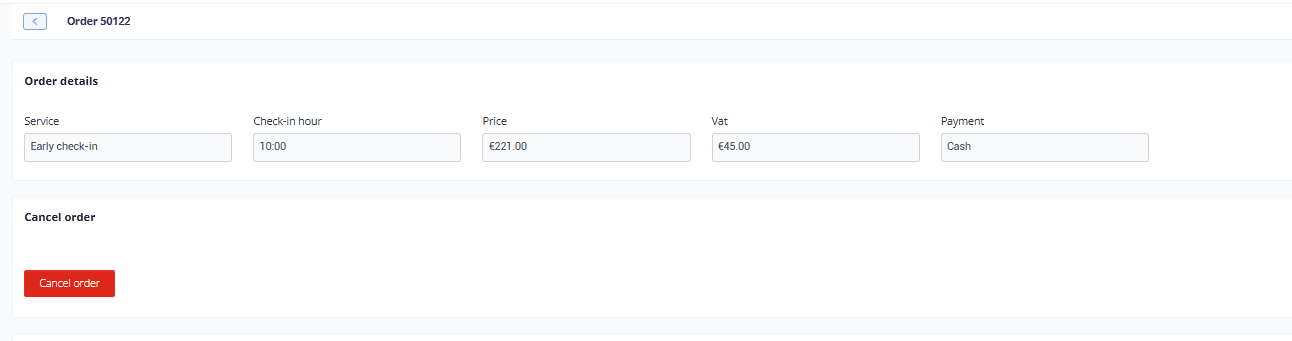
Approved order in Duve:
FAQs
Q: Where in Opera Cloud do these notes appear?
A: They are written to the reservation's comments in Opera Cloud through the OHIP reservation API, in the same place Duve already writes its pre-check-in and pre-check-out notes.
Q: Does the guest see anything different?
A: No. This behavior changes only the data Duve writes to Opera Cloud. There is no guest-facing change in the online check-in or online check-out flow.
Q: Will a pending request post a charge to the folio?
A: No. While a request is pending approval, Duve writes the note only. The charge is not posted to the Opera Cloud folio until the request is approved.
Q: What happens if I approve a request after the pending note was already written?
A: Duve pushes a second note with the "Approved" line and the confirmed time. The earlier pending note remains on the reservation, because Opera Cloud notes cannot be edited or removed by the integration.
Q: What happens if I deny a request?
A: The request is treated as no request. Any later note for that reservation shows the property's standard check-in or check-out time instead of the requested one.
Q: Why does one of my notes show a currency code instead of a symbol?
A: Duve maps common currencies to their symbols and falls back to the raw currency code when no symbol is mapped for that currency.
Q: Can the note be translated into our working language?
A: Not currently. The status text is written in English for all properties.
Q: Could the note be duplicated if the integration retries?
A: No. Duve records that the pending note and the approved note were each pushed, and skips them on later retries. If the push itself failed, nothing is recorded, so a retry can still write the note.
Q: Does this work with our on-premise Opera installation?
A: This behavior is part of the Opera Cloud (OHIP) co nnector. Other Opera connections are not covered.
Q: What if the guest asks for a time after midnight?
A: The next-day marker is removed from the note, so a 01:00 arrival request appears as
01:00. Check the reservation's arrival date in Opera Cloud to confirm the day.
Comments
0 comments
Article is closed for comments.