
Give guests who use WeChat a convenient way to reach your team. Duve connects your WeChat Official Account to the Communication Hub so you can manage WeChat conversations alongside your other channels.
Overview
Duve provides a direct integration to a WeChat Official Account. Guests can message your connected account with text or images, and your team can reply from the Communication Hub with text, images, or mapped WeChat private templates. Duve does not create QR codes, and delivery is subject to WeChat's own policies and account status.
In this article
Use cases
- Reach guests on the app they actually use. For many guests, WeChat is their main communication platform, and they will not open an email or answer a WhatsApp message. Connecting your Official Account gives them a way to reach you, and gives you a way to reach them, on the channel they check all day
- Answer repeat questions with templates instead of retyping them. Questions like check-in time, address and directions, parking, and Wi-Fi come in over and over. Map those answers once as WeChat templates, then send the right one in a couple of clicks with the guest and reservation details already filled in from Duve fields
Before you start
- You need a WeChat Official Account with its App ID, App Secret, and WeChat User (account identifier)
- You need Duve user permissions to edit Settings → Connections → Messaging Providers
- If you plan to use templates, make sure your WeChat private templates already exist in your WeChat account
- If your Official Account requires a verification token or encryption key, contact Duve Support to complete webhook verification
How to set it up
Path: Settings → Connections → Messaging Providers → WeChat
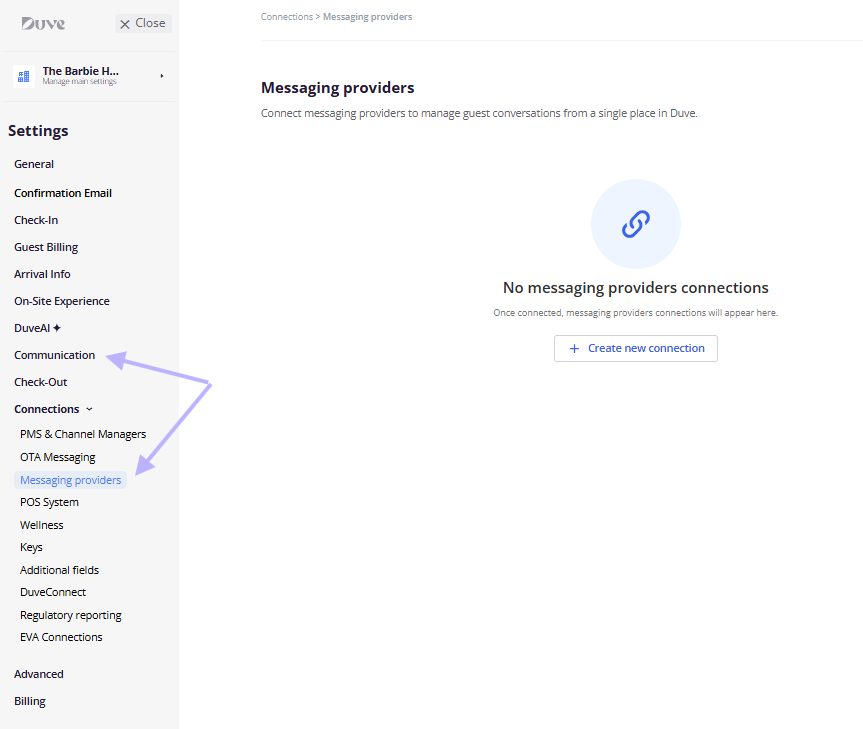
Connect a WeChat Official Account
- Go to Settings → Connections → Messaging Providers → Create new connection → Select "WeChat"
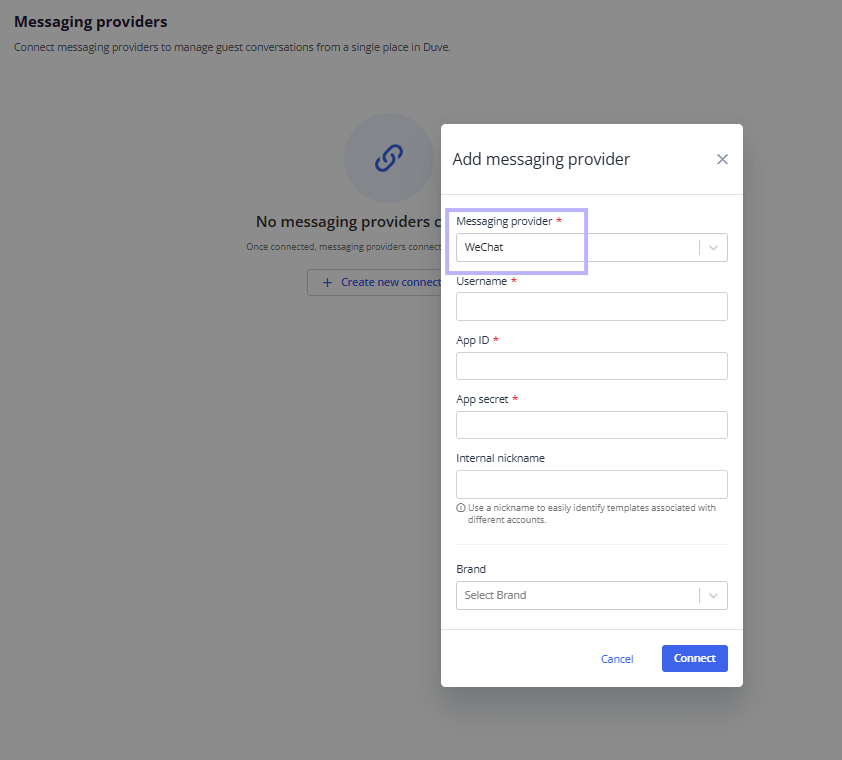
- Enter your WeChat Username, App ID, and App Secret, providing the following WeChat guide link, then click Connect
- Once the connection is established and active, the user will be navigated to the connection page and can change the connection details:
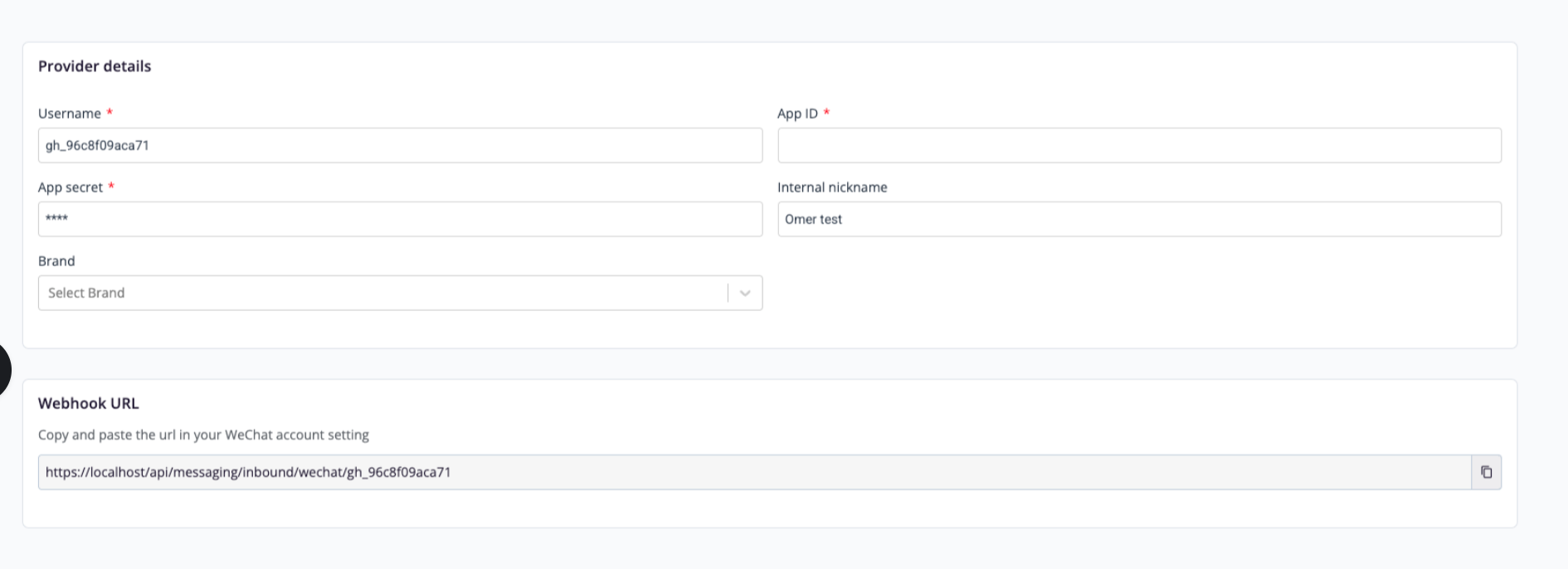
Setup note: To receive inbound messages, your WeChat account must send events to Duve's webhook. The inbound URL format is:
https://<your-Duve-hostname>/api/messaging/inbound/wechat/{providerExternalId}, That will be automatically created in the connection page:WeChat templates
The WeChat templates page pulls in every template assigned to your connected WeChat account. Your job in Duve is to map each WeChat parameter to a Duve dynamic parameter so the template is ready to send.
- Go to Settings → Communication → WeChat templates. The page is visible once a WeChat provider is connected
- Review the list of templates pulled from your WeChat account. If no templates are assigned to the account, the page shows an empty state, and you need to add templates in WeChat first
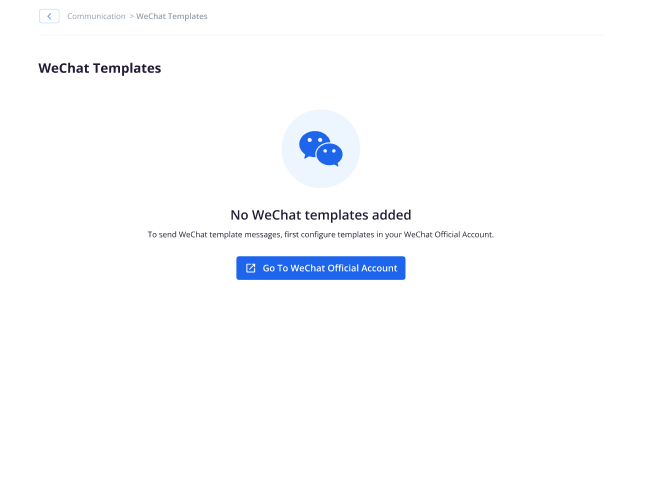
- Click a template to open the template editor, which shows:
- The template content
- The WeChat variable in the template
- A drop-down of Duve dynamic parameters - For each WeChat variable, select the Duve dynamic parameter that should fill it. The Duve dynamic parameters you select become the values sent in the WeChat template, and save the template.
- Check the Status of each template:
- Action needed: the template still has WeChat parameters that are not mapped, so it cannot be used yet
-
Ready: every parameter is mapped, and the template can be used by your team
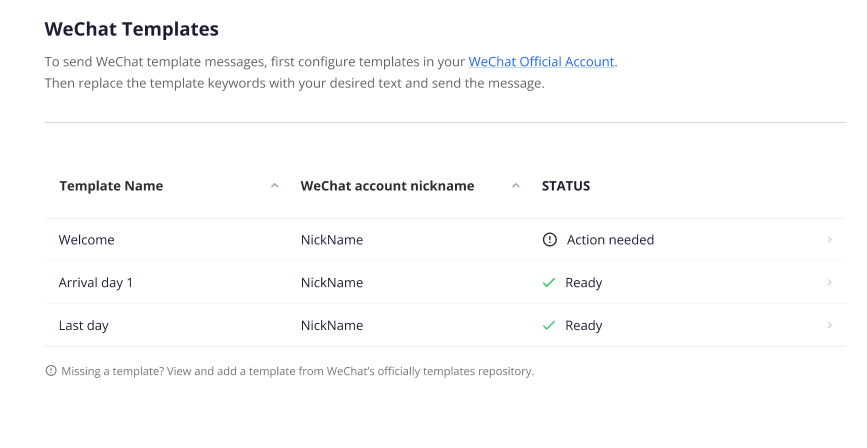
- Ready templates appear in the canned responses section of the Communication Hub, so your team can pick them straight from the conversation
Messaging from the Communication Hub
- Open a guest in the Communication Hub
-
Select WeChat as the message type
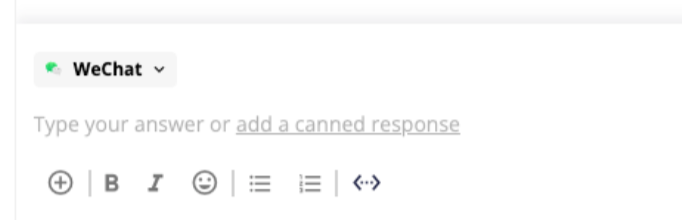
- Compose and send a message:
- For text, type and send
- For images, attach an image and send
- To send a template, choose a “Canned Response” pop-up for the WeChat template, review the preview, and send
Troubleshooting notes:
- The host cannot send a message to a guest if the guest has not sent a message in the last 48 hours. If the window has passed, wait for the guest to message again before you can reply
- If DuveAI is activated in the account, incoming WeChat conversations can be answered by DuveAI
Troubleshooting
- Incoming messages never arrive: Confirm your WeChat account is pointed to the correct Duve inbound URL and that webhook verification is complete. If encryption or a verification token is required, contact Duve Support to finalize the setup
- Guest sent a voice, video, or file message and it did not appear: Only inbound text and image messages are processed for WeChat
- Host cannot send on WeChat: Make sure a WeChat provider is active, the guest chat has a linked WeChat recipient, and an access token can be obtained
- Image fails to send: The image must first be uploaded to WeChat temporary media. If the upload fails, the message will not send. Try a different image or resend later
- Template not available to send: Sync your WeChat private templates and map every placeholder. Templates stay in Action Needed until all Duve's placeholders are mapped
- Messages rejected with a provider error: Duve records WeChat's error code and does not retry automatically. Check your WeChat account status and messaging permissions
Restrictions & Limitations
- Supported inbound message types: text and image only
- Text and image cannot be combined into one WeChat message. They are sent as two separate messages
- No broadcasts, quick replies, buttons, or interactive menus
- No document, video, audio, or location messages
- Duve does not create or submit new WeChat templates. Only your existing private templates can be synced and used
- Duve does not generate WeChat QR codes or deep links
- Duve does not display or enforce a WeChat service-session timer. Delivery depends on WeChat account rules and permissions
- Duve strips HTML before sending, so use plain text. Emojis behave as regular text, subject to WeChat acceptance
FAQs
Q: Can I broadcast messages to a segment of guests on WeChat?
A: No. Broadcasts are not supported in Duve's WeChat channel.
Q: Can I send files, videos, or voice messages?
A: No. Outbound messages support text, images, and mapped WeChat private templates.
Q: Can I include both text and an image in one message?
A: No. Text and image are sent as two separate WeChat messages.
Q: How do guests start a WeChat chat with us?
A: Guests message your connected Official Account. Duve links the conversation using the guest's WeChat user identifier when the message arrives.
Q: Does Duve enforce a 48-hour WeChat window?
A: Yes. The host cannot send a message from Duve to a guest if the guest has not sent a message in the last 48 hours. If the window has passed, wait for the guest to message again before you can reply
Q: Can Duve create or approve WeChat templates for me?
A: No. Duve syncs your existing WeChat private templates. You map placeholders in Duve, then send them from the Communication Hub.
Q: Does translation work with WeChat?
A: Yes. WeChat conversations use Duve's standard Communication Hub translation controls when translation is enabled for your account.
Q: Where do I see WeChat analytics?
A: WeChat conversations appear in the Communication Hub. There is no WeChat-specific analytics dashboard in Duve.
Comments
0 comments
Article is closed for comments.