
When you connect a Duve upsell to a service in Apaleo, Duve books every purchase as that service on the guest's reservation, on the date the guest will receive it. Apaleo then posts it to the folio itself, so your team sees what was sold, for which day, and how many, directly in Apaleo. Before showing a connected upsell to a guest, Duve also checks with Apaleo that the reservation can book that service, so guests are only offered what you can actually deliver.
Quick navigation:
- Applies to
- Use cases
- Before you start
- How to set it up
- Host experience
- Guest experience
- Troubleshooting
- Restrictions & Limitations
- Tips & Tricks
- FAQs
Applies to:Accounts with an active Apaleo connection. Custom upsells only.
|
Use cases
- Breakfast on a chosen morning: A guest buys breakfast for the second day of the stay. The breakfast appears in Apaleo on that exact day, not on the day the guest paid.
- Extra quantity: A guest buys one breakfast, then a second one for the same day. Apaleo shows a quantity of two.
- Limited stock: You sell 10 parking spots. When Apaleo has no parking left for the guest's dates, the parking upsell is hidden from that guest.
- Rate plan rules: A service that the guest's rate plan doesn't allow is never offered to that guest.
- Kitchen and operations reports: Because purchases are booked as services, they appear in Apaleo's ordered services reporting, so your teams can plan by date.
Before you start
- Your property must be connected to Duve through Apaleo. See Apaleo | How to Connect.
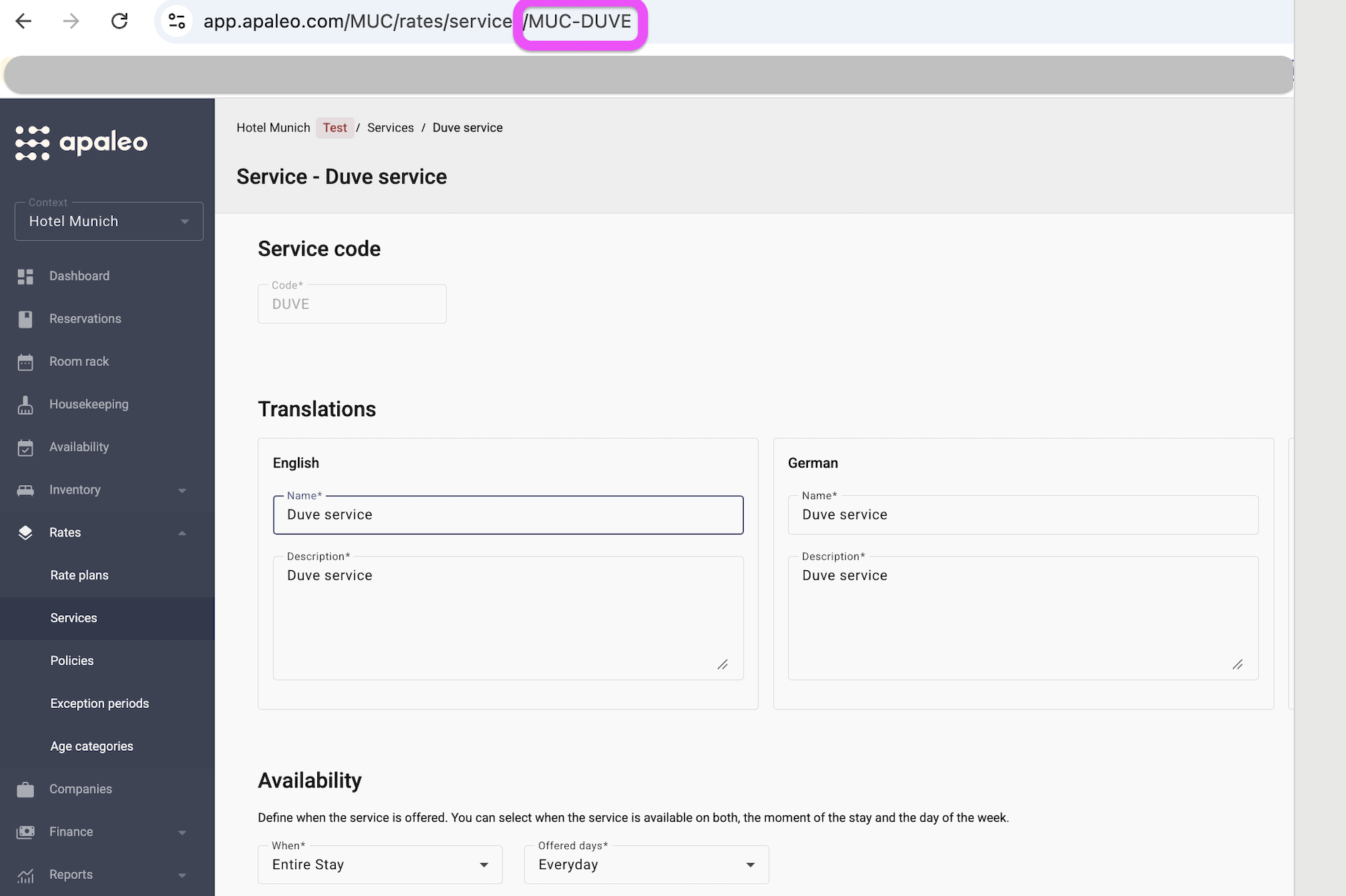
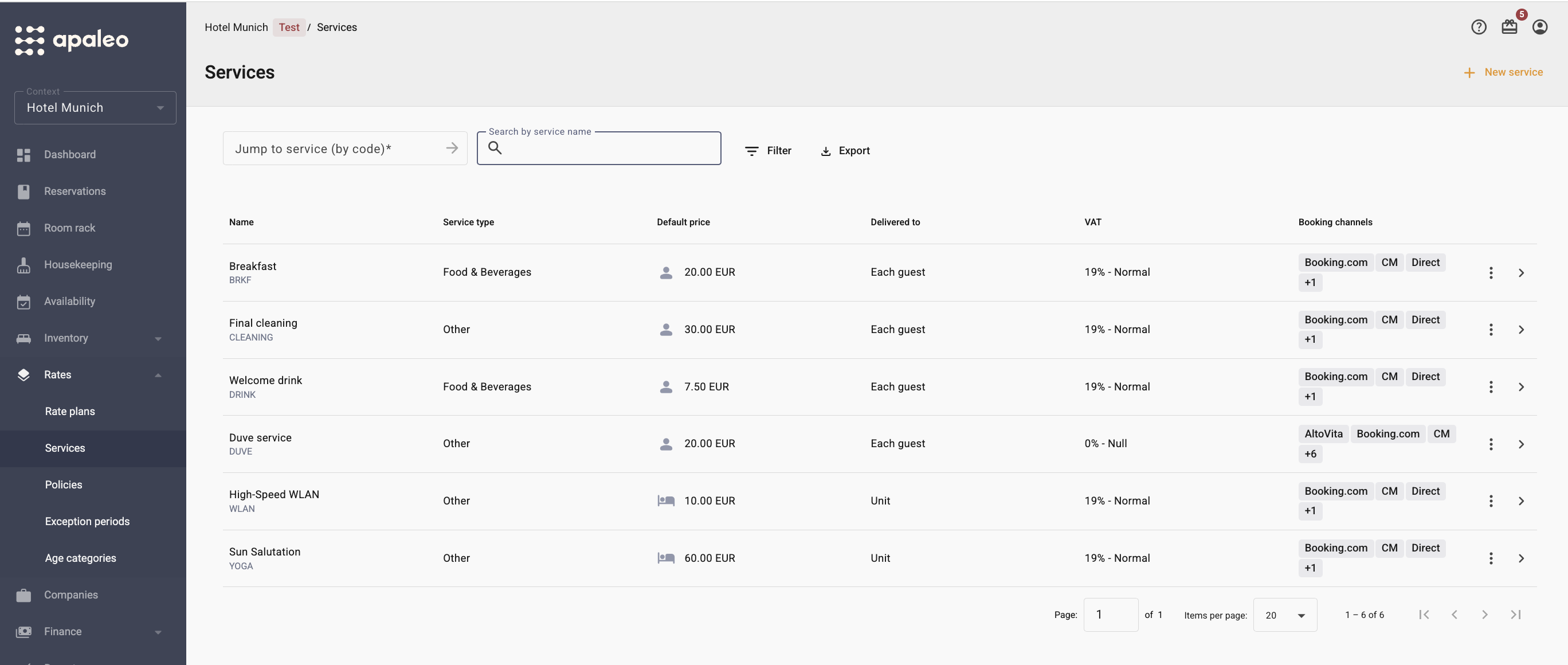
- The service must already exist in Apaleo, under Rates > Services. Set its price, availability, and accounting configuration (including the VAT type) there.
- Copy the service ID from Apaleo. You will paste it into Duve exactly as it appears.
How to set it up
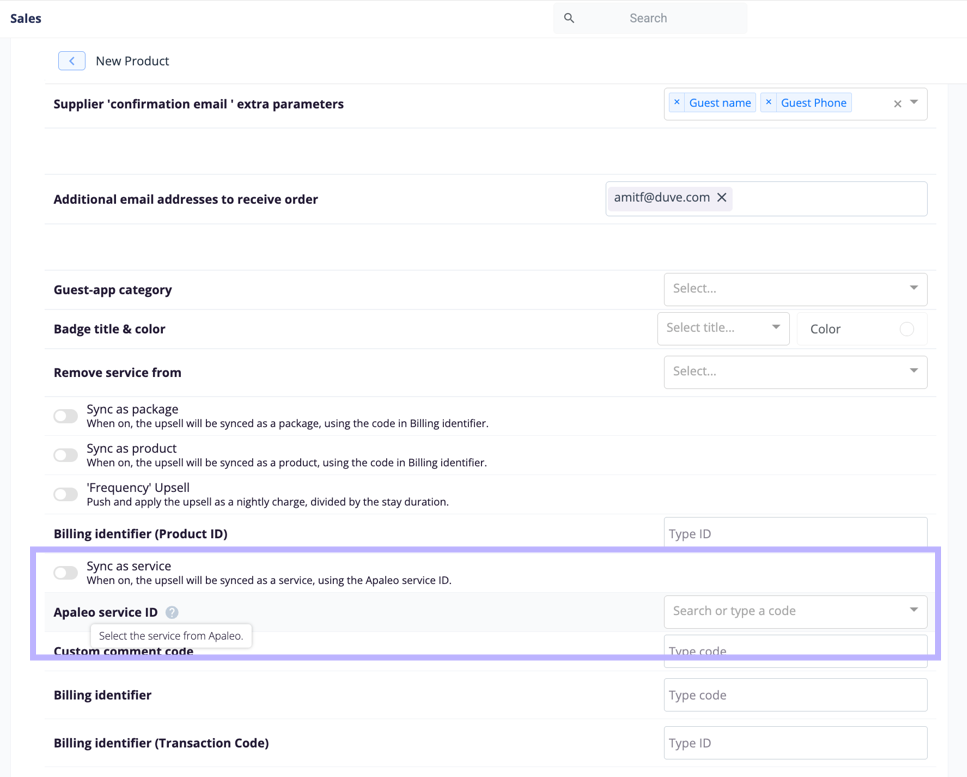
- In Duve, go to Upsells and open the custom upsell you want to connect (or create a new one).
- Open the Advanced tab.
- In the Apaleo Service ID field, paste the service ID you copied from Apaleo.
- Click Save.
That's it. From now on, every new purchase of this upsell is booked in Apaleo as that service. Upsells you leave without a service ID continue to sync exactly as they do today, as a folio charge.
Host experience
What you see in Apaleo
- The purchase appears under the reservation's Services on the delivery date.
- Apaleo posts the service to the folio automatically. Duve does not post a separate charge.
- The amount is the price the guest paid in Duve.
- If the guest buys the same service more than once, Duve updates the total quantity on the reservation instead of creating duplicate lines. Services the hotel booked directly in Apaleo stay untouched.
Which date is used
- Upsells with a date the guest selects: the date the guest chose.
- Upsells without a date: the reservation's check-in date.
- Dates are set in the property's time zone, so the service lands on the correct calendar day.
Cancellations
When an order is canceled in Duve, Duve removes the service from the reservation in Apaleo.
Guest experience
- The guest only sees connected upsells that Apaleo confirms the reservation can book.
- For upsells with a fixed date (for example, check-in or check-out day), the upsell is hidden when the service isn't available on that date.
- For upsells where the guest picks a date, the upsell is hidden only when the service isn't available on any date of the stay.
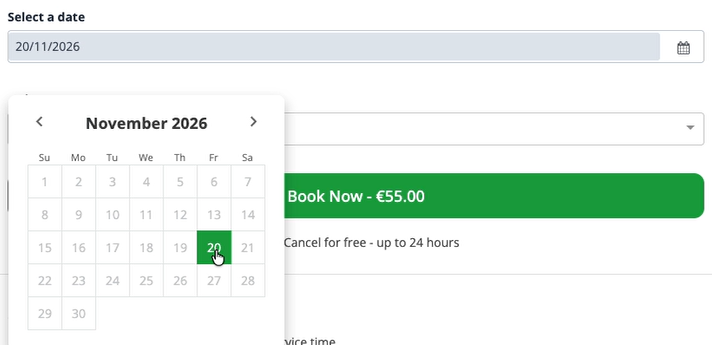
- In the date picker, the guest can only select the days Apaleo offers the service. Other days are grayed out.
- The guest pays exactly as before. Nothing changes in the payment flow.
Troubleshooting
- A connected upsell doesn't appear for guests: Check that the service has availability in Apaleo for the guest's dates.
- Check that the guest's rate plan allows the service.
- Check the service ID for typos. A wrong service ID looks exactly like a sold-out service, and the upsell will never show.
- All connected upsells disappeared at once: Duve could not reach Apaleo. To avoid selling something that can't be delivered, Duve hides connected upsells until Apaleo responds again. Upsells without a service ID are not affected.
- A purchase appears in Apaleo as a folio charge instead of a service: Apaleo rejected the service ID (for example, the service was archived or the ID is wrong). Duve posts a regular folio charge instead, so the payment is not lost. Fix the service ID in the upsell's Advanced tab. [CONFIRM WITH PRODUCT: whether this fallback applies to all payment methods or only Apaleo Pay]
- A canceled order is still in Apaleo: Apaleo refuses to remove a mandatory service, already posted, or dated in the past. In this case, nothing is changed in Apaleo, and you need to credit the charge manually in Apaleo.
Restrictions & Limitations
- Available for custom upsells only.
- Applies to new orders only. Orders placed before you added the service ID stay as folio charges.
- The availability check runs on the guest upsell list only. Upsells offered through emails, automated messages, Guest app posts, and AI-generated suggestions are not checked against Apaleo.
- Each upsell can be connected to one Apaleo service.
- A purchase dated in the past is sent to Apaleo as is. If Apaleo refuses it, Duve does not move it to another date.
- Duve doesn't yet show a list of your Apaleo services to choose from. You need to type in the service ID manually.
Tips & Tricks
- Copy and paste the service ID rather than typing it, to avoid hidden typos.
- After connecting an upsell, place a test order on a test reservation and check that it appears under Services in Apaleo on the right date.
- Manage stock in one place: set the service availability in Apaleo, and Duve follows it automatically.
- VAT for connected upsells comes from the Apaleo service's accounting configuration. See How to Sync VAT Rate for Upsells to Apaleo.
FAQs
Q: What happens to upsells I don't connect to a service?
A: Nothing changes. They keep syncing to the Apaleo folio as a charge, exactly as before.
Q: Why are purchases now booked as services instead of folio charges?
A: This is the method Apaleo recommends. A booked service carries the date the guest will receive it, appears in Apaleo's reports, and posts to the folio automatically. A folio charge can only be posted on the current day.
Q: Do I need to reconnect Apaleo or approve new permissions?
A: No. The feature works with your existing Apaleo connection.
Q: Will historical orders be moved to services?
A: No. Only orders placed after you add the service ID are booked as services.
Q: Can a guest buy the same service twice?
A: Yes. Duve updates the total quantity on the reservation, so two purchases for the same day show as a quantity of two.
Q: Does Duve's own upsell stock limit still work?
A: Yes. Any purchase limits you set in Duve still apply. The Apaleo availability check is applied in addition to them.
Q: Does this work for Early Check-in, Late Check-out, or room upgrades?
A: No. Only custom upsells can be connected to an Apaleo service.
Comments
0 comments
Article is closed for comments.