
In order to sync Payment for Stay and upsells back to Stayntouch, you must locate the Charge Code ID in Stayntouch and add it back to the Billing Identifier section of the Upsell. If there is no existing PMS Connect ID for the service, please create a new one.
There are two ways to sync an upsell to Stayntouch. As a folio charge using the Charge Code ID, covered below, or as a native add-on using the add-on ID, covered at the end of this article
Please note: only a person with Admin user rights in Stayntouch can access the Charge Code ID.
Go to Configuration > Integrations > Utilities
.png)
PMS Connect ID Lookup
.png)
Filter the Entity for Charge Code and then find the Charge Code ID
.png)
Copy the Charge Code into the Upsell. Go to Advanced and paste the Stayntouch Charge Code ID into the Billing Identifier section
Save your changes and then you're done!
Sync an upsell as a StayNtouch add-on
By default, a mapped upsell posts to the reservation as a charge line. You can instead have it land on the reservation as the matching native StayNtouch add-on, so it appears where your operational teams already work. Teams running the daily breakfast list or any other add-on-based report see the guest's entitlement without anyone copying it over, and the revenue reaches the PMS instead of sitting in Duve for finance to reconcile by hand.
The setup uses the same Billing Identifier field as above, with one important difference: when the toggle is on, that field holds the add-on ID, not the Charge Code ID.
Who this is for
|
Which upsells support it
- Custom upsells
- Early check-in
- Late check-out
- Menu products
- Room upgrades are not included. They have their own StayNtouch flow and are pushed as a room type upsell on the reservation.
Before you start
StayNtouch charges its own price for an add-on. Duve sends the add-on ID and a quantity, nothing else, so the price the guest sees in Duve and the price StayNtouch posts to the folio are two separate numbers. Set the upsell price in Duve to match the add-on price in StayNtouch, and keep them aligned whenever either one changes.
How to set it up
- In StayNtouch, find the ID of the add-on you want to map.
- In Duve, open the upsell and go to the Advanced section. For early check-in and late check-out, open their settings pages.
- Turn on the "Sync as add-on" toggle.
- Paste the add-on ID into the Billing Identifier field, replacing the Charge Code ID if one is already there. The field accepts a plain number only. A value such as BREAKFAST or 12-3 is rejected, nothing is sent to StayNtouch, and the sync team gets a warning.
- Save the upsell.
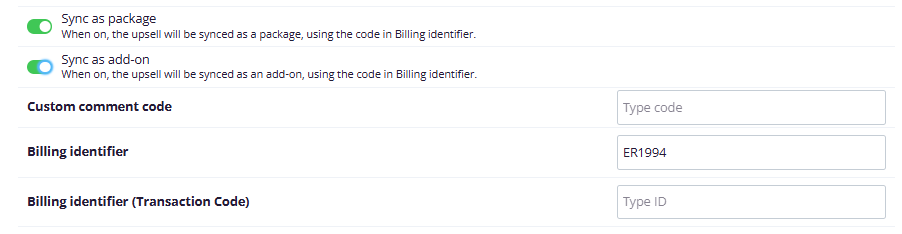
Setup note: To change a mapping later, edit the identifier on the same screen, or to stop syncing the upsell as an add-on, turn the toggle off and put the Charge Code ID back in the Billing Identifier field, or clear the field to stop the sync entirely.
What happens after a purchase
- When a guest buys the upsell, Duve adds the mapped add-on to the guest's StayNtouch reservation. Add-ons already on the reservation are kept as they are. If the same add-on is already there, its quantity goes up instead of a second entry being created.
- No charge line is posted to the folio. StayNtouch posts the charge itself, at its own add-on price and according to the add-on's post type in StayNtouch, for example nightly across the stay. The charge appears on the bill after End of Day.
- The quantity is the number of items the guest picked. One breakfast package priced per person per night counts as one. Three glasses of wine count as three. Two parking spots for the whole stay count as two.
- Duve also writes a note on the reservation describing the order, so it is visible to anyone opening the reservation.
- If the guest paid by card, the payment is recorded against the reservation as well.
- An order still pending capture or approval, such as a billing hold, does not post yet. Duve pushes a note about the hold, and the charge follows once the order is captured.
- If the upsell is canceled, Duve lowers the add-on quantity by the same number of items, and removes the add-on from the reservation when it reaches zero. No negative charge line is posted, because the add-on itself is gone. If the guest canceled a card payment themselves, or the cancellation came with a refund, the card payment is reversed too.
- A refund is the exception. The card is refunded, but any charge StayNtouch already posted from the add-on is not reversed automatically, so the folio has to be corrected in StayNtouch by hand.
Troubleshooting note: Nothing changes for the guest. They buy the upsell in the Guest app exactly as before, and their confirmation is unchanged. The benefit reaches them at delivery, because the teams working from StayNtouch can see what they bought.
Note: Add-ons sitting on a StayNtouch reservation are also counted into the amount due Duve shows the guest before arrival, so an add-on bought through this flow is reflected there as well.
Restrictions and limitations
- One identifier per upsell, so an upsell maps to a single StayNtouch add-on.
- Room upgrades cannot be mapped as add-ons.
- If the Billing Identifier is empty, nothing is posted to StayNtouch for that upsell.
- The add-on ID must be a plain number. A code or an ID with any other character in it is not sent.
- StayNtouch add-ons carry a single price. If your upsell lets the guest choose between options at different prices and the guest picks more than one price, Duve cannot express that as one add-on. It falls back to posting a folio charge for the Duve amount, using the charge code attached to that add-on in StayNtouch. The guest is charged the right total, but the entitlement does not appear as an add-on on the reservation.
- Prices are not synced. StayNtouch charges the add-on price configured in StayNtouch, whatever the guest paid in Duve.
- A refund does not reverse an add-on charge. Correct the folio in StayNtouch manually after refunding.
- An upsell is not synced as an add-on if Duve cannot read the reservation, if the reservation comes back without its dates, or if another add-on already on the reservation is missing its ID or quantity. If the add-on to cancel is no longer on the reservation, nothing is changed. Each of these cases raises a warning for the sync team rather than failing silently for the guest.
- Reservation date changes after a purchase are not handled. If a guest moves their stay dates after buying, no cancellation is triggered and the posting is not recalculated.
Tips
- Start with your highest volume operational upsells, such as breakfast, parking, and early check-in. Those are the ones driving daily reports.
- Keep an internal list of which Duve upsell maps to which StayNtouch add-on ID, so the mapping survives staff changes.
- Check the price on both sides whenever you edit an upsell in Duve or an add-on in StayNtouch. A price changed on one side only shows the guest one amount and bills them another.
- Run one test purchase and check the reservation in StayNtouch before relying on it for an operational report. The add-on appears on the reservation right away, and its charge reaches the bill after End of Day.
- For an upsell whose options have different prices, consider splitting it into one upsell per option, each mapped to its own add-on, so every purchase lands as a real add-on.
FAQs
Q: Is this the same as the Charge Code ID setup above?
A: No. Both use the Billing Identifier field, but the value is different. With the toggle off, the field holds the Charge Code ID and the upsell posts as a charge line. With the toggle on, it holds the add-on ID and the upsell posts as a native add-on.
Q: Which price does the guest get charged on the folio?
A: The add-on price set in StayNtouch. Duve sends only the add-on ID and the quantity. Keep the Duve price and the StayNtouch price the same so the guest is billed what they agreed to pay.
Q: Why is the charge not on the folio yet?
A: The add-on is placed on the reservation straight away, and StayNtouch posts its charge during End of Day, following the post type set on the add-on.
Q: Do I have to map every upsell as an add-on?
A: No. The toggle is per upsell. Anything you leave off keeps syncing as before.
Q: I do not see the toggle. Why?
A: Check that StayNtouch is connected to the account, that the upsell is one of the supported types, and that two way sync is not blocked for your account.
Q: What happens when I refund an upsell that synced as an add-on?
A: The guest's card is refunded, but any charge StayNtouch already posted from the add-on stays on the folio. Correct it in StayNtouch manually. A cancellation is different: it removes the add-on, or lowers its quantity, on its own.
Q: Can I change a mapping after guests have already purchased?
A: Yes. The change applies to purchases made after you save it and does not alter charges already posted to StayNtouch.
Q: What happens if the guest changes their stay dates afterward?
A: Nothing happens automatically. The order is not canceled or repositioned by Duve.
Comments
0 comments
Article is closed for comments.