
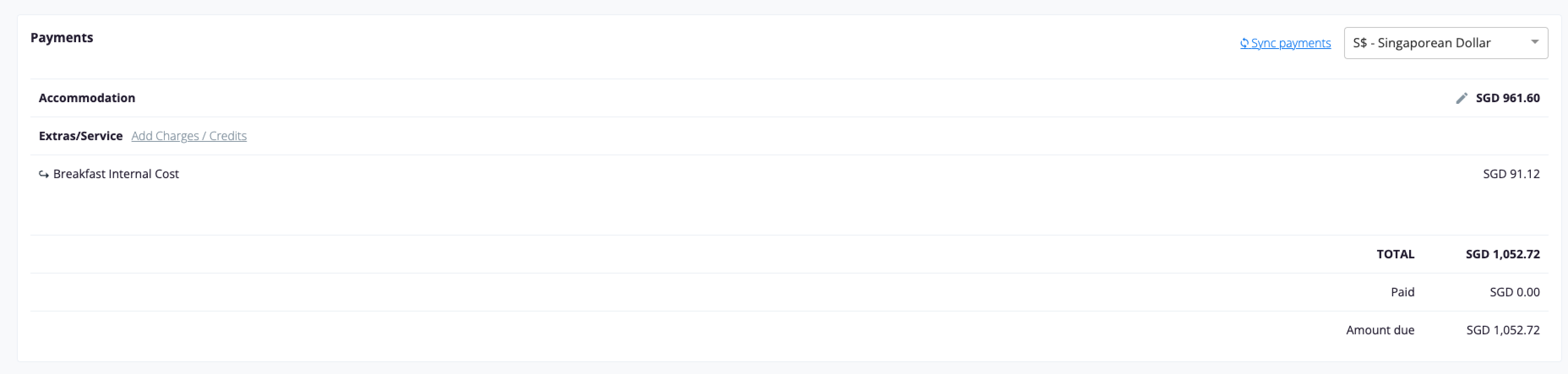
When your property is connected to Oracle OPERA Cloud through OHIP, Duve reads the accommodation value of each reservation directly from OPERA and stores it on the reservation as the accommodation (room) price. This is the "net accommodation" figure: the room revenue for the stay, without separately charged extras, and without charges that OPERA routes to another folio window.
That figure matters for Early Check-In (ECI) and Late Check-Out (LCO) in two ways:
- It is the base price when you price an ECI or LCO time frame as a percentage instead of a fixed amount.
- It is the room line a guest sees in the stay bill, next to any package that OPERA keeps inside the rate.
This article explains where the net accommodation value comes from, how ECI and LCO prices are calculated from it, how an ECI or LCO charge is posted back to OPERA, and what you and your guests see in each case.
Applies to
|
Use cases
- You want ECI or LCO to be priced as a share of what the guest already pays for the room, so a suite pays more than a standard room without maintaining separate price lists.
- You want ECI or LCO revenue to land on the right OPERA transaction code and on the right date, so night audit and reporting stay clean.
- You attach ECI or LCO to the rate as an OPERA package, and you want the guest bill in Duve to show it as included rather than charging it twice.
- You need to explain to a front desk team why the accommodation amount in Duve differs from the rate total they see in OPERA.
Before you start
- Have the OPERA codes ready for the ECI and LCO products:
- The transaction code to post the charge to when it posts to the folio.
- The package code, when you choose to sync the product as a package.
- Decide which folio window ECI and LCO should post to. Duve posts to guest folio window 1 unless another window is configured on the sync source.

- Check your OPERA routing instructions. Any billing code or transaction code routed away from the guest window is excluded from the accommodation value and from the guest's bill in Duve.
How it works
Where the net accommodation value comes from
Duve asks OPERA for the reservation and its folio, then builds the accommodation value in one of two ways.
- With the rate-based calculation enabled:
- Duve requests the rate breakdown for every night of the stay, one night at a time.
- It adds up the Accommodation revenue reported for each night, before tax.
- It adds the value of packages that OPERA reports as part of the rate header for the booked rate plan, because that money is already inside the room rate.
- It skips any revenue code or package that your routing instructions send to another folio window.
- Taxes follow your tax sync setting. With tax sync off, accommodation tax is included in the accommodation amount. With tax sync on, the accommodation amount is the pre-tax value and all taxes are grouped into a single "Taxes" line.
- Without the rate-based calculation, Duve uses the stay total that OPERA returns on the reservation instead, which already includes rate packages, and lists reservation packages separately.
- Two more rules apply in both cases:
- If the reservation is routed to an agent or company account through one of the routing codes configured for the property, the accommodation amount is set to zero, because the guest is not the one paying for the room.
- Charges posted on the guest folio window that OPERA marks as the accommodation portion of the rate are not added again as extras, so the room is counted once.
Troubleshooting note: The accommodation value is refreshed when the reservation is first synced, when the number of nights changes, after an order is pushed to OPERA, and whenever the folio is synced for that reservation.
How ECI and LCO prices use it
On an ECI or LCO time frame, you choose a price type:
- Simple price - A fixed cost in your currency.
- "% of Acc.", a percentage of the accommodation amount for the whole stay.
- "% of Avg. Stay Night", the same percentage divided by the number of nights, so the price reflects one average night.
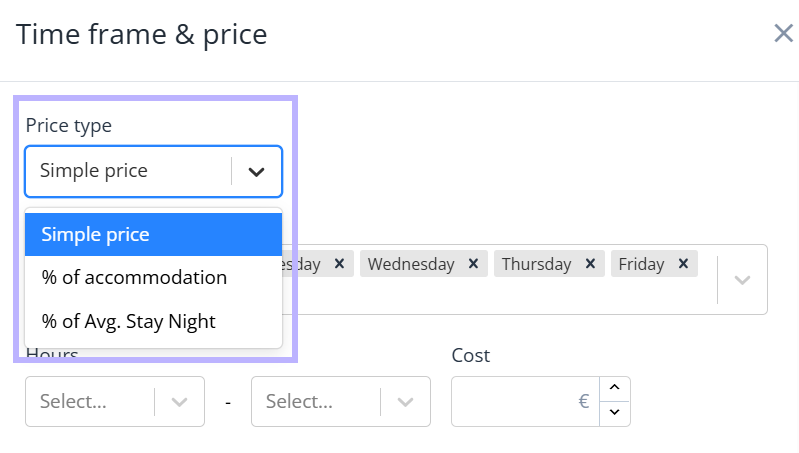
Worked example, for a three-night stay with an accommodation amount of 900 and a 10 percent ECI time frame:
- "% of Acc." gives 90.
- "% of Avg. Stay Night" gives 30.
Note: Percentage prices are converted when the product currency and the reservation currency differ, using the exchange rate at the time the offer is built.
How the charge reaches OPERA
When an ECI or LCO order is created, Duve decides how to post it:
- If "Sync as package" is on for the product, and the stay has not passed the point where package pushes are blocked, Duve attaches the amount to the reservation as an OPERA package, using the Billing identifier as the package code. If the package already exists on the reservation, the amount is added to the matching schedule row instead of creating a second package.
- If the reservation is already checked in, Duve posts a charge to the folio.
- If the reservation is not yet checked in, Duve posts a fixed charge instead.
The posting date follows the service:
- Late Check-Out posts on the order delivery date, or the check-out date when there is none.
- Early Check-In posts on the order delivery date, or the arrival date when there is none.
- When "shift package charges from the check-out day" is enabled on the connection, a charge that would land on the check-out day is moved back to the last stay night, so the night audit picks it up. One-night stays are left alone.
Troubleshooting note: Cancellations reverse the same way they were posted. A package schedule row is reduced or removed, and a folio charge is reversed with a negative amount. A refund to the guest's card is sent only when the guest canceled and paid by card.
Packages that stay inside the rate
If a package is attached to the rate in OPERA, either through the rate header or with "add to rate", its value is already part of the room rate. In that case, Duve does not bill it again:
- The accommodation amount includes that package value.
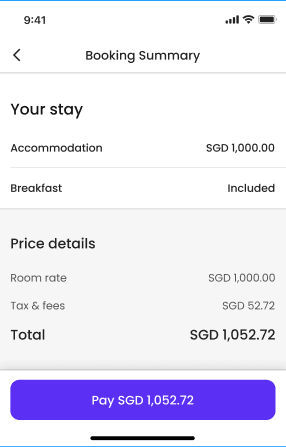
- The package still appears as a line in the stay breakdown, marked as included instead of carrying an amount.
How to set it up
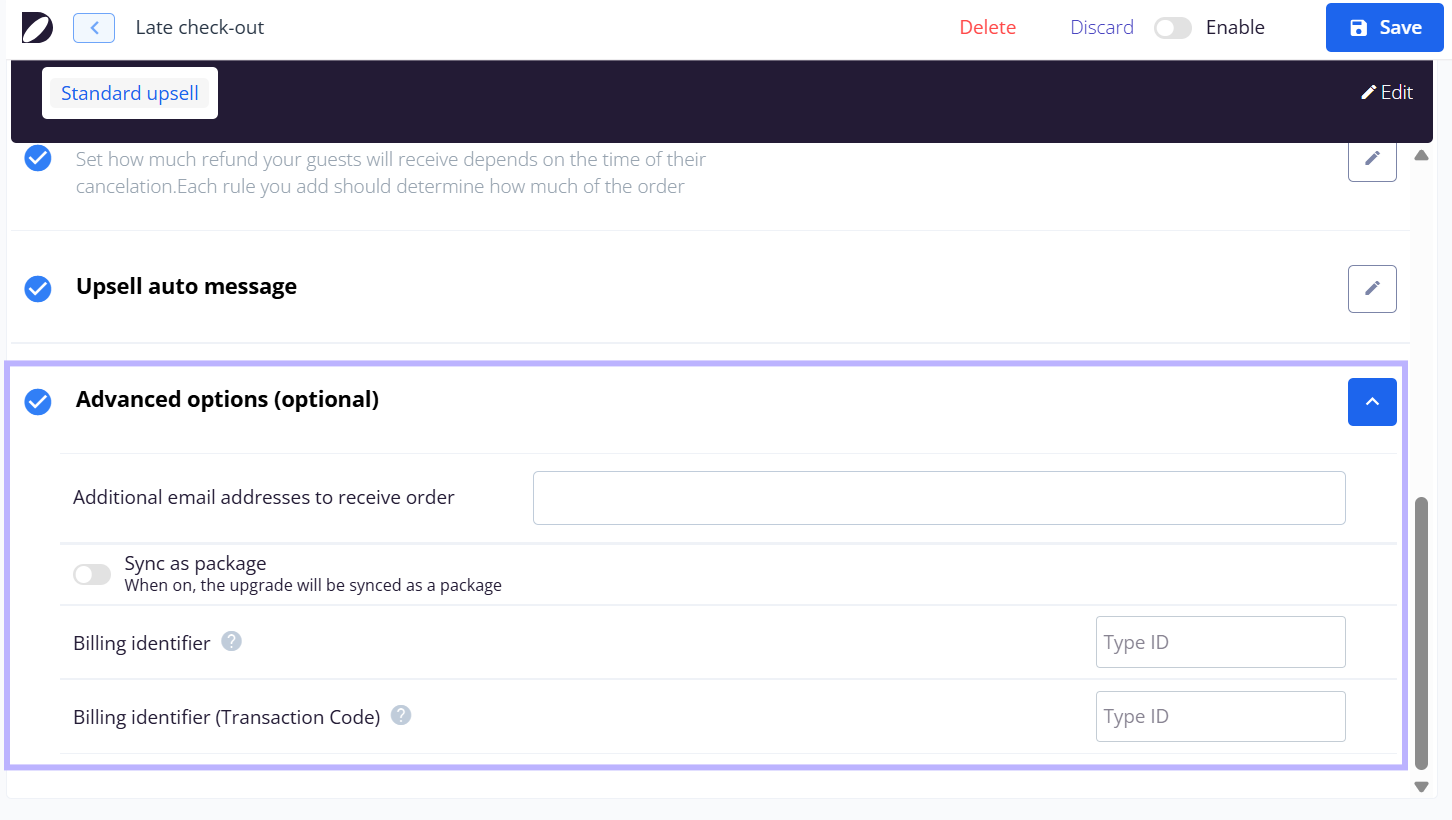
- Open the Early Check-In or Late Check-Out product in Duve and go to "Advanced options (optional)".
- Fill in "Billing identifier". This is the package code when you sync the product as a package, and the transaction code when you do not.
- Fill in "Billing identifier (Transaction Code)". OPERA Cloud properties get this second field, and Duve uses it as the transaction code when "Sync as package" is on.
- Turn "Sync as package" on if ECI or LCO should be attached to the reservation as an OPERA package rather than posted as a folio charge.
- Open the time frames for the product and set the price type for each time frame, either a fixed cost or one of the two percentage options described above.
- Save, then test with one reservation and confirm in OPERA that the amount, the transaction code, and the posting date are what you expect.
Host experience
- Duve writes a status note on the OPERA reservation when an ECI or LCO order is created. An approved request reads like "Check-out time: Approved Late Check-out time: 14:00 at $50.00 (Include Tax & Service Charges)". A request that still needs your approval reads "Pending Approval for" instead, and the note is written once per status so retries do not duplicate it.
- A canceled request gets its own note, stating the requested time, the amount, and that it was canceled.
- If standardized upsell comments are enabled on the connection, Duve also writes a structured comment that your systems can parse. Early Check-In uses the code ERYCHK and Late Check-Out uses LATCHK, followed by the price, the currency, and the requested time.
- While an order is pending approval, nothing is posted to the folio. Duve pushes the status note and the card hold when one applies and waits for the decision.
- On the reservation in Duve, you see the accommodation amount, the extra charges, and the paid amount that came back from OPERA.
Guest experience
- In the Guest app, the guest sees the ECI or LCO price already converted into their reservation currency. They never see a percentage.
- Percentage-priced Late Check-Out offers are hidden when the accommodation amount is missing or zero, for example on an agent-paid reservation, because there is nothing to calculate from. A percentage-priced Early Check-In option on such a reservation has no amount to calculate either, so check the accommodation value before troubleshooting the product.
- In the stay bill, the room line carries the accommodation amount, and the stay extras are listed under it. A package that OPERA keeps inside the rate shows the word "Included" instead of an amount.
- After an approved ECI or LCO, the guest's arrival or departure time in Duve reflects the new time.
Troubleshooting
- A percentage-priced Late Check-Out offer does not appear, or a percentage-priced Early Check-In option shows no price: Check that the reservation has an accommodation amount above zero. Reservations routed to an agent or company account are set to zero on purpose, and reservations that have not yet had a folio sync have nothing to calculate from.
- The accommodation amount in Duve is lower than the rate total in OPERA: This is expected when the rate carries packages or taxes that are reported separately, or when routing instructions send part of the rate to another window. Compare the per-night rate breakdown in OPERA rather than the stay total.
- The charge is missing in OPERA: The most common causes are an empty Billing identifier on the product, an order still waiting for approval, and an amount of zero, which OPERA rejects for folio postings.
- The charge was posted twice: Duve stamps an order once it has reached OPERA and skips it on later syncs, so a duplicate usually means the same upsell was also posted manually in OPERA.
- A cancellation did not reverse the charge: If the package is no longer on the reservation in OPERA, there is nothing for Duve to reverse, and it will not post a negative package instead.
- The guest bill shows an extra you expected to be included in the rate: Check in OPERA whether the package is attached to the rate header or has "add to rate" set. Only then is it treated as included.
Restrictions and limitations
- OPERA rejects folio postings of zero, so a fully comped ECI or LCO is not posted as a charge. A zero value package inclusion is allowed.
- With "shift package charges from the check-out day" enabled, a package can no longer be pushed once the stay has passed its last night, except for cancellations.
- An ECI or LCO amount that is missing or invalid is not posted at all, and the order stays unsynced so it can be pushed again once the data is corrected.
- Late Check-Out cannot be canceled once the late check-out window has started, which is the property's standard check-out time on the departure day.
- The daily frequency option for package pushes is not offered for Early Check-In and Late Check-Out on OPERA Cloud. It is available for room upgrades and menu products.
- The custom comment code field is limited to custom and menu products, so ECI and LCO always use their standard codes.
- Percentage price types depend on data that comes from OPERA, so they are only as current as the last folio sync for that reservation.
Tips and tricks
- If you use percentage pricing, decide early between "% of Acc." and "% of Avg. Stay Night". On long stays, the two produce very different amounts.
- Keep the tax decision consistent with how you report. With tax sync on, the accommodation amount is pre-tax, and percentage prices are calculated on the pre-tax value.
- Use a dedicated OPERA transaction code for ECI and for LCO, so upsell revenue is easy to separate from room revenue in reporting.
- Before a rollout, test one checked-in reservation and one pre-arrival reservation. They follow different posting paths.
- If the front desk questions an amount, open the reservation in Duve and compare the room line and the extras against the OPERA rate breakdown for the same nights.
FAQs
Q: What exactly does "net accommodation" mean here?
A: It is the room revenue Duve stores for the reservation after reading OPERA: the per-night accommodation value plus any package that is part of the rate, excluding separately charged extras and anything routed to another folio window.
Q: Does the accommodation amount include taxes?
A: It depends on the tax sync setting for your connection. With tax sync off, accommodation tax is inside the amount. With tax sync on, the amount is pre-tax, and taxes appear on their own "Taxes" line.
Q: Is a percentage calculated on the whole stay or on one night?
A: "% of Acc." uses the accommodation amount for the whole stay. "% of Avg. Stay Night" divides that result by the number of nights.
Q: Why is my percentage-based offer missing on some reservations?
A: Those reservations have no accommodation amount to calculate from. The most common reason is that the room is routed to an agent or company account, which sets the amount to zero. Late Check-Out offers priced by percentage are filtered out entirely in that case.
Q: When is the accommodation amount refreshed?
A: On the first sync of the reservation, when the number of nights changes, after an order is pushed to OPERA, and on a folio sync for that reservation.
Q: Should ECI and LCO be synced as a package or posted as a charge?
A: Post as a charge when you want a clean, separate revenue line on the folio. Sync as a package when the hotel prefers the amount attached to the reservation as an OPERA package. The package route uses the Billing identifier as the package code, so the code has to exist in OPERA.
Q: Which date does the charge post to?
A: Late Check-Out posts on the delivery date or the check-out date, and Early Check-In posts on the delivery date or the arrival date. If charges are shifted off the check-out day for your property, a check-out day charge moves back to the last stay night.
Q: What happens when a request still needs approval?
A: Nothing is posted to the folio. Duve writes a "Pending Approval" status note on the OPERA reservation, and posts the charge only after the request is approved.
Q: Why does a package show "Included" with no amount on the guest bill?
A: Because OPERA keeps that package inside the room rate. Its value is already part of the accommodation amount, so charging it again would double-bill the guest.
Q: Can I use a different transaction code for Early Check-In and Late Check-Out?
A: Yes. The codes are set per product in "Advanced options (optional)", so each product can point to its own OPERA code.
Comments
0 comments
Article is closed for comments.