
Overview
Special Fields Sync:
- Sync of Specific Date and Hour of Task
- Special Requests Field
Pricing
How It Works
- Custom upsell Setup: Hosts define free or paid upsells - custom services in Duve (e.g., towel service or deep cleaning).
- External ID Setup: Hosts define external IDs for each custom service in Duve (see below).
- Trigger Configuration: Hosts set up webhooks to send data to Hub OS whenever a guest requests a custom service.
- Task Mapping: Task attributes such as room number, guest name, service type, and delivery time are mapped to corresponding fields in Hub OS.
- Task Confirmation: Hub OS confirms task creation, which is logged in Duve for transparency.
How to Set it up?
What is needed to start the process?
1. Request/Locate Credentials for HubOS Integration from HubOS' Support team.
- Hotel ID
- Access Token
- Password Token
- HubOS Request Type
| How to Setup HubOS via DuveConnect - Click Below for Step by Step Instructions |
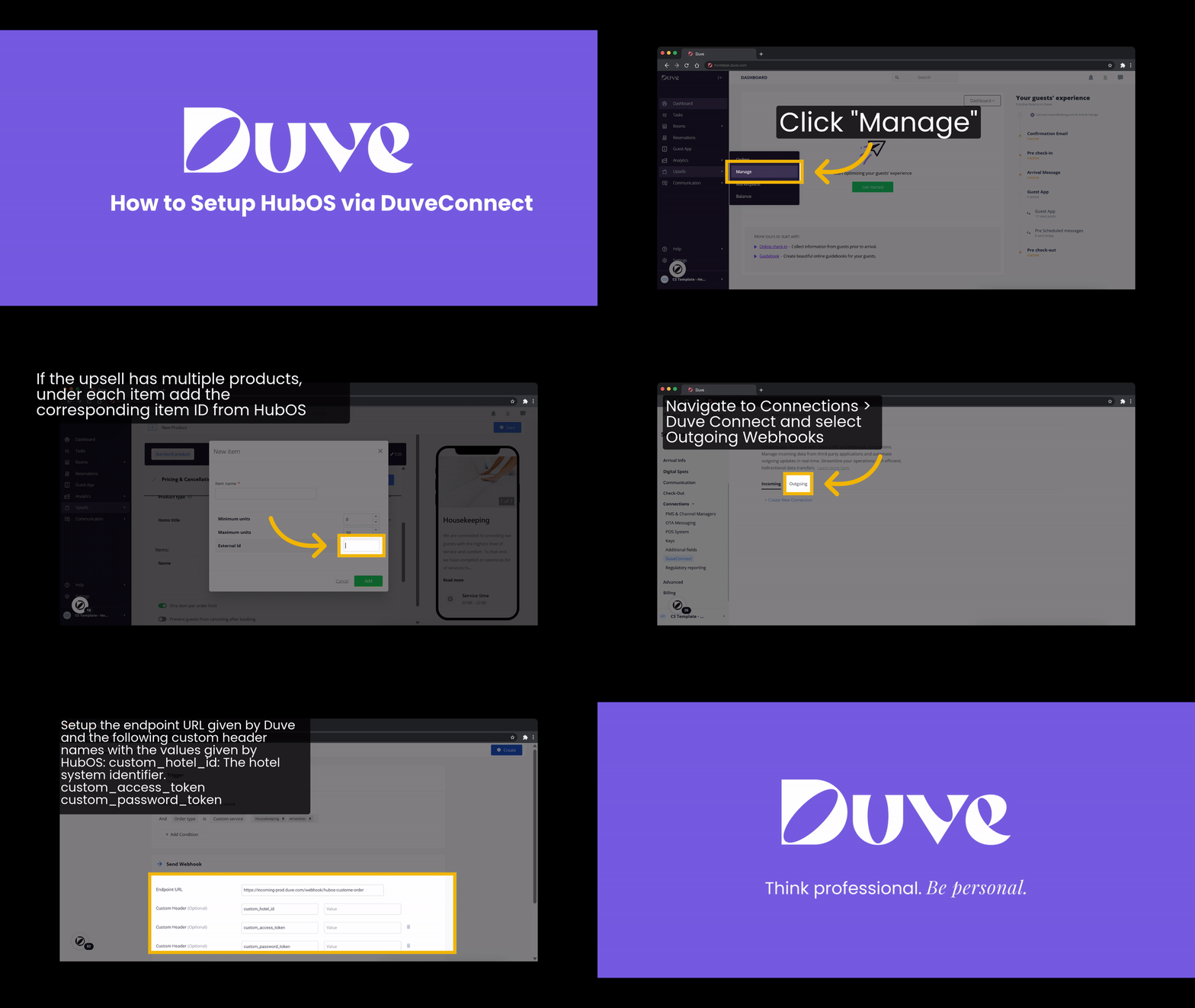 |
In the meantime, Start Setup of Menus or Custom Products
Duve hosts can already start to set up a menu product or custom service and align it to Housekeeping and Maintenance Requests
Note: Please ensure that Housekeeping and Maintenance requests are separated to 2 separate products in Duve.
Within the Service setup
When seting up the Menu Item or Custom Product, make sure to set the condition to be visible only from the check-in date on to ensure orders cannot be placed before guests arrive.
Navigate to Dashboard > Upsell > Manage
Select 'Edit'
In the 'Add Condition' section select the 'In-House' option.
Services must be set to 'Free'


Mandatory Last Step
- Make sure the Room Number is set on the Room/Rental
To do this, please go to the Frontdesk.
Click on the Rooms/Rentals
Go into each Rental and check that the Room Number field is filled in as shown below:
External ID for Each Type of Service
ID |
Task Name |
2 |
Change bed sheets |
3 |
Request cleaning |
4 |
Serve towels |
5 |
Check minibar |
6 |
Serve pillows |
7 |
Serve amenities |
8 |
Install baby cot |
9 |
Install extra bed |
10 |
Deep cleaning |
11 |
Taps purge |
12 |
Turndown service |
13 |
Other task |
14 |
Zip beds |
15 |
Separate beds |
16 |
Room service tray |
17 |
Check |
18 |
Review |
19 |
Ventilate |
20 |
Minibar restocking |
21 |
Bellboy |
22 |
Luggage |
23 |
Ice bucket |
24 |
Laundry |
25 |
Valet |
26 |
Securit |
Hub OS
Browser
App
Comments
0 comments
Please sign in to leave a comment.