
Duve now supports a new Selfie Match workflow that enables hosts to verify guest identity via a live selfie taken in the Online Check-in. This verification compares the selfie with the passport uploaded during online check-in, ensuring compliance, improving security, and reducing fraud.
The feature is available to hosts globally who wish to implement enhanced identity checks.
Pricing & Activation
First, reach out to your Customer Success Manager or to Duve's Support Team to request to enable Seflie Face Match integration.
This feature is an add-on to the Duve subscription, priced at $1.50 per active unit per month.
How It Works
Guest Experience
When the guest reaches the Required Documents page, they will be prompted to upload their verified passport and then a selfie. Duve will then verify if there is a match.
- Guest uses their front-facing camera; selfie is auto-captured after 4 seconds.
- System compares the selfie to the uploaded passport photo.
- Includes a liveness check to prevent photo/video spoofing.
Verification Outcome
- Success: Confirmation shown; guest proceeds to the app.
-
Failure:
- Up to 3 attempts allowed.
- After 3 failed attempts, guest is redirected to the app with a message to visit reception.
- In multi-guest reservations, the system highlights which guest failed and returns to the guest list.
- If the guest stops mid-process, scanning the QR code again resumes from where they left off.
- If the guest failed to upload a document, Duve will not ask the guest to do the selfie, because the system will not be able to compare the selfie to any document.
How to Set It Up
Settings → Check in → Required Documents
- Enable 'Require Scanning Documents'
- Enable the Passport verification and data match and Face Match during Online Check-in toggles.
- Enable 'Store uploaded documents on our secure storage for 6 months'
- The "Required Documents" page now includes an 'ID Verification' feature, which can be activated by the host via the settings screen.
Document Status Tracking
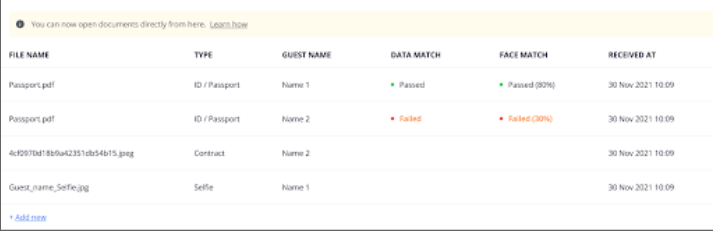
- A new “Face Match” column in the document section shows the verification status of each guest.
Scheduled Messages
Duve has added a new condition to Scheduled messages depending on whether the guest has passed the ID verification or not.
Tips and Notes
- The flow resumes if a guest abandons it mid-process.
- Supports repeat verification for all guests in a reservation.
Comments
0 comments
Please sign in to leave a comment.