
Introduction
By integrating Duve with TAC guests can now enjoy a completely smooth and contactless check-in process. From completing pre-check-in online to picking up their wristbands at a self-service kiosk, everything happens seamlessly through Duve’s communication platform.
This integration keeps your existing TAC and PMS setup intact while enhancing it with Duve’s powerful messaging and branding capabilities.
Overview
Previously, guests received their QR codes and check-in instructions directly from TAC. This meant multiple communication channels and a fragmented guest experience. Now, with Duve integrated into the TAC workflow, you can:
- Keep your current process without changing TAC or kiosk hardware.
- Send the TAC QR code through Duve to unify all pre-arrival communication.
- Use Duve’s branding and upsell tools to keep your guest experience consistent and polished.
Here’s how it works:
- Duve retrieves reservation details
- It generates a TAC-compatible QR code using the guest’s confirmation number.
- The QR code is included in Duve’s pre-arrival or welcome messages.
- Guests scan the QR code at the TAC kiosk upon arrival to receive their wristband.
How to Set It Up
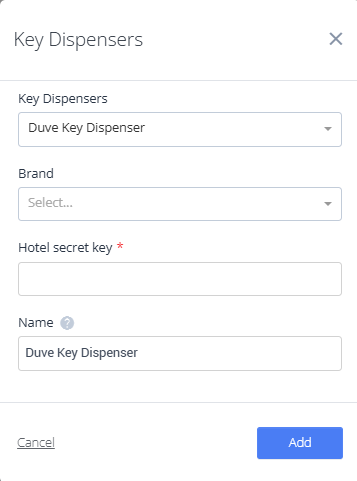
Add the TAC Key Dispenser Connection
- Open the Key Settings page.
- Click New Key Dispenser.
- In the dropdown, select TAC Key Dispenser.
- Fill in:
- Brand: Select the relevant brand for your account.
- Name: Add a nickname for this integration (for internal reference).
- Save your connection.
Once connected, your system can automatically generate and send TAC QR codes through Duve.
Add the QR Code to Guest Communications
- In your Duve messaging setup, use the dynamic parameter {{KeyDispenserCode}}
- This will generate a unique Salto-compatible QR code for each guest.
- Add it to your:
- Guest App posts
- Scheduled messages (Email, WhatsApp, SMS, or Chat)
When the guest clicks the link, Duve will open the Guest App and display a bottom sheet with their QR code.
They can scan this code directly at the Salto kiosk to receive their room key.
- Guests who click their QR link before completing online check-in will be redirected to complete the check-in flow first.
- After completing check-in, the QR code appears in a bottom sheet within the Guest App, ready to be scanned at the TAC kiosk.
FAQ
Q: Can guests access their QR code again if they lose the email or message?
A: Yes. Guests can reaccess their QR code anytime through the Duve Guest App by opening their pre-arrival or welcome message.
Q: Do I need to change anything in my TAC or PMS setup?
A: No changes are required to your TAC kiosk or PMS setup. Duve integrates smoothly without altering your existing systems.
Q: Can I include the QR code in different communication channels?
A: Absolutely. You can send the QR code via email, WhatsApp, SMS, or chat using Duve’s communication hub.
Q: What happens if the guest hasn’t completed their online check-in yet?
A: If a guest clicks the QR link before completing online check-in, they will be automatically redirected to complete it first. Once done, the QR code will appear in the Guest App.
Comments
0 comments
Please sign in to leave a comment.