
Introduction
The Duve Integration with Roommatik Key Dispenser allows you to offer a fully self-service key pickup experience to your guests — directly from the Duve Guest App.
By connecting Duve to your Roommatik kiosk, guests can collect their room keys independently after completing online check-in, using a secure QR code generated by Duve. This saves valuable front desk time, reduces congestion during busy check-in hours, and enhances your guest experience with a smooth, contactless arrival process.
How it Works
- Set up your Roommatik connection by entering your Hotel Secret Key and common doors.
- Once a guest completes online check-in, they receive a unique QR code via the Guest App or other communication channels.
- The guest scans the QR at the Roommatik kiosk to receive their key — no front desk intervention needed.
How to Set It Up
Step 1: Configure the Roommatik Connection
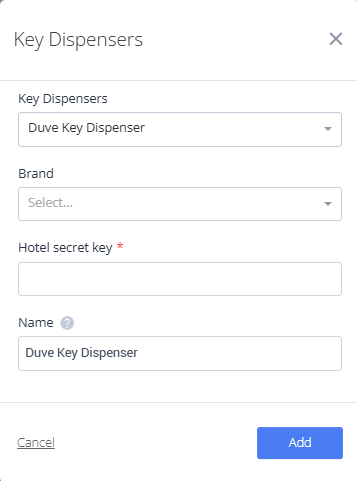
- Open the Key Dispensers dropdown in your Key Settings page.
- Select Duve Key Dispenser.
- Fill in the required details:
- Brand: Select your property brand.
- Hotel Secret Key: Provided by Roommatik (masked in Duve for security).
- Common Doors: Enter door numbers separated by commas (e.g., 1, 2, 3).
- Click Add. Duve will validate your entries before saving.
You can view or edit your connection later saved details such as the Hotel Secret Key are masked for your security.
Step 2: Delivering QR Codes to Guests
After guests complete online check-in, Duve automatically generates a dynamic QR code tied to their reservation: {{KeyDispenserCode}}
Add it to your:
-
- Guest App posts
- Scheduled messages (Email, WhatsApp, SMS, or Chat)
When the guest clicks the link, Duve will open the Guest App and display a bottom sheet with their QR code.
They can scan this code directly at the Roommatik kiosk to receive their room key.
If a guest tries to access the QR code before completing online check-in, they’ll be redirected to the check-in flow first.
Step 3: Guest Key Pickup
Once on property:
- The guest opens the Duve Guest App and displays their QR code.
- They scan it at the Roommatik kiosk.
- The kiosk instantly issues the correct room key - without staff involvement.
Frequently Asked Questions
Q: What happens if a guest hasn’t completed online check-in?
A: Guests will be redirected to the check-in flow before they can view or use their QR code.
Q: Is the QR code secure?
A: Yes. Each QR code is dynamically generated and encrypted according to Roommatik’s specifications. It includes a unique signature and time-based validation.
Q: What should I do if the kiosk doesn’t issue a key?
A: Ensure that:
- The Roommatik kiosk is online and configured for QR reading.
- The guest’s QR code hasn’t expired.
- Your Hotel Secret Key and common door setup are valid.
If the issue persists, contact Duve Support with your connection details.
Comments
0 comments
Please sign in to leave a comment.