
Duve is excited to announce its new integration with SARA, a leading task management platform in the hospitality industry. This integration enables hotels to streamline operations by automatically creating tasks in SARA based on guest activity or service requests within Duve.
The integration is designed to:
- Enhance operational efficiency through automation
- Eliminate manual task creation
- Ensure consistent task management from guest request to completion
Supported Task Types:
- Maintenance Tasks
- Housekeeping Tasks
- Bellstand Tasks
- Frontdesk Tasks
- Valet Tasks
- Security Tasks
Special Fields Sync:
- Sync of Specific Date and Hour of Task
- Special Requests Field
Pricing
In order to open SARA integration, customers must purchase the Add-on. SARA is an add-on feature that will be available upon request and at an additional monthly cost of $0.50 per unit with a monthly minimum of 50 eur required. For more information contact our Support Team or your dedicated Customer Success Manager.
How It Works
The integration uses unique identifiers and webhooks to map tasks between Duve and SARA. The workflow includes:
- Custom upsell Setup: Hosts define free upsells - custom services in Duve (e.g., towel service or deep cleaning).
- Custom Service Setup: Hosts define external IDs for each custom service in Duve.
- Trigger Configuration: Hosts set up webhooks to send data to SARA whenever a guest requests a custom service.
- Task Mapping: Task attributes such as room number, guest name, service type, and delivery time are mapped to corresponding fields in SARA.
- Task Confirmation: SARA confirms task creation, which is logged in Duve for transparency.
What is needed to start the process?
1. Request/Locate Credentials for SARA Integration from SARA Support Team
- Username
- Password
- Interface Code - You can find the interface code below from your SARA dashboard
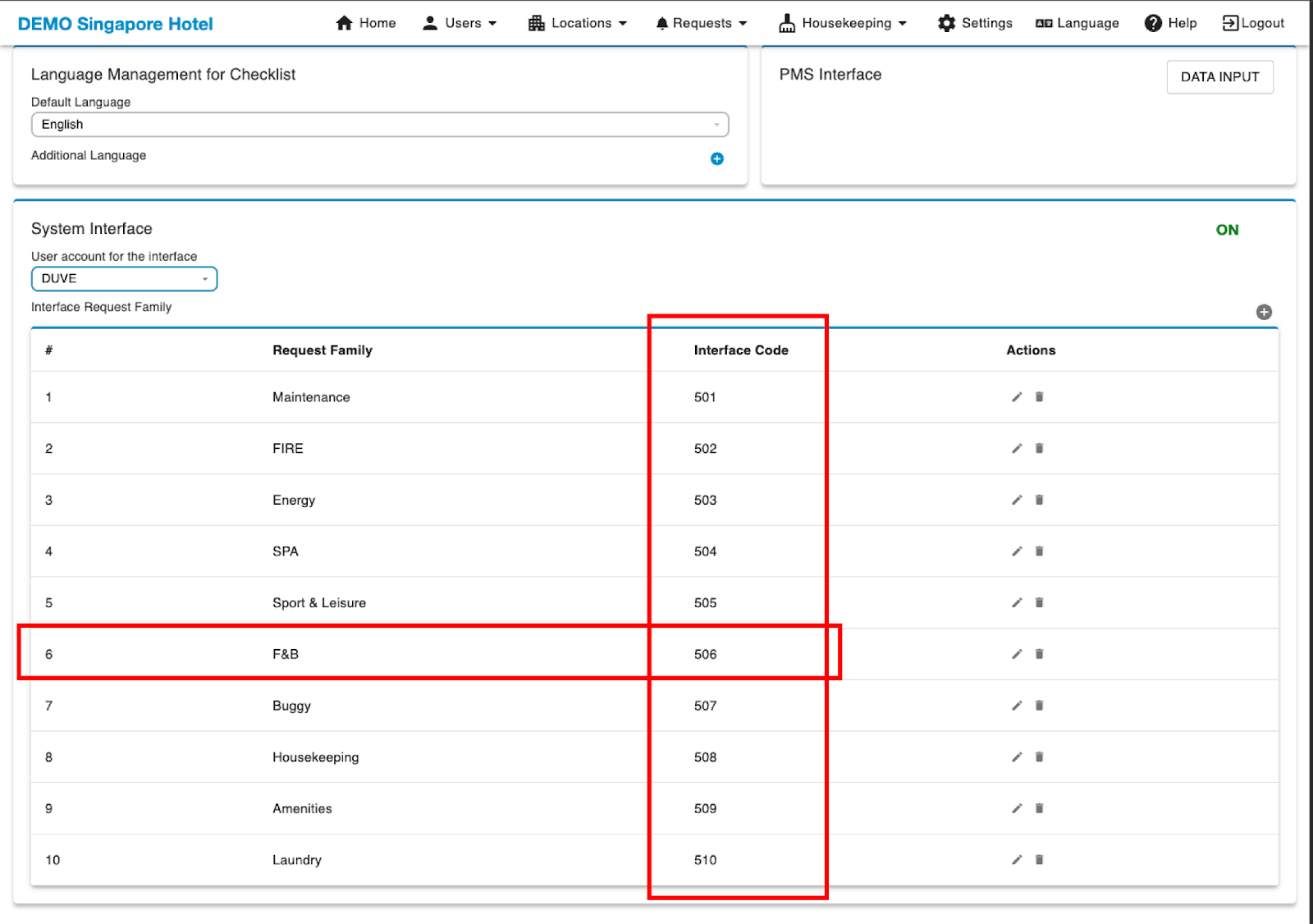
In the meantime, Start Setup of Menu or Custom Products
Duve hosts can already start to set up a custom service and align it to the supported task type requests.
Note: Please ensure that the task type requests are separated to each separate product in Duve.
Within the Service setup:
When seting up the Menu Item or Custom Product, make sure to set the condition to be visible only from the check-in date on to ensure orders cannot be placed before guests arrive.
Navigate to Dashboard > Upsell > Manage
Select 'Edit'
In the 'Add Condition' section select the 'In-House' option.
Services must be set to 'Free'
Each item must have an External ID (Provided by Support) in the upsell in order to successfully push to SARA.
Single Product:
Multi Product:
Mandatory Last Step
- Make sure the Room Number is set on the Room/Rental
To do this, please go to the Frontdesk.
Click on the Rooms/Rentals
Go into each Rental and check that the Room Number field is filled in as shown below:
Comments
0 comments
Please sign in to leave a comment.