
Overview
For hotels connected to Infor PMS, Duve now builds the amount due shown in Online Check-In (OCI) from Infor's live rate details instead of the guest folio while the reservation is still pre-arrival.
Before this change, Duve read the balance from the Infor folio. The folio only opens at around check-in time, so before arrival it was empty. That produced two recurring problems: an amount due of 0 for reservations that genuinely owed money, and a full-stay amount due for guests who had already paid a deposit or prepaid the whole stay, because the prepayment was not recognized as a payment.
Duve now reads Infor's
rateDetails for every pre-arrival reservation and nets the stay totals against Infor's own amountDue. Whatever the guest already paid (deposit, partial prepayment, or full prepayment) is deducted, so the OCI amount due always matches what Infor says is still open.The same release adds rate plan routing control. Some rate plans are prepaid away from the guest folio: OTA prepaid bookings (for example, Booking.com non-refundable, paid by virtual credit card that Infor never sees) and reservations routed to an AR or direct-bill company account. Duve handles both, so the guest is asked to pay only for what is actually theirs to pay:
- Rate plans you list in the "Rates that skip payment" field have their room charge dropped from the OCI amount due, while city tax, fees, and add-ons stay on the guest.
- AR and direct-bill reservations are netted to Infor
amountDuelike any other reservation, so a guest tax that remains payable is still collected instead of being wrongly zeroed.
In this article
- Who this is for
- Applies to
- Use cases
- Before you start
- How to set it up
- How it works
- Host experience
- Guest experience
- Troubleshooting
- Restrictions & limitations
- Tips & tricks
- FAQs
- Related articles
Who this is for
Applies to
|
Use cases
- A guest paid a deposit at the time of booking. Before this change, OCI asked for the full stay amount. Now OCI asks only for the remaining balance.
- A guest prepaid the entire stay. OCI now shows 0 due instead of the gross amount, so the guest completes check-in without being asked to pay twice.
- A Booking.com non-refundable reservation is paid by virtual credit card that Infor never receives. The room charge is excluded from OCI, and the guest is charged only the city tax and any extras they added.
- An OTA reservation that is also billed to an AR account still owes a small city tax. OCI now surfaces that tax instead of showing 0.
- A guest added a crib, a facial, or another add-on to the reservation. OCI itemizes each add-on as its own line at its stay total rather than folding everything into one unexplained number.
- A corporate or direct-bill reservation arrives pre-arrival. OCI shows exactly what Infor reports as still open on the guest side.
Before you start
- Confirm the property's Infor sync source is connected and saving successfully in Duve.
- Collect the exact Infor rate plan codes that should skip the room payment, for example
BAROTA. These must be the rate plan codes as they exist in Infor, not the rate plan display names. - Confirm with the property which rate plans are genuinely prepaid outside the guest folio. Any code you add here will stop the room charge from being collected in OCI, so an incorrect code means lost revenue at check-in.
- You need access to the sync source connection page for the property. [SCREENSHOT: Infor sync source connection page in Duve]
How to set it up
Deducting pre-arrival deposits requires no configuration. It applies automatically to every pre-arrival reservation on an Infor connection as soon as the integration is active.
Rate plan routing is configured per sync source:
- Open the property's Infor sync source in Duve.
- Find the "Rates that skip payment" field, next to the existing transaction code fields such as room charge codes and payment transaction codes.
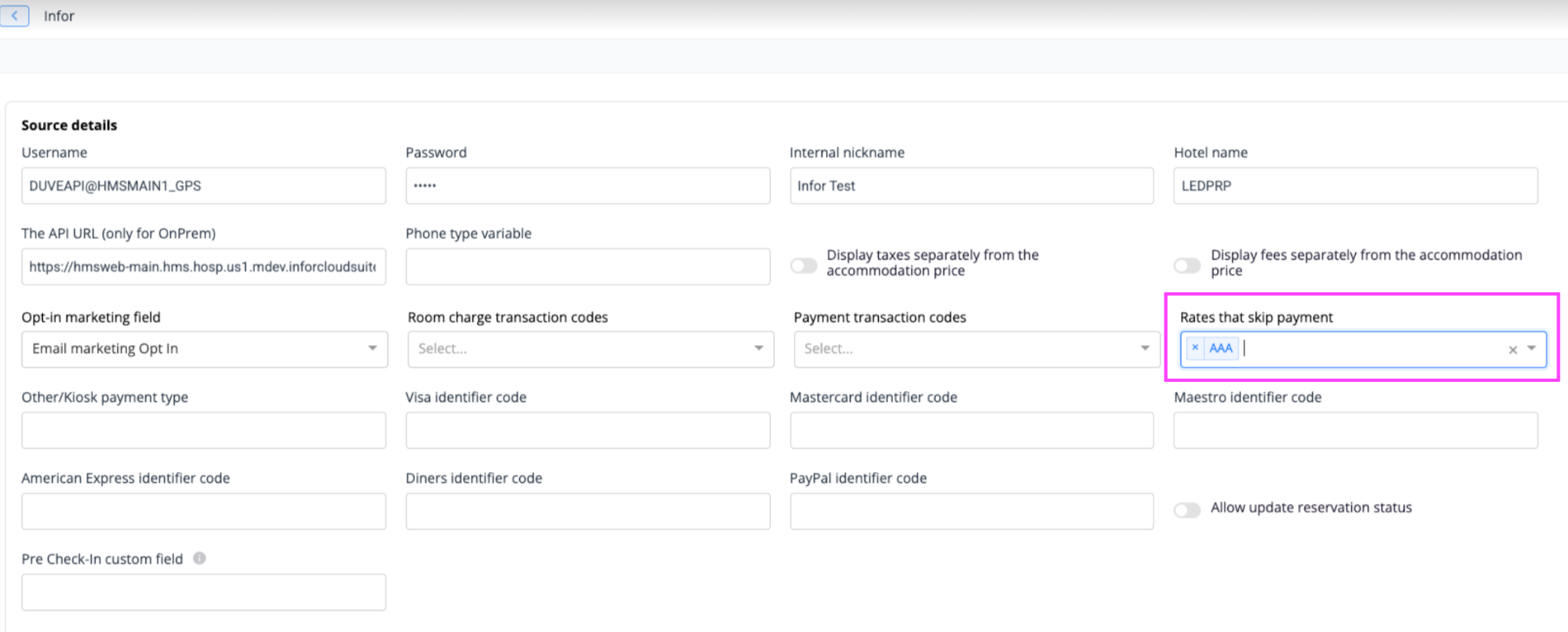
- Enter each rate plan code that should skip the room payment. The field accepts multiple values, and you can type a new code directly if it is not already in the list.
- Save the sync source.
Notes on how codes are matched:
- Matching is case-insensitive, so
barota,BAROTA, andBarOtaall match the same Infor rate plan. - Leading and trailing spaces are ignored.
- Leaving the field empty means nothing is excluded and all reservations keep their full room charge.
How it works
Pre-arrival balance:
- Duve looks up the reservation's folio ID in Infor, then requests the rate details for that folio.
- The room charge shown in OCI is the guest subtotal minus the add-on total, so it is the room only.
- Taxes and fees are always listed as their own lines on the pre-arrival path, even if the connection is set to fold them into the room price for in-house reservations. This is deliberate, so that excluding a room charge never silently removes the tax with it.
- Add-ons are listed one line per item, aggregated across the nights of the stay at the stay total. If an add-on has more than one unit per day, the quantity appears in the line title, for example "Water (x 2)". If the itemized add-ons do not reconcile to Infor's add-on total, Duve falls back to a single "Add-ons" line so the total always stays exact.
- The amount already paid is calculated as Infor's guest total minus Infor's amount due. This is what makes deposits and prepayments disappear from the amount the guest is asked to pay.
- If a small residual remains after all lines are listed, for example because of a tax adjustment on a tax-exempt or corporate rate, Duve adds an "Adjustments" line so the displayed lines always add up to the Infor total.
- The result is that the OCI amount due always collapses to Infor's
amountDue.
Rate plan routing:
- If the reservation's rate plan code is in your "Rates that skip payment" list, the room charge is removed from the amount due and the paid amount is reduced by the same room amount. This keeps the balance equal to Infor's amount due and prevents a negative balance.
- City tax, fees, and add-ons are never removed by this exclusion. Only the room charge is dropped.
- AR and direct-bill reservations run through the same calculation as any other reservation and are netted to Infor's amount due. They are not bounced to the folio based calculation.
- When a guest places an order during their stay flow, the rate plan code and the PMS fields travel with the order, so the balance is recalculated with the same exclusion rules after the order.
Host experience
- You configure the rate plan codes once per Infor sync source. No per-reservation action is needed.
- The amount due you see on the reservation in Duve reflects the same netted figure the guest sees in OCI.
- Excluded room charges are not posted to the guest in OCI, so the room revenue continues to be settled through whichever channel it was routed to (the OTA or the company account) rather than through Duve.
Guest experience
- The guest opens Online Check-In and sees an amount due that already accounts for any deposit or prepayment.
- The payment breakdown is itemized: room, taxes, fees, and each add-on as its own line.
- A guest on an excluded rate plan sees no room charge at all, only the city tax, fees, and any extras they added.
- A fully prepaid guest sees 0 due and can complete check-in without a payment step.
Troubleshooting
- OCI shows 0 due for a pre-arrival reservation that should owe money: Duve returns an empty balance when Infor does not return a folio ID for the reservation, when the rate details request fails, or when Infor returns rate details that are entirely zero. Check the reservation in Infor first, then check the Infor sync logs for the reservation's external ID.
- OCI shows no room charge for a reservation that should be charged: check whether that reservation's rate plan code is listed in "Rates that skip payment". Remember the match is case-insensitive, so a code entered in lowercase still matches.
- The room charge is still shown for a prepaid OTA reservation: confirm the code you entered is the Infor rate plan code on that reservation and not the rate plan name.
- The guest was charged the full stay despite paying a deposit: confirm the reservation is still pre-arrival. In-house and checked-out reservations use the folio-based calculation, which behaves as it did before.
- An unexpected "Adjustments" line appears: this closes the gap between the itemized lines and Infor's total, usually caused by a tax adjustment on the rate. The total amount due is still correct.
Restrictions & limitations
- This applies to the Infor integration only. Other PMS connections are not affected.
- It applies to pre-arrival reservations only. Once a reservation is in-house or checked out, the previous folio-based behavior applies, including the previous handling of AR reservations, where the room and taxes are dropped, and fees and add-ons stay on the guest.
- When the pre-arrival rate details cannot be retrieved, Duve shows an empty balance rather than falling back to the folio, because the folio is empty before check-in and would produce a misleading figure.
- The exclusion drops the room charge only. It cannot be used to exclude taxes, fees, or add-ons.
- Rate plan codes must be entered manually and are maintained per sync source. Adding a new OTA prepaid rate plan in Infor does not add it to Duve automatically.
- True corporate direct-bill reservations, meaning a non-OTA stay billed in full to a company account, have not been verified against a live sample pre-arrival. Duve trusts whatever Infor reports as the amount due for them. Check one such reservation before and after go-live at your property.
Tips & tricks
- Keep the list short and precise. Every code you add removes the room charge for every reservation on that rate plan.
- Test with a real reservation on the rate plan before relying on it in production. Compare the OCI amount due with Infor's amount due for the same reservation. They should be identical.
- When an OTA prepaid reservation still shows a small amount due, that is usually city tax, which the guest is correctly expected to pay at the property.
- Review the list whenever the property adds or renames rate plans in Infor.
FAQs
Q: Do I need to turn on deposit deduction anywhere?
A: No. It applies automatically to pre-arrival reservations on Infor connections. Only the rate plan exclusion list needs configuration.
Q: Where do I add the rate plan codes?
A: On the property's Infor sync source connection page, in the field labeled "Rates that skip payment".
Q: Why can I not see the field when creating a new connection?
A: The field is hidden during creation. Save the sync source first, then reopen it to add the codes.
Q: Does the exclusion also remove the city tax?
A: No. Only the room charge is removed. City tax, fees, and add-ons remain payable by the guest.
Q: Does capitalization matter when entering a code?
A: No. Matching is case-insensitive, and spaces around the code are ignored.
Q: What happens to a reservation billed to an AR or company account?
A: Pre-arrival, it is calculated like any other reservation and netted to Infor's amount due, so any remaining guest-side charge, such as city tax, is still collected.
Q: Why does a guest who prepaid everything see 0 due?
A: Because the amount already paid is derived from Infor's total minus Infor's amount due. When Infor reports nothing is due, OCI shows 0.
Q: Will this change the amount due for a guest who has already checked in?
A: No. In-house and checked-out reservations continue to use the existing folio-based calculation.
Q: Can I use this to stop collecting payment for a specific guest rather than a rate plan?
A: No. The exclusion is configured by rate plan code and applies to every reservation on that rate plan.
Q: Why does OCI show 0 due when the reservation clearly has charges in Infor?
A: Duve shows an empty pre-arrival balance when it cannot retrieve usable rate details from Infor, for example, when no folio ID is returned. Check the reservation in Infor and the sync logs for that reservation.
Comments
0 comments
Article is closed for comments.