
Check-out Suggestions let you recommend extra menu items to guests at the moment they review their order. When a guest reaches the check-out screen of a Food and Beverage menu, the Guest app shows a horizontal "You might also like" carousel above the order summary. Tapping a card opens the standard item drawer so the guest can add it to the same order in one or two taps.
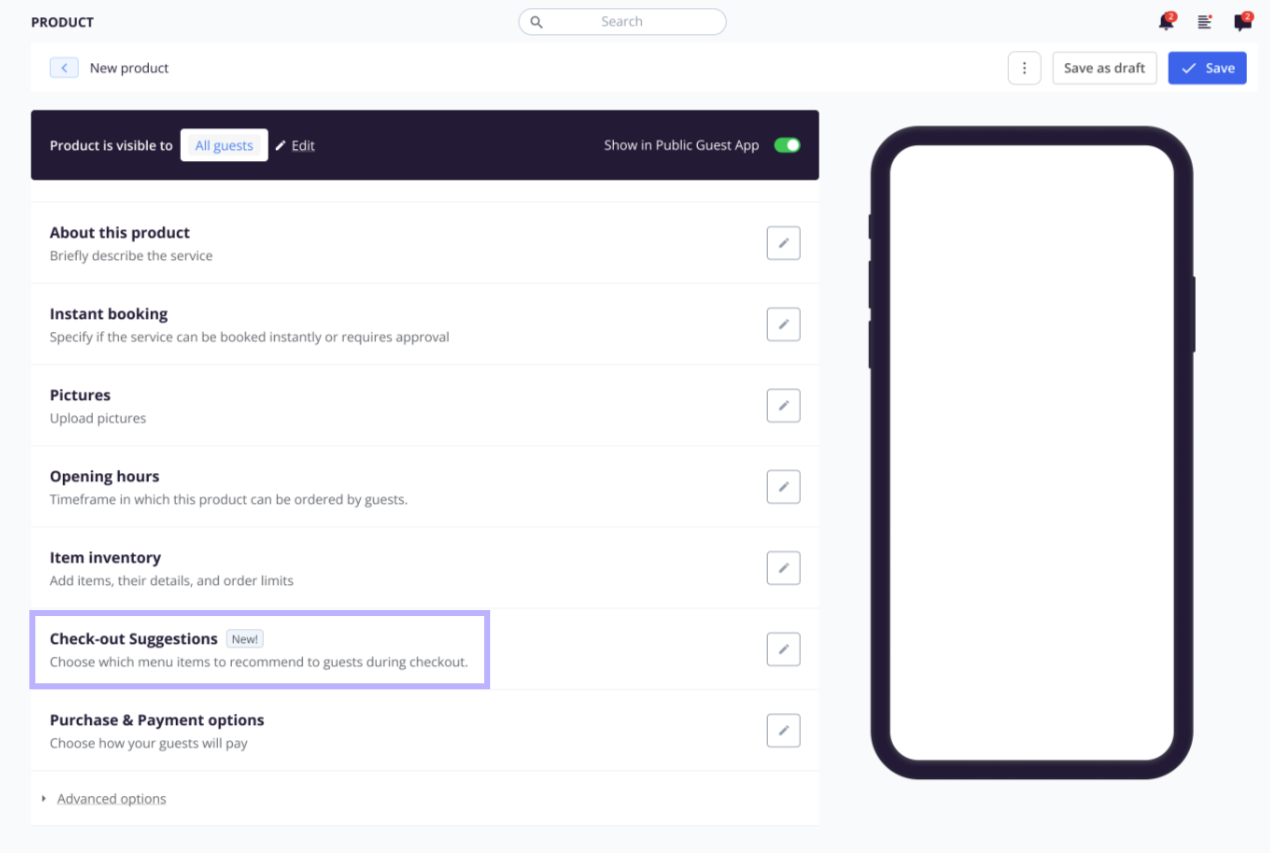
You control what is recommended from the menu itself, inside a new Check-out Suggestions section in the menu editor. There are three things you configure and one that Duve fills in for you:
- Personalized Recommendations: suggests an item the guest already ordered during this stay.
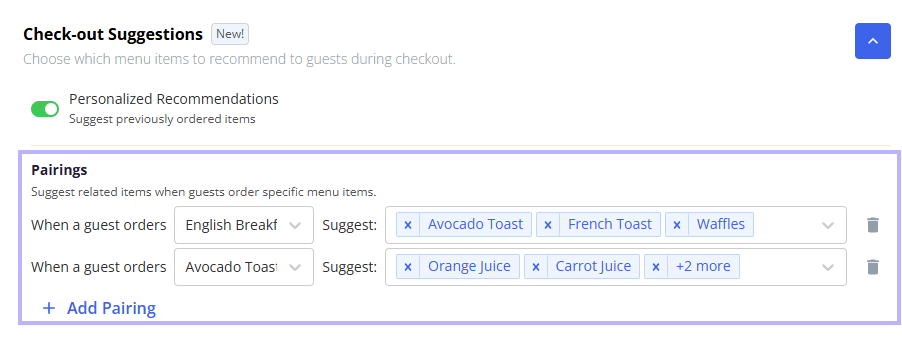
- Pairings: suggests related items when a guest orders a specific item (for example, fries and a beer when a burger is in the cart).
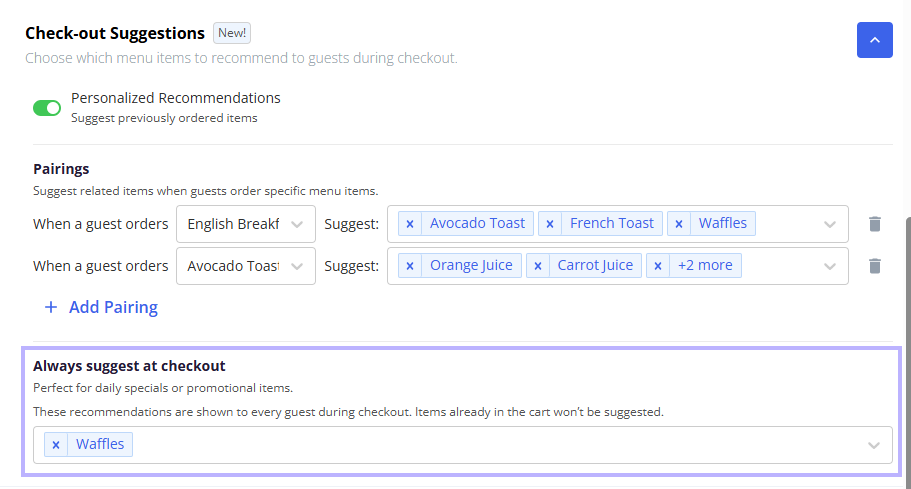
- Always suggest at check-out: items offered to every guest, useful for daily specials and promotions.
- Duve suggestions: an automatic recommendation based on what actually sells on that menu. You do not configure this one, and it only appears once you have configured at least one of the three above.
Note: The carousel is assembled per guest and per cart. Items already in the cart, disabled items, deleted items, category headers, and items your POS reports as out of stock are never suggested.
Quick navigation:
- Applies to
- Use cases
- Before you start
- How to set it up
- Host experience
- Guest experience
- Troubleshooting
- Restrictions and limitations
- Tips and tricks
- FAQs
- Related articles
Applies to:
|
Use cases
- Classic food pairings: when a guest orders a burger, suggest fries, a beer, and a dessert.
- Drinks attachment: when a guest orders any main course, suggest the house wine and a soft drink to lift the average order value.
- Daily specials: always suggest today's cake or a seasonal cocktail at check-out to every guest, with no pairing rules to maintain.
- Repeat orders during a stay: turn on Personalized Recommendations so a guest who ordered a cappuccino yesterday sees it again, badged "Reorder", when they check out today.
- Let the data choose: leave the Duve suggestion to surface the item that earns the most and the item that sells the most on that menu over the last 30 days, without you having to track it.
- Promoting high-margin items: within each group, the most expensive item is shown first, so premium items get the first card in the carousel.
Before you start
- Build the menu first. You can only suggest orderable items that belong to the same menu. Category headers cannot be suggested, and you cannot pull an item in from a different menu.
- If the menu is synced from a POS, make sure the inventory has synced before you configure pairings, so the items you want to reference exist.
- Item names in the pickers appear in the menu's base language, not in the translated language you may be viewing.
How to set it up
- In the Duve dashboard, go to your Upsells and open the Food and Beverage menu you want to configure.
-
Open the Check-out Suggestions section.
-
Turn on Personalized Recommendations if you want to suggest previously ordered items. This toggle is off by default.

- Create your Pairings:
- Click Add Pairing. A row appears reading "When a guest orders [Select item] Suggest: [Select items...]".
- Pick the trigger item in the first field. Each item can trigger only one rule, so an item already used as a trigger is hidden from the other rows.
- Pick the items to suggest in the second field. You can add up to 10 items per rule. Once a rule is full, further items cannot be selected.
- An item cannot suggest itself. The trigger item is filtered out of its own suggestion list, and if you change the trigger to an item the row already suggests, it is removed from the suggestions.
-
Use the trash icon at the end of a row to delete that rule.
-
Fill in Always suggest at check-out with the items you want every guest to see. There is no limit on this list. The description notes that items already in the cart will not be suggested.
- Save the menu.
Notes on saving:
- A pairing row you opened and left blank, or only partly filled in, is dropped when you save rather than blocking the save. If you pick a trigger and forget the items, that row is removed silently.
- If you reference an item that does not belong to this menu or is not orderable, the save is rejected with a message explaining that suggestions can only reference orderable items of this menu.
- The configuration is recorded in the product audit log, so changes are traceable.
Host experience
- The section is part of the menu editor, so suggestions are saved with the rest of the menu. There is no separate publish step.
- You can configure an item that is temporarily disabled. The stored reference is kept, and the item is filtered out of the carousel until it is orderable again. The same applies to an item that your POS soft-deletes during a sync, so your rules survive catalog churn.
- Turning the feature on fires a feature activation event, so adoption is measurable.
- When guests buy a suggested item, the purchase event records which suggestion type sold it, the item name, and its unit price in both the order currency and in EUR. One entry is recorded per purchased unit, so summing the prices gives suggested revenue without double counting.
Guest experience
- On the checkout screen, the guest sees a You might also like heading with a horizontal, scrollable row of cards.
- Each card shows the item image, name, description, and price, with a plus button in the brand color notched into the corner of the image. If an item has no image, your company logo is used as the placeholder:

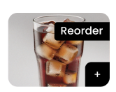
- An item the guest already bought earlier in this stay carries a Reorder chip in the brand color, whichever group surfaced it:
- Tapping a card opens the normal item drawer, including for items with no modifiers, so modifiers, quantity, and notes behave exactly as they do from the menu. Confirming adds the item to the order and fires the usual "added to your order" confirmation.
- On a free menu, no price is shown on the cards.
- The list is fetched once per visit to the checkout screen. Changing quantities in the cart does not reshuffle the carousel underneath the guest.
How the order of the carousel is decided
- Groups always appear in a fixed order: Pairings first, then Personalized, then Always suggest, then the Duve suggestion.
- Inside each group, items are sorted by price from high to low. The sort never runs across groups, so a more expensive Duve item still appears after a cheaper paired item.
- An item offered by an earlier group is not repeated by a later one, and it is attributed to the first group that offered it.
- Personalized contributes exactly one item: the most expensive item the guest already bought on this menu that is not already in the cart. The rest of the purchase history still matters, because it is what puts the Reorder chip on items surfaced by other groups.
- The Duve group contributes the item with the highest revenue and the item sold most often on that menu over the trailing 30 days. These are recalculated nightly. When both metrics point at the same item, it appears once.
Troubleshooting
- No carousel appears at check-out: Check that at least one of the three configurations is in place on that menu. With nothing configured, the feature returns an empty list and renders nothing. Also confirm the account's Upsells switch and plan feature are on.
- A specific item never shows: It is excluded if it is already in the cart, disabled, deleted, a category header, no longer part of the menu, or reported as out of stock by the POS. An item with stock remaining still shows and is handled by the usual "Only X left" behavior at checkout.
- A pairing rule you created is gone after saving: Incomplete rows, meaning a row with no trigger or with a trigger and no suggested items, are removed on save. Re-add the rule and fill in both fields.
- You cannot select an eleventh item in a pairing: That is the cap. Remove an item first, then add another.
- The Duve suggestion is missing: The nightly job has not yet produced results for that menu, or the menu had no qualifying paid orders in the last 30 days. The other three groups continue to work on their own.
- Saving a non-menu upsell fails: This was a short-lived regression that has been fixed. An empty suggestions block on a non-menu product is now accepted.
Restrictions and limitations
- Available on Food and Beverage menu products only.
- A pairing rule allows a maximum of 10 suggested items.
- Each menu item can be the trigger of only one pairing rule.
- An item cannot be paired with itself.
- Suggestions can only reference orderable items of the same menu. Category headers and items from other menus are not eligible.
- Personalized Recommendations contributes at most one item per check-out.
- Personalized Recommendations relies on a reservation, so visitors and guests in public mode have no purchase history and see no personalized item and no Reorder chip.
- Fully refunded orders are not counted as purchases, so a refunded item is not offered back to the guest as a reorder.
- Duve suggestions are not configurable, are based on a trailing 30-day window, and are refreshed once a night rather than in real time.
- The Duve group never appears on its own. At least one of the three configured types must be in place.
- Item names in the host pickers are shown in the menu's base language only.
- The same check-out view is shared with the front desk "Book a Service" flow, so the carousel also appears there.
- If the request for suggestions fails, the section simply renders nothing. It never blocks or delays check-out.
Tips and tricks
- Put your highest margin item first in a group by pricing. Within a group, the most expensive item takes the first card.
- Keep pairing rules focused. A rule with two or three strong companions reads better in a carousel than one with ten.
- Use Always suggest at check-out for anything that changes often, such as a daily special, and reserve pairings for stable combinations.
- Turn on Personalized Recommendations for longer stays, where guests are likely to order from the same menu more than once.
- Because an item surfaced by an earlier group is not repeated, there is no harm in listing a popular item both in a pairing and in Always suggest. It will simply appear once, attributed to whichever group came first.
- Configure an item you are about to re-enable. Disabled items keep their place in your rules and start appearing again as soon as they are orderable.
FAQs
Q: Do I need to configure anything for the Duve suggestion to appear?
A: Yes, indirectly. The Duve suggestion only contributes when at least one of Personalized Recommendations, Pairings, or Always suggest at check-out is configured on that menu.
Q: How many items can I suggest in one pairing rule?
A: Up to 10. Once a rule holds 10 items, additional items cannot be selected until you remove one.
Q: Can one menu item trigger more than one pairing rule?
A: No. Each item can be the trigger of a single rule, and items already used as triggers are hidden from the other rows.
Q: Can I suggest an item from another menu?
A: No. Every suggested item must be an orderable item of the same menu.
Q: Will guests see an item that is already in their cart?
A: No. Items in the cart are excluded from the carousel.
Q: What happens if an item I configured is later disabled or deleted?
A: The reference stays in your configuration, but the item is filtered out of the carousel. If it becomes orderable again, it starts appearing again without you having to reconfigure anything.
Q: What does the Reorder chip mean?
A: The guest already bought that item during this stay, from this menu, in an order that was paid and not fully refunded.
Q: Does a guest without a reservation see personalized suggestions?
A: No. Visitors and guests in public mode have no stay history, so they see no personalized items and no Reorder chip. The other suggestion types still work.
Q: How often are the Duve suggestions updated?
A: They are recalculated once a night from paid orders over the previous 30 days, and the result is held for up to 48 hours so that a single missed run still serves the previous answer.
Q: Are taxes and service charges included in the revenue used for the Duve suggestion?
A: No. The calculation uses gross line revenue, which is quantity multiplied by the item price. Order-level tax and service charges cannot be attributed per line, and modifier surcharges are excluded so that the figure matches the price used to order the carousel.
Q: Does the carousel slow down or block check-out?
A: No. The suggestions are requested once when the guest reaches the check-out screen, and if the request fails, nothing is rendered. Check-out is never gated on it.
Q: Can I see how much revenue suggestions generate?
A: Yes. When a guest buys a suggested item, the purchase event records the suggestion type, the item name, and the unit price in both the order currency and EUR, with one entry per purchased unit.
Q: Why did my half-filled pairing row disappear when I saved?
A: Rows without both a trigger and at least one suggested item are not valid rules, so they are dropped on save instead of blocking the whole menu from saving. Recreate the rule and complete both fields.
Comments
0 comments
Article is closed for comments.