
Overview
The Booking Agent is the DuveAI agent for people who are not guests yet. When someone messages you before they have a reservation, typically through the chat widget on your website, the Booking Agent works out what they are looking for, searches real availability in your booking engine, and shows them matching hotels and rooms with prices and a booking link.
It is a separate agent from SmartReply. SmartReply handles guests who already have a reservation. The Booking Agent handles conversations with no reservation attached, and only when you have turned it on and connected a booking engine.
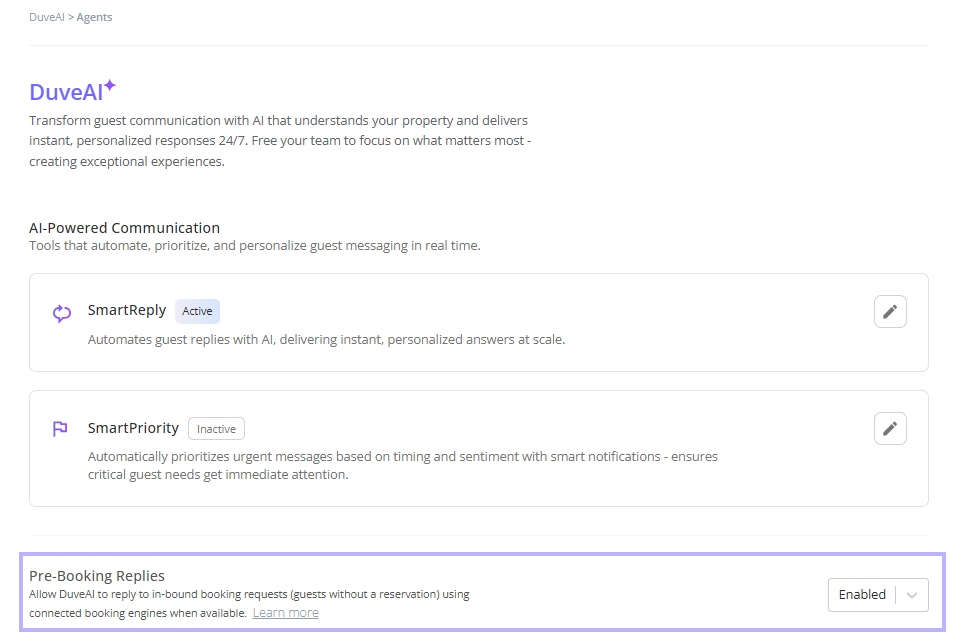
You enable it at Settings > DuveAI > Agents, in the Pre-booking replies row.
Applies to:Accounts with the AI Booking Agent on their plan. You also need SmartReply active, since the Booking Agent runs inside the same DuveAI settings, and a connected booking engine, since without one there is nothing to search.
Pricing:The Booking Agent is a paid addition to DuveAI. For current pricing, contact Duve Support or your Customer Success Manager.
|
Use cases
- Capture demand outside office hours. Someone browsing your site late at night asks about next weekend and gets real rooms and prices instead of a contact form.
- Push more direct bookings. Every answer ends with a link to your own booking engine rather than an OTA.
- Guide people through a portfolio. With several properties connected, the agent helps the person narrow down to the right hotel before showing rooms.
- Answer the question behind the question. People often ask about parking or breakfast in the same message as their dates. The agent answers both in one reply.
- Sell in the visitor's language. The conversation and the cards are presented in the language the person is writing in.
- Rescue a dead end. When the requested dates are full, the agent proposes nearby dates or another city that genuinely has availability, instead of just saying no.
Before you start
- Confirm the AI Booking Agent is on your plan and SmartReply is active.
- Connect a booking engine at Settings > Connections > Booking Engines and let the first sync finish. Duve currently supports Simplex and SimpleBooking.
- Check that every property you want offered has a country set in the booking engine. Properties without a country are excluded from the agent's hotel list.
- Review your room names, descriptions, photos, and amenities in the booking engine. That content is what the guest sees on the cards.
How to set it up and use it
Turn on pre-booking replies
- Go to Settings > DuveAI > Agents.
- Find the Pre-booking replies row.
- Set it to Enabled.
Setup note: Until a booking engine is connected, the row is disabled and shows "No booking engine connected" with a Connect to enable link.
Know which conversations it handles
The agent is chosen automatically per conversation. A conversation with no linked reservation and pre-booking replies enabled goes to the Booking Agent. Everything else goes to SmartReply. You do not assign conversations to it by hand, and there is no way to route a guest with an existing reservation to it.
What the agent collects
Before it can search, the agent needs four things, and it asks for whatever is still missing, one question at a time:
- Where the person wants to stay, meaning a city or a specific hotel
- When they want to arrive, either specific dates or a range with several nights
- How many adults and children, including the age of anyone under 18
- How many rooms, and how the party splits across them
Troubleshooting note: People rarely give these in order, and they change their minds. The agent handles both: it picks up details wherever they appear in the conversation and updates what it already had when someone revises something later.
How a message gets handled
Each incoming message is sorted into one or more of four kinds:
- A booking question, which goes to the availability flow
- A question about the hotel, such as parking, breakfast, pets, or check-in time, which is answered from your Guest app posts and other AI knowledge sources
- A question about the assistant itself, such as "what can you do" or "are you a real person"
- Small talk, such as a greeting or a thank you
Troubleshooting note: When a message contains both a booking question and a hotel question, both are handled, and the answers are merged into a single reply rather than sent as two messages.
How the search works
The agent only calls your booking engine once it has enough to search with. Before searching, it runs a set of checks and will come back to the person instead of searching if something does not add up, for example, dates in the past, no adults in the party, or a child age that cannot be right. If the same search was already run earlier in the conversation and nothing has changed, the agent reuses the previous result rather than querying again.
When nothing is available
If the requested dates come back empty, the agent tries two things in order:
- Nearby dates. It looks for availability on shifted dates and offers those instead.
- Another city. If your portfolio covers more than one city, it checks whether other cities actually have rooms for the original dates, and only proposes a city that genuinely does.
If neither produces an option, the conversation is handed to your team automatically. The agent does not ask permission first, and it does not invent an alternative it has not verified.
Host experience
- Booking conversations appear in the Communication Hub like any other conversation, including the cards the person was shown.
- When the agent hands over, the conversation is flagged for your team with the reason recorded, so you can see whether it was a dead end on availability or something else.
- Anonymous conversations are noted as such when the agent escalates, so your team knows there is no booking to look up.
Guest experience
A booking reply is delivered as a short sequence rather than one long message, in this order: the AI disclosure if it is the first message of the session, a summary of the hotel where relevant, a short line introducing the results, a prompt to pick a room, and then the answer with the cards.
Hotel cards are shown when the person needs to choose a property. Each one carries a photo, the hotel name, a "Starting from" price, and how many offers that hotel has. Tapping a card picks that hotel and moves the conversation to rooms.
Room cards are shown once the hotel is settled. Each one can carry a photo, the room name, a description, amenities, the meal plan, the price, the total for the stay, and a link to book. The cheapest option is shown as the main offer, and other rates for the same room, such as the same room with breakfast, are listed underneath with the price difference from the cheapest. One option can be marked as recommended.
Other details worth knowing:
- Dates appear on the cards only when the person is comparing shifted dates, where the dates are the thing that differs. Otherwise, the dates are stated once in the intro line.
- Meal plans are shown as Room Only, Bed and Breakfast, Half Board, Full Board, or All Inclusive.
- Card text is translated into the conversation language, and the intro lines are available in around 30 languages.
- On WhatsApp, the cards are delivered as an approved WhatsApp template with tappable buttons. If that delivery fails, the agent falls back to plain text so the person still gets the information. Your team sees the same content in the Communication Hub either way.
- Cards are not re-sent every turn. Once a set has been shown, it is not repeated unless the person asks to see the options again.
- The booking is completed in your booking engine. The agent presents offers and links; it does not take payment or create the reservation.
Troubleshooting
- The AI is replying, but not about availability: Check whether the conversation has a reservation attached. If it does, SmartReply is handling it, and that is expected.
- Pre-booking replies are disabled, and I cannot turn them on: No booking engine is connected. Connect one first.
- A hotel is never offered: Two usual causes: the property has no country set in the booking engine, or it has not been synced yet. Fix the country, then sync.
- The agent keeps asking for dates the guest already gave: A value that failed a check is cleared so it cannot be reused, and the agent asks again. Dates in the past are the most common trigger.
- The room details on the card are wrong: Card content comes from your booking engine. Correct the room there, then sync.
- A guest on WhatsApp got plain text instead of cards: Card delivery failed, and the agent fell back to text, so the answer still arrived. If it happens repeatedly, contact Duve Support.
- The conversation was handed over without offering anything: The dates had no availability, and no alternative dates or city could be verified. That is the designed behavior.
- The person came back the next day, and the agent had forgotten their search: After a long gap, the conversation is treated as a fresh session, and the previous search is cleared.
Restrictions and limitations
- The agent only handles conversations with no linked reservation.
- It cannot create, change, or cancel a reservation, and it never takes payment.
- It can only offer properties and rooms that exist in your connected booking engine and have been synced.
- It will not promise a specific price, room, or availability without a real search behind it.
- It will not discuss how it works, what it is built on, or how messages are processed, and it will decline politely if asked.
- It will confirm honestly that it is an AI assistant if asked directly, and it can hand over to a person at any point.
- Long gaps in the conversation start a new session, and the previously collected details do not carry over.
- Once a set of cards has been shown, it is not shown again unless the person asks.
Tips and tricks
- Test with a realistic conversation before you go live: Give a city, a date range, and a party including a child, and check the rooms and prices match what you would have quoted by hand.
- Treat your booking engine content as guest-facing copy: Room names, descriptions, amenities, and photos go straight onto the cards with no editing in between.
- Sync after any structural change in the booking engine, such as a new property or a new room type: The agent cannot offer what it has not synced.
- Try a question that mixes a hotel question with a booking question, since that is how people actually write, and confirm the merged reply reads well.
- Watch the handovers in your first few weeks: A pattern of dead ends on particular dates is useful commercial information, not just an AI problem.
- Ask the agent an out-of-scope question during testing and check that the handover feels graceful to a prospective guest.
FAQs
Q: What is the difference between the Booking Agent and SmartReply?
A: SmartReply answers guests who already have a reservation. The Booking Agent answers people who do not, and it can search live availability and present rooms with prices. Both are configured on the same settings page.
Q: Do I need a booking engine?
A: Yes. Without one, there is no availability to search, and the setting cannot be enabled.
Q: Where do people actually talk to it?
A: Most commonly, your website chat widget, since that is where people without a reservation reach you. Any conversation with no reservation attached is eligible.
Q: Can the agent complete a booking?
A: No. It presents offers and a link, and the person finishes on your booking engine. Duve does not take payment or create the reservation.
Q: Can it handle several properties?
A: Yes. It helps the person narrow down to a hotel first, shows hotel cards to choose from, and then moves to rooms for the chosen property.
Q: What happens when the dates are full?
A: It offers nearby dates, or another city that it has confirmed has availability. If it can verify neither, it hands the conversation to your team.
Q: What languages does it work in?
A: It replies in the language the person is writing in, and the cards are translated to match. The card intro lines are available in around 30 languages.
Q: Can I change what it asks for, or the order of the questions?
A: No. The agent asks for destination, dates, party, and rooms as needed, and adapts to whatever the person has already provided.
Q: Will it answer questions about the property, not just availability?
A: Yes. Hotel questions are answered from your Guest app posts and the other AI knowledge sources, the same content SmartReply uses.
Q: Does it tell people it is an AI?
A: It sends a short disclosure at the start of a session, and if someone asks directly, it confirms honestly in one sentence. It will not pretend to be a person.
Q: Can I see what the agent showed a guest?
A: Yes. Booking conversations, including the cards, appear in the Communication Hub.
Q: What happens if the booking engine is slow or unavailable?
A: The agent does not invent availability. If it cannot get a verified answer, it hands the conversation to your team.
Comments
0 comments
Article is closed for comments.