
Duve connects to both Protel products through the same Protel I/O interface: Protel on Premise (Protel On Premise MPE and SPE) and Protel Air. Each connection is set up in Duve as its own integration source, and each one carries an integration version setting that tells Duve which generation of the Protel interface your property runs on.
Two versions are supported: V1 and V2. V2 is the recommended version and unlocks capabilities that V1 cannot deliver:
- Creating brand new guest profiles in Protel for additional guests (companions) that guests add during online check-in, and linking those profiles to the reservation.
- Live room availability for Room Upgrade upsells, so Duve only offers an upgrade when the room type is genuinely available for every night of the stay.
If no version is selected, Duve stores the connection as V1 by default, so existing Protel connections keep behaving exactly as they did before this setting existed. Switching to V2 is a setting change in Duve, but it only works once Protel has enabled the V2 interface on their side for your property.
Use cases
- Capture every guest in the stay, not just the booker. With V2, when a guest adds companions during online check-in, Duve creates a profile for each of them in Protel and attaches it to the reservation, so your front desk sees the full party before arrival.
- Sell room upgrades you can actually honor. With V2, Protel pushes live inventory and availability restrictions to Duve, so the Room Upgrade upsell is only offered for room types with real availability across the whole stay.
- Keep registration data clean. Guest details collected in online check-in (name, contact details, document details, address, nationality, date of birth, marketing opt-in) are written back to the matching Protel guest profile.
- Give the front desk context without extra work. Duve posts the online check-in summary as a trace (comment) on the Protel reservation under the "Duve" department.
- Keep the folio accurate. Upsell charges, stay payments, deposits, refunds, and room upgrades purchased in Duve are posted to the Protel folio, and Protel folio updates flow back into the reservation in Duve.
- Update arrival and departure expectations. Estimated arrival and departure times entered by guests are written to the Protel reservation.
Before you start
- Confirm with Protel, or with your Protel integrator, which interface version is active for your property. Duve cannot detect this automatically, and selecting V2 in Duve does not enable V2 on the Protel side.
- Have your Hotel ID and API Token for the property ready. Both are required to connect and to verify the connection.
- If you plan to post payments by card type, collect the Protel revenue codes you use for Visa, Mastercard, Maestro, Amex, and Diners.
- Make sure the integration source in Duve is active. Protel messages for a hotel code that does not match an active Duve source are rejected.
Upgrading an existing connection from V1 to V2
- Ask Protel to enable the V2 interface for the property first.
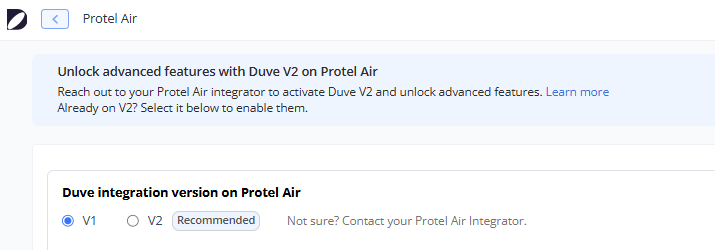
- Open the existing Protel source in Duve. While the source is not on the recommended version, Duve shows an upgrade banner at the top of the page explaining what V2 unlocks, with a Learn more link. You can dismiss the banner, and it stays dismissed in that browser.
- Change the selection to V2 and save. The change is recorded in the activity log for the account.
- Features that require V2, such as live availability on Room Upgrade products, become available immediately after saving.

Turning on live availability for room upgrades
- Open the Room Upgrade product and go to its advanced options.
-
Find the Use live availability switch.
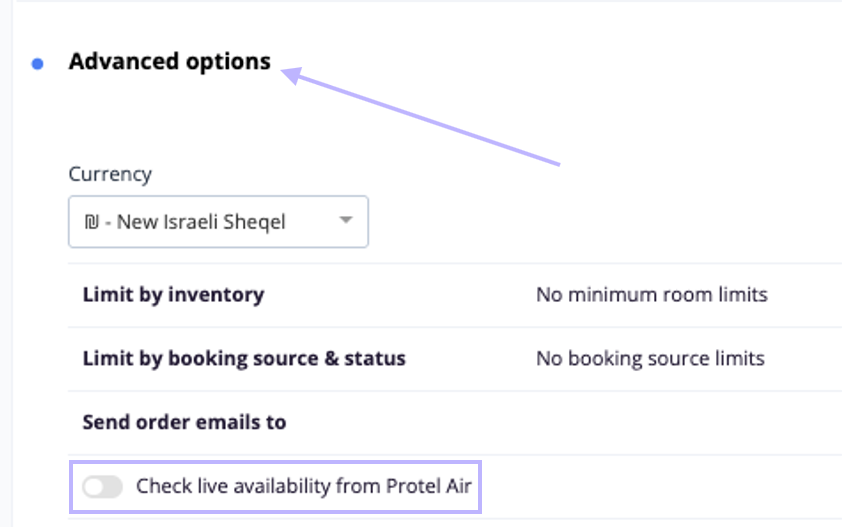
-
If the connected Protel source is not on V2, the switch is disabled, and Duve shows an inline message with a link that takes you straight to that integration source.
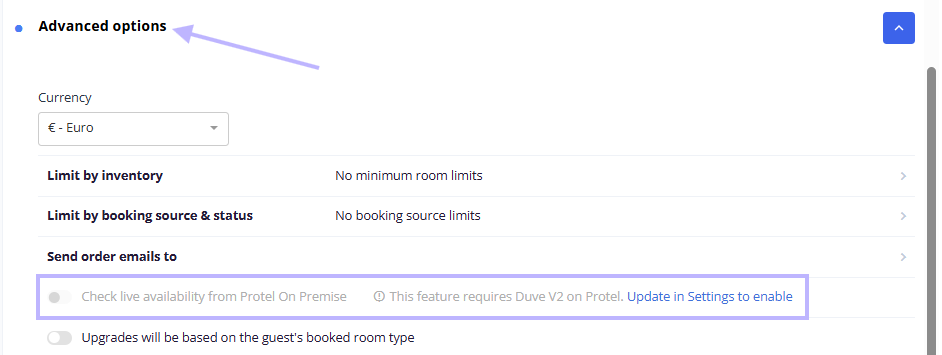
- Set the Protel source to V2, come back to the product, and turn the switch on.
Companions in V2
On a V1 connection, Duve can only update guest profiles that already exist in Protel, so the extra guests a booker adds during online check-in (companions) stay in Duve and never reach the PMS.
On a V2 connection, Duve creates a profile in Protel for each companion who does not already have one, stores the profile ID that Protel returns, and then attaches that profile to the reservation, so your front desk sees the full party on the booking before arrival. Each companion is sent with that person's details filled in (name, contact details, and document details). At the same time, the main guest continues to be sent with the verified reservation-level details. A companion with no last name is skipped because Protel requires a last name on a profile. Protel confirms each creation asynchronously, so a new profile can take a moment to appear attached to the reservation.
Troubleshooting note: If no version is selected, Duve stores the connection as V1 by default, so existing Protel connections keep behaving exactly as they did before this setting existed. Switching to V2 is a setting change in Duve, but it only works once Protel has enabled the V2 interface on their side for your property.
Host experience
- The version selector appears on the connection screen for both Protel products, on creation and on edit, with the recommended option marked. A hint next to the options reminds you to contact your Protel integrator if you are unsure.
- Reservations, folios, and availability updates arrive in Duve as Protel pushes them, rather than on a fixed polling schedule. Protel on-premise reports changes based on the arrival date, while Protel Air reports them based on the last update date.
- Charges and payments you push from Duve are confirmed asynchronously by Protel. The result is attached to the order log for that order, so a failed posting is visible on the order itself.
- Room upgrades, charge updates, refunds, and cancellations that fail on the Protel side are logged with the reason returned by Protel.
Guest experience
- Guests complete online check-in in the Guest app. The details they fill in for themselves and for each companion are sent to Protel.
- Estimated arrival and departure times entered by the guest are written to the Protel reservation.
- Upsells, room upgrades, and stay payments the guest buys in Duve are posted to the Protel folio, so the balance the front desk sees matches what the guest paid.
Troubleshooting
- Saving the source fails with an invalid integration version error: Only V1 and V2 are accepted. The value is not case-sensitive, so "V2" and "v2" both work, but anything else is rejected, and nothing is saved.
- The "Use live availability" switch stays disabled: The Protel source connected to that property is still on V1. Use the link in the inline message to open the source and switch it to V2.
- New companion profiles are not appearing in Protel: Check three things: the source is on V2, the guest has a last name, and the guest did not already exist in Protel. Duve only creates a profile for guests that have no Protel profile yet.
- Reservations are not reaching Duve: The hotel code Protel sends must match the Hotel ID on an active Duve source. Duve rejects messages for a hotel code it cannot match, for an inactive source, and for an account whose trial has ended.
- A card payment posting has no revenue code: Fill in the card identifier that matches the card type used on the order. Duve first looks for an identifier matching the exact card type, then falls back to the Visa, Mastercard, Maestro, Amex, or Diners fields.
- The online check-in comment in Protel is only a link: See the trace length limit below.
Restrictions & limitations
- Guest profile creation in Protel is available on V2 only. It is not available on V1, and it is not available on older connections that have never had a version selected, since those count as V1.
- Live availability for Room Upgrade products requires V2 on the connected Protel source.
- Traces (the comments Duve posts on the reservation) are limited to 150 characters each. Duve splits a longer summary into several traces at paragraph and line breaks. If a single line is still longer than the limit, Duve posts only a link to the full response instead.
- Protel integrations do not support pushing an upsell as a package or inclusion, and they do not support pushing a stored card token to the PMS.
- On cancellation, Duve reverts a room upgrade in Protel. Other service types do not have an automatic reversal on the Protel side.
- On Protel Air folio sync, folios that are marked as not payable by the guest, and folios that are closed, are not counted toward the guest balance.
Tips & tricks
- Decide the version first, then configure the features that depend on it. Setting a product to use live availability is only possible after the source is on V2.
- When you edit a Protel source, you only need to change the fields you care about. Duve merges your changes with what is already stored, so partial updates never wipe the rest of the configuration.
- If you run several Protel properties, remember that the version is per property. Moving one property to V2 does not change the others.
- Use the activity log to confirm that a version change was actually saved before you start troubleshooting a V2 feature.
FAQs
Q: What is the difference between Protel V1 and V2 in Duve?
A: V2 is the newer Protel I/O interface generation. In Duve, V2 adds the creation of new guest profiles in Protel for guests added during online check-in, and it enables live room availability for Room Upgrade upsells. Everything else, including reservation sync, folio sync, guest profile updates, traces, and charge posting, works on both versions.
Q: Which version is my property on?
A: Duve cannot detect it. Check with Protel or with your Protel integrator, then make sure the selection in Duve matches.
Q: What happens if I select V2 but Protel has not enabled V2 for my property?
A: Duve will send V2-only requests, such as the guest profile creation request, and Protel will not process them. Confirm with Protel that V2 is active before switching.
Q: My connection is older than this setting. Which version is it on?
A: V1. Any source saved without an explicit version is stored as V1, so nothing changes until you select V2 yourself.
Q: Does the version apply to Protel on Premise and Protel Air in the same way?
A: Yes. Both products use the same setting, the same V1 and V2 options, the same default, and the same V2-only features.
Q: Do I need to reconnect or re-enter credentials to change the version?
A: No. Open the existing source, change the selection, and save. Your Hotel ID, API Token, and other configuration stay as they are.
Q: Can I switch back from V2 to V1?
A: Yes, the selection can be changed in either direction, and the change is recorded in the activity log. Features that depend on V2 stop being available once the source is back on V1.
Q: Why is the "Use live availability" switch greyed out on my Room Upgrade product?
A: The Protel source for that property is not on V2. The message next to the switch includes a link to the integration source so you can change it.
Q: Are companion profiles created immediately when a guest finishes online check-in?
A: Duve sends the creation request when pre-check-in is completed, and Protel confirms it asynchronously. Duve stores the returned profile ID on the guest and then links the profile to the reservation, so there can be a short delay before the profile appears attached in Protel.
Q: What happens to a guest who did not provide a last name?
A: That guest is skipped for both profile creation and profile updates, because Protel requires a last name on a profile.
Q: Where do upsell charges land in Protel?
A: On the reservation folio. After check-in, Duve posts a charge posting. Before check-in, Duve posts a fixed charge on the reservation. Card payments and deposits are posted with the revenue code configured for that card type.
Q: Why is the comment on my Protel reservation shorter than the check-in summary?
A: Protel limits a trace to 150 characters. Duve splits longer summaries across several traces, and when a single line still does not fit, it posts a link to the full response instead.
Comments
0 comments
Article is closed for comments.