
Overview
Room Upgrades let you offer guests a paid move to a better room type before or during their stay. By default, Duve decides which upgrade room types to show based on the room inventory it holds in its own database.
When your property is connected to Oracle Hospitality Opera Cloud (OHIP), you can switch the Room Upgrade product to live availability instead. With live availability turned on, Duve asks OPERA Cloud in real time whether the upgrade room type can be sold for the guest's exact dates, and only offers the room types OPERA confirms. This prevents you from selling an upgrade to a room type that is already fully booked or closed in Opera Cloud.
The question Duve asks OPERA is the same question the Look to Book screen answers: can this room type be sold for these dates, for this number of guests. That matters when you troubleshoot, because anything that closes a rate in OPERA also hides the upgrade in Duve. The troubleshooting section below walks through how to check that in Opera Cloud yourself.
Live availability is set per Room Upgrade product, not per property, and it is turned off until you enable it.
Use cases
- A city hotel that sells out its suites regularly and wants upgrade offers to disappear from the Guest app the moment Opera Cloud can no longer sell those suites.
- A property that keeps a safety buffer, for example never selling the last two Deluxe rooms, and wants upgrades to stop being offered once availability drops to that buffer.
- A resort where reservations are frequently moved and rooms are blocked in Opera Cloud, so Duve's own inventory picture drifts from the real one during the day.
- A hotel that wants upgrade prices to follow the guest's actual rate code in Opera Cloud instead of a fixed price list, using the live pricing option alongside live availability.
- A front desk team using Book a Service to sell an upgrade at check-in, who need the room types shown on screen to reflect what Opera Cloud can really give the guest right now.
Before you start
Make sure the following are in place:
- The OHIP integration is connected in Duve and its status is Active. If the sync source is inactive, Duve treats live availability as zero rooms available and no upgrade room types will be offered.
- Your room types are matched between Opera Cloud and Duve, and the properties you want to upgrade guests into carry the correct room type.
- A Room Upgrade product already exists, is enabled, and has upgrade levels defined with the room types you want to sell, plus prices set for each from and to room type combination. Live availability filters an existing offer, it does not create one.
- Every from and to room type combination has a price saved. A combination with no saved price and no live price is never offered, because it would otherwise appear to the guest as a free upgrade.
- You know which room types, if any, need a minimum inventory buffer, so you can set that up in the same session.
How to set it up in Opera
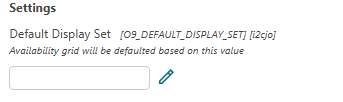
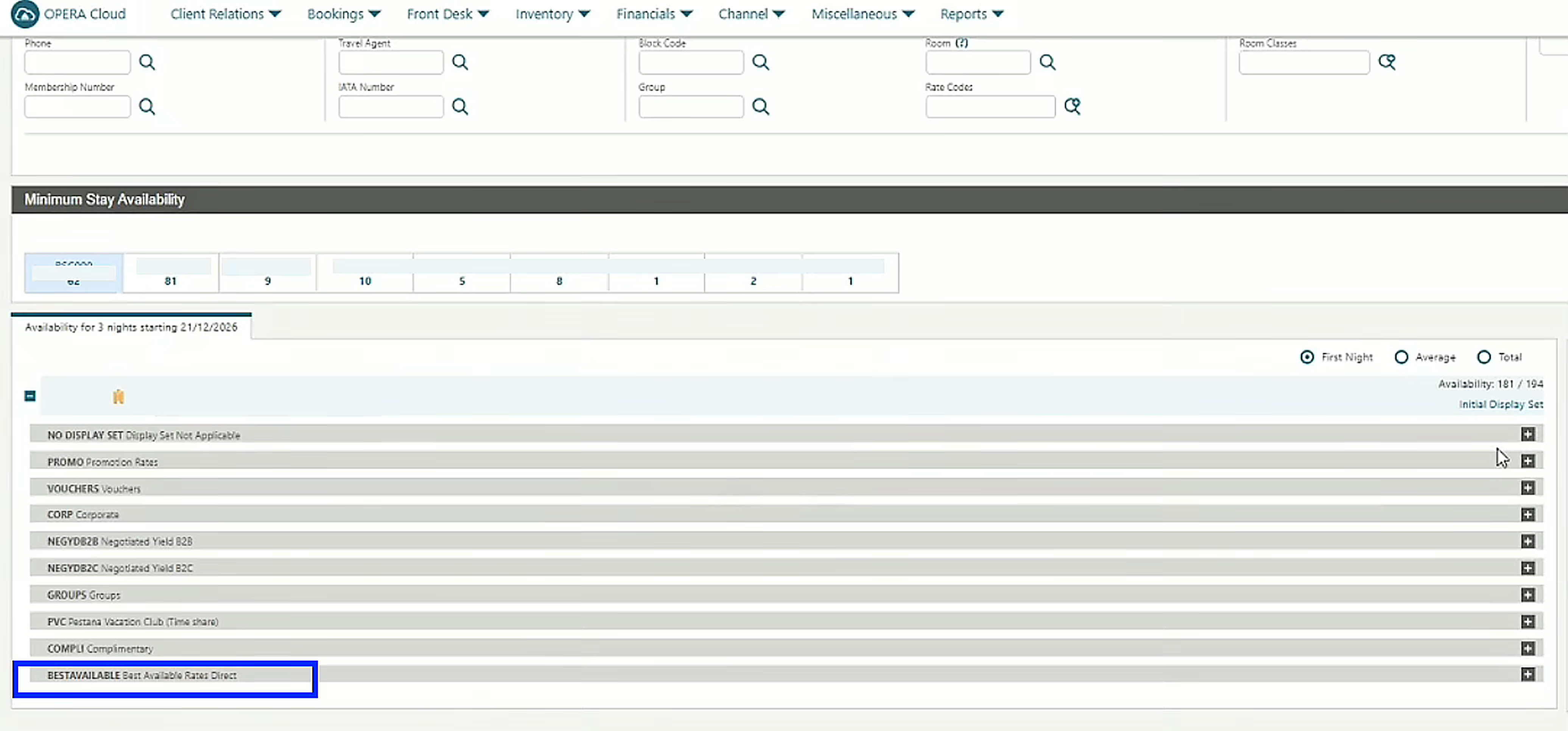
For the necessary setup, go to Administration > Enterprise > OPERA Controls > Group: Look To Book Sales Screen > Default Display Set
Set the Default Display Set to 'Best Available Rate'
How to set it up in Duve
- In Duve, open your Room Upgrade product.
- Scroll to Advanced options.
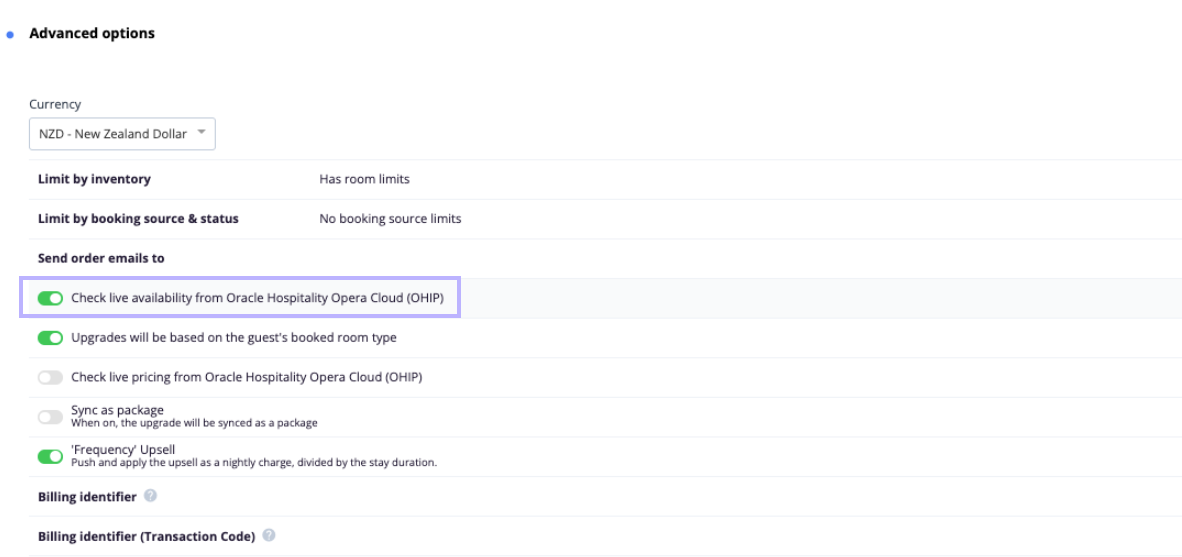
- Turn on the switch labeled Check live availability from Oracle Hospitality Opera Cloud (OHIP). The switch only appears when your account has an OHIP sync source, and it names the connected system, so the label confirms which PMS the check runs against.
-
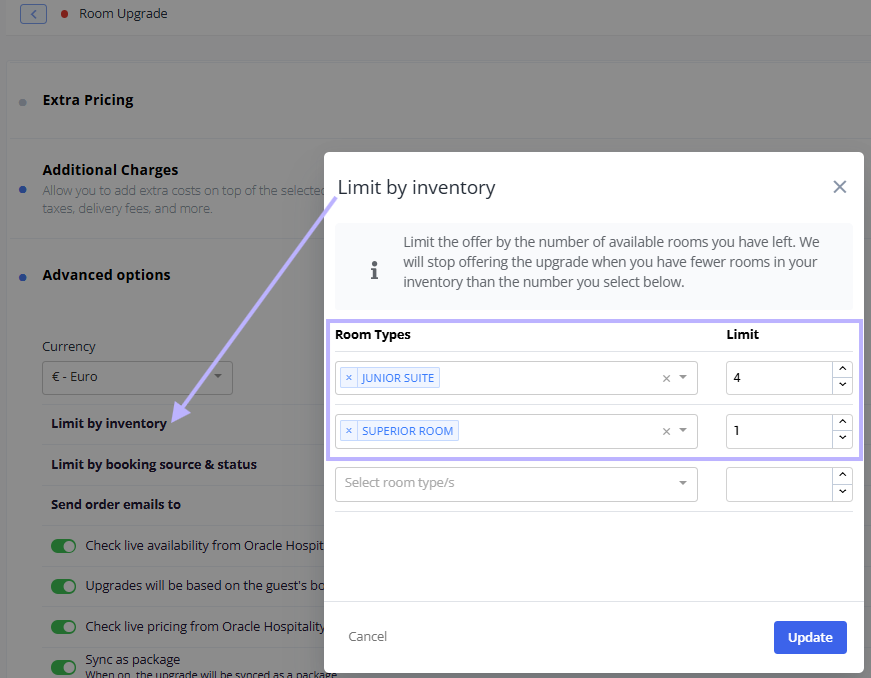
Optional, set an inventory buffer. Open Limit by inventory, choose a room type, and set the minimum number of rooms that must stay available. Duve offers the upgrade only when the live count from OPERA is higher than the minimum you set. Room types with no entry are offered whenever at least one room is available
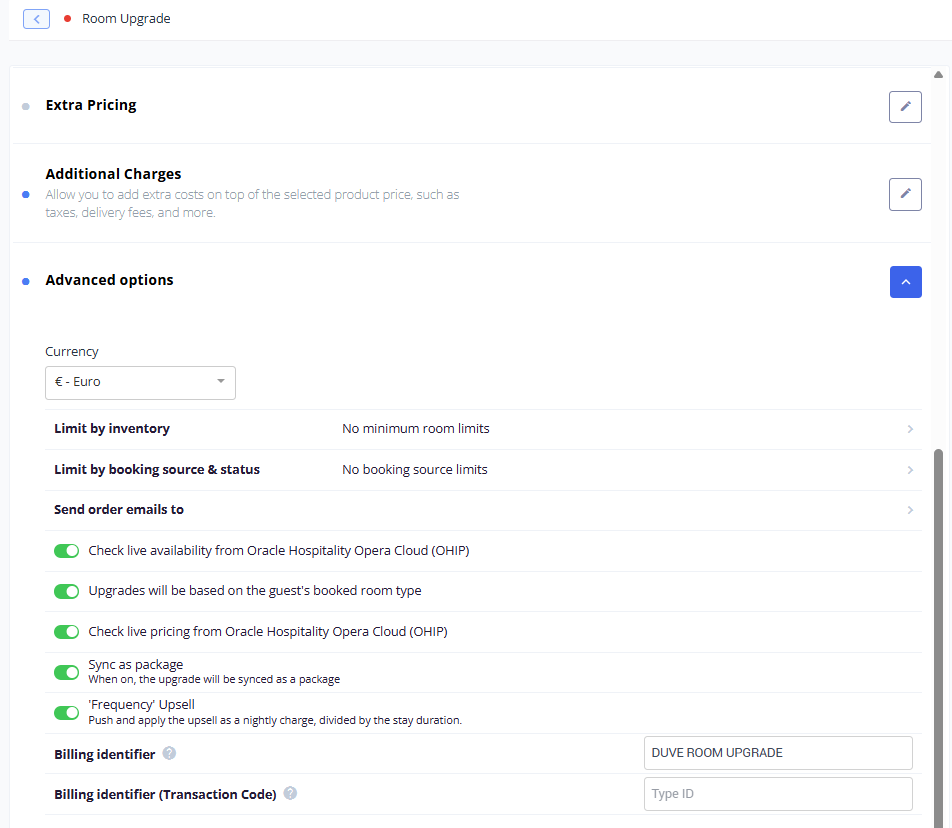
- Optional, turn on Upgrades will be based on the guest's booked room type. This makes Duve build the upgrade offer from the room type the guest originally booked rather than the room type currently assigned to the reservation. This option is supported for OHIP.
- Optional, turn on Check live pricing from Oracle Hospitality Opera Cloud (OHIP). Duve then asks Opera Cloud for the rate of the current room type and of the upgrade room type, and prices the upgrade from the difference between them, per night. This option is hidden when the product is set to bidding mode.
- If you use live pricing, set Calculate dynamic price based on to either the reservation's own rate code or manual rate codes that you enter per room type.
- Optional, review Limit by booking source and status so that upgrades are only offered to the reservations you want.
- Save the product.
Optional, rate plan groups for live pricing
If your Opera Cloud setup returns a different rate plan code for the upgraded room than the one on the guest's reservation, Duve can treat a set of rate codes as one group so it still finds a comparable rate.
- Open the Oracle Hospitality Opera Cloud (OHIP) integration in your settings.
- Find the room upgrade rate plan groups section and turn on the enable switch.
- Add a group, give it a name, and list the rate plan codes that belong together.
- Save the integration.
Note: When rate plan groups are enabled, Duve requests the full set of rates for the upgrade room type and picks the first rate that belongs to the same group as the guest's rate code. When they are not enabled, Duve filters the request by the guest's own rate code instead.
Host experience
- The live availability switch is only visible when an OHIP source exists on the account, so a property with no supported PMS never sees the option.
- Duve runs the live check per upgrade room type, not once per product. Each room type that has a price defined for the guest's current room type gets its own check against OPERA.
- The check runs when the room upgrade offer is built for a reservation, so the answer reflects Opera Cloud at that moment rather than the last sync.
- Duve asks Opera Cloud for sellable availability, the same thing a new booking would ask for, using the reservation's arrival date, departure date, and guest counts. If Opera Cloud returns a sellable rate for that room type, Duve reads the number of units from it. If it returns nothing, Duve treats the room type as unavailable.
- If the OHIP sync source is not active when the check runs, Duve treats the result as zero rooms available and the room type is not offered.
- Product preview does not use live availability. When you preview the Room Upgrade product, Duve shows the room types without asking OPERA, so the preview is not a reliable availability test.
- While a guest has a pending or paid room upgrade order, Duve stops re-checking availability for that reservation and keeps showing the ordered upgrade, so a paid order never disappears from the guest's view because inventory moved. Orders the hotel has denied, canceled, or expired do not hold the offer open, so the next offer for that guest runs the full live availability and live pricing check again.
- When the guest completes an upgrade, Duve pushes the new room type back to the reservation in Opera Cloud, and runs the same availability check again before it does.
When the house is full
Opera Cloud answers the sellable availability question as if a new booking were being made. When the house is fully sold for a night, OPERA refuses every room type for that night, even room types that still have free rooms. A room type change on a reservation that already exists does not add a room to the house, so this can hide upgrades that you could in fact deliver.
Duve has an optional per-property behavior for this, which Duve Support turns on for your OHIP integration. It is rolled out in two stages:
- First, an observation stage. Nothing changes for guests. Duve records the sellable answer alongside Opera Cloud's room type inventory, so your team can confirm that free suites really do exist on the sold-out nights.
- Then, an enforcement stage. When Opera Cloud returns a sellable rate, that answer is used as before. When it returns nothing and the house is full on every night of the stay, Duve falls back to the room type inventory count from Opera Cloud and offers the upgrade. A room type that is closed while the house still has rooms stays closed, because that closure was deliberate.
Note: If your property sees upgrades vanish on high occupancy nights, raise it with Duve Support and ask about this behavior rather than turning live availability off.
Guest experience
- When live availability is on, the Guest app and the online check-in flow refresh the room upgrade offer as soon as the guest opens the room upgrade screen, so the guest sees a current answer rather than a cached one.
- While the offer is being rebuilt the guest sees a short loading state before the available room types appear.
- Room types that Opera Cloud reports as unsellable, or that fall at or below your inventory minimum, are simply not shown. The guest is not told that a room type was filtered out.
- Room types whose maximum number of guests is lower than the number of guests on the reservation are also not shown.
- If nothing is available, the room upgrade offer does not appear for that guest at all.
How to check room upgrade availability in Opera Cloud
If a room upgrade is not available in Duve, use the Look to Book screen in Opera Cloud to check whether the requested room type and rate are available, and to identify possible restrictions.
Step 1: Create a test reservation
Create a test reservation in Opera Cloud with the relevant booking details. Make sure you choose a room type that is eligible to upgrade.
Step 2: Open the Look to Book screen in OPERA
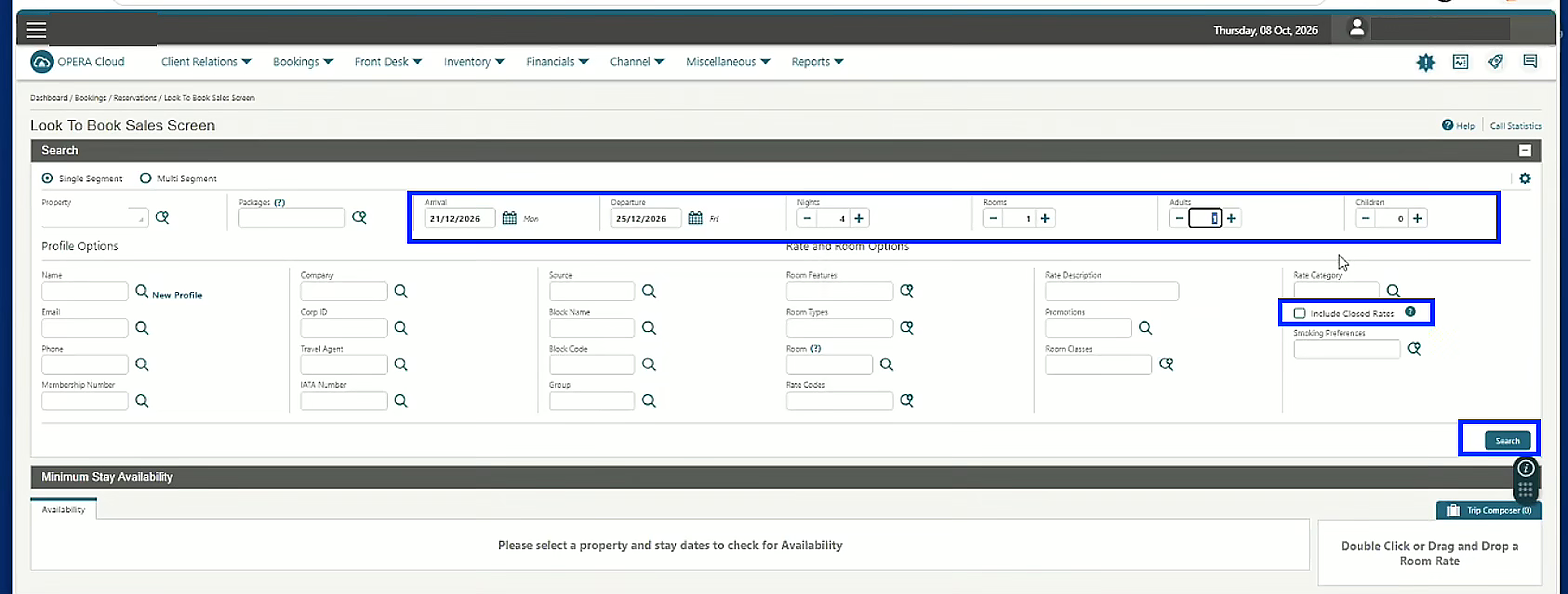
- Open Bookings > Reservations > Look To Book Sales Screen.
- Enter the same arrival and departure dates, and the same number of adults and children, as your test reservation.
- Select Include Closed Rates in the search options. This is important: Include Closed Rates lets you see rates that are unavailable or restricted, rather than only the available ones.
- Click Search.
Step 3: Check the Best Available Rate (BAR) section
Once the search results appear, locate and expand the Best Available Rate (BAR) section. This is the rate group to verify when investigating room upgrade availability through Duve. Check whether the room type you are trying to upgrade to appears under the relevant BAR rate code.
Step 4: Verify whether the rate is available
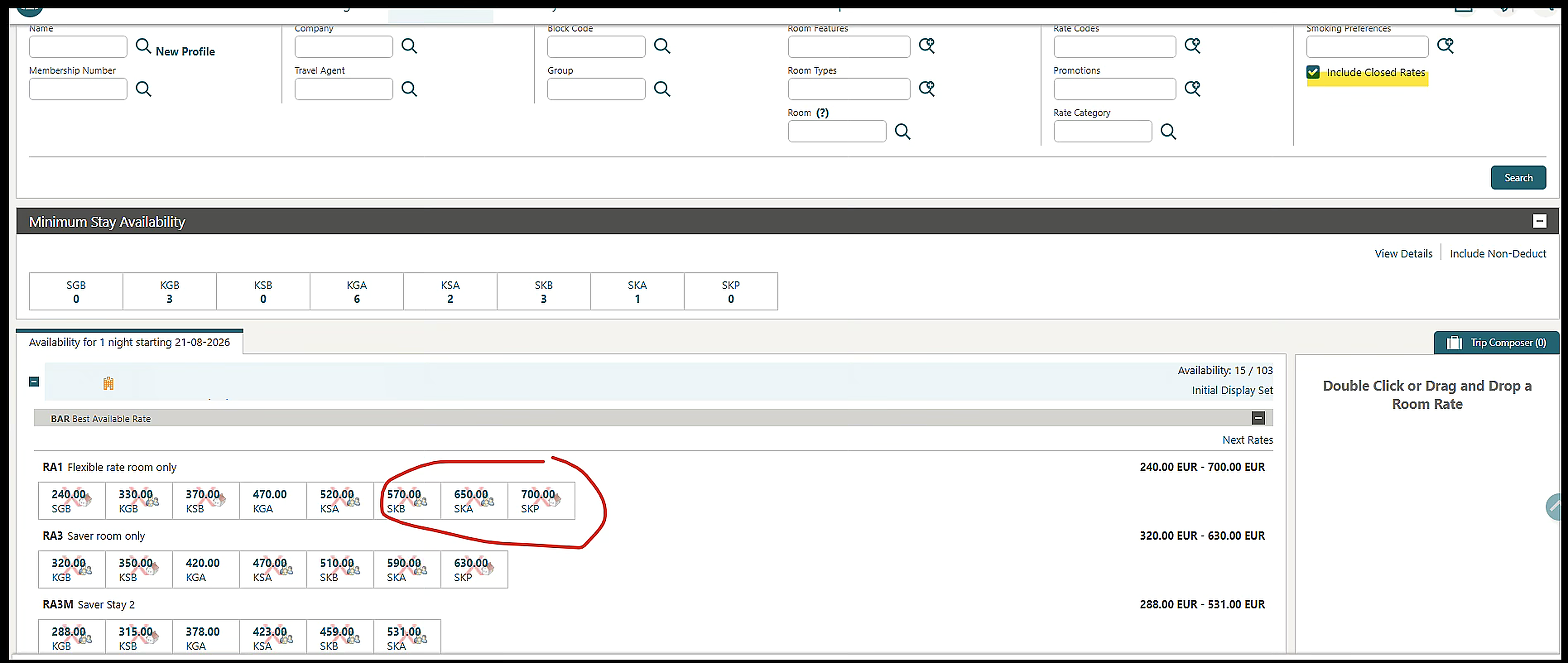
Review the rate displayed for the requested room type.
If there is no rate under BAR:
- Check whether the Default Display Set is set to BAR, Best Available Rate, at Administration > Enterprise > OPERA Controls > Group: Look To Book Sales Screen > Default Display Set.
- If it is, review the display set assignment for the individual rate code at Administration > Financial > Rate Management > Rate Codes.
If the rate appears with a red X, the rate is closed or unavailable under the selected search conditions. Possible reasons include:
- No available room inventory for the requested dates
- Occupancy restrictions, meaning the number of adults or children
- Rate plan restrictions, such as closed to arrival or closed to departure
- Minimum or maximum length of stay restrictions
- Other restrictions configured in OPERA
Your OPERA administrator should review the applicable restrictions and determine why the rate is unavailable.
If the rate appears without a red X, Opera Cloud is displaying the rate as available for the selected search criteria. Take a screenshot showing the BAR section and send it to Duve Support, along with the test reservation number, so the team can continue investigating.
Troubleshooting
Start with the quick checks, then use the Opera Cloud procedure below when the quick checks do not explain it.
- No upgrade offers appear at all: Check that the Room Upgrade product is enabled, that the guest's current room type is included in an upgrade level, and that prices exist from that room type to the room types above it. Live availability only narrows an offer that already exists.
- A room type you expect is missing: Confirm in Opera Cloud that the room type can actually be sold for the stay dates, then check whether the room type has an inventory minimum that the live count did not exceed.
- All room types disappeared at once: Check the OHIP integration status. An inactive sync source makes every live check return zero.
- Upgrades disappear only on busy nights: This is the full house behavior described above. Contact Duve Support.
- Offers look right in preview but not to guests: Preview skips the live check by design. Test with a real reservation instead.
- The price changed between two offers for the same guest: When live pricing cannot find a comparable rate in Opera Cloud, Duve falls back to the price you saved for that room type combination, which can be very different from the live rate. This is most common after an upgrade was denied, because the next offer runs the live checks again from scratch.
- Live pricing returns no price: Duve needs a usable rate for both the current room type and the upgrade room type. Rate plan groups often resolve this when the upgraded room sells under a different rate plan code.
Restrictions and limitations
- Live availability applies to the Room Upgrade product only.
- The setting is per product. If you run several Room Upgrade products, enable it on each one you want it on.
- Live availability requires an active OHIP sync source. It does not fall back to Duve's internal inventory when the live check fails, it simply offers nothing for that room type.
- Because Duve asks Opera Cloud whether the room type can be sold, every restriction that closes a rate in OPERA also hides the upgrade in Duve. Length of stay rules, closed to arrival or departure rules, occupancy limits and rate code configuration all have this effect, even when physical rooms are free.
- Unless the optional full house behavior is enabled for your property, a fully sold house hides every upgrade for those nights.
- The separate Live availability ID field that appears for some integrations is not used for OHIP, so there is no extra identifier to fill in.
- Live pricing by rate code is not available when the Room Upgrade product is set to bidding mode.
- Availability is requested for the reservation's stay dates, from check-in to check-out, and the answer is treated as a single yes or no for that room type.
Tips and tricks
- Use Limit by inventory rather than turning live availability off when your concern is protecting the last few rooms of a category. Live availability plus a minimum of two rooms is safer than either setting alone.
- Before you report an upgrade as missing, run the Look to Book check above. It separates a Duve question from an OPERA configuration question in a few minutes, and the screenshot is the first thing Duve Support will ask for.
- Keep a sensible saved price on every room type combination even when you use live pricing. It is what the guest is offered when Opera Cloud returns no comparable rate, and a combination with no saved price is silently skipped.
- Turn live availability and live pricing on together when your rates move often. Availability keeps you from overselling, and live pricing keeps the upgrade price aligned with what Opera Cloud would charge.
- If your property sells the same physical room under several rate plan codes, set up rate plan groups before you investigate missing prices. It is the most common reason live pricing returns nothing.
- Combine live availability with booking source and status rules so that the live checks only run for the reservations you actually want to upsell.
FAQs
Q: Does live availability replace the room inventory Duve already holds?
A: For that Room Upgrade product, yes. When the switch is on, Duve asks Opera Cloud instead of counting rooms in its own database. When it is off, Duve uses its own inventory.
Q: What exactly does Duve ask Opera Cloud?
A: Whether the upgrade room type can be sold for the reservation's arrival and departure dates and guest counts, which is the same question behind the Look to Book screen. If Opera Cloud returns a sellable rate, Duve reads how many units are available from it.
Q: How often is availability checked?
A: There is no schedule. The check happens when the room upgrade offer is built for a reservation, and the Guest app and online check-in refresh that offer when the guest opens the room upgrade screen.
Q: Why do upgrades disappear on sold-out nights even though we still have free suites?
A: Opera Cloud answers as if a new booking were being made, and a full house means it refuses every room type. Duve has an optional per-property behavior that falls back to room type inventory in exactly that case. Contact Duve Support to have it enabled.
Q: A rate shows in Look to Book with a red X. Is that a Duve problem?
A: No. A red X means OPERA has closed or restricted that rate for the search conditions, so Duve is correctly hiding the upgrade. Your OPERA administrator should review the restriction.
Q: We see the rate in Look to Book with no red X, but Duve still hides the upgrade. What now?
A: Send Duve Support a screenshot of the BAR section and the test reservation number. That is the case worth investigating on the Duve side.
Q: Why did the same guest get two very different prices for the same upgrade?
A: A denied upgrade order no longer holds the offer open, so the next offer runs live availability and live pricing again. If Opera Cloud cannot return a comparable rate at that moment, the offer falls back to the price saved on the product, which can be much lower or higher than the live rate.
Q: What happens if the OHIP connection is down or the integration is inactive?
A: Duve treats the live count as zero and does not offer the room type. It does not fall back to its own inventory.
Q: Can a guest still see an upgrade they already bought if the room type sells out afterward?
A: Yes. While there is a pending or paid room upgrade order on the reservation, Duve stops re-checking availability for it and keeps showing the ordered upgrade.
Q: Why is the live availability switch missing on my Room Upgrade product?
A: The switch only appears when your account has a sync source from a PMS that supports live availability for room upgrades. If OHIP is not connected on that account, the switch is hidden.
Q: Do I need to enter a Live availability ID for OHIP?
A: No. That field is used by other integrations only and does not appear for OHIP.
Q: Can I use live availability for upgrades based on the room the guest originally booked?
A: Yes. Turn on Use booked room type in Advanced options. OHIP supports this, and Duve will build the offer from the booked room type rather than the currently assigned one.
Q: Will the guest know that a room type was hidden because it was unavailable?
A: No. Unavailable room types are simply not shown, with no message.
Q: Is live pricing required in order to use live availability?
A: No. They are independent switches. You can run live availability with your own saved price list.
Related articles:
Room Upgrade Multi-Product Management
Set Room Upgrade as a Fixed Charge Per Night (OHIP PMS Only)
Comments
0 comments
Article is closed for comments.