
Elavon is a payment service provider (PSP) you can connect to Duve so that guest payments run through your own Elavon merchant account. Duve supports the Elavon Payment Gateway (EPG, also known as Converge-EU) and orchestrates the payments, while the money moves through your existing Elavon banking relationship.
Elavon is a host-owned gateway, which means you connect your own merchant credentials and Duve never holds or stores raw card data. When a guest pays, Duve opens Elavon's secure Lightbox overlay on top of the Duve payment page. The guest enters card details inside that Elavon-hosted overlay, so there is no redirect to another site and no new browser tab. Elavon then notifies Duve of the result through a webhook, and Duve updates the order and lets the guest continue.
Connecting Elavon unlocks Duve's payment-dependent features: online check-in payments, upsells and orders, security deposits and incidentals holds, and check-out settlement.
In this article
- Duve supported Payment types
- Use cases
- Before you start
- How to set it up
- Host experience
- Guest experience
- Troubleshooting
- Restrictions and limitations
- Tips and tricks
- FAQs
Duve supported Payment types
Once Elavon is connected, you can use it for the following payment types:
- Immediate payment (payment for the stay). The guest is charged during online check-in, and the funds are captured right away.
- Authorize and hold (pre-authorization). Funds are held on the guest's card rather than captured, and you capture them later. You choose the hold amount (flat or percentage) and when the hold fires (on card submission or on the arrival date).
- Hold on the arrival date (deferred hold). You can set the hold to fire at the start of the guest's arrival day instead of at card entry, so the authorization is still valid when the guest arrives. Elavon supports both timings, and you can choose between them. Because Elavon does not accept a zero-amount authorization, the guest's card is verified at card entry with the smallest amount Elavon accepts, and Duve releases that verification charge as soon as the arrival-day hold is scheduled.
- Additional hold for incidentals. After an immediate stay payment, Duve places a supplementary hold on the card the guest already entered, using Elavon's stored-card (card-on-file) capability. No second card entry is needed from the guest. This requires the incidentals hold to be enabled in your check-in guest billing settings.
- Upsells and orders. Guests pay for products, services, and add-ons in the Guest app through the same Elavon overlay.
- Check-out settlement. Collect the outstanding balance during the check-out wizard, using Duve's existing check-out billing model.
- Front desk and manual charges. Charge a guest from the back office by generating a payment link for the guest to complete.
- Capture from a hold. You can capture a held authorization. On Elavon, this is a full capture only: the amount field is locked to the full held amount, because partial capture is not enabled on the Elavon account.
- Refunds and voids. Duve automatically chooses the right operation. A transaction that has already settled with Elavon can be refunded in full or in part. A transaction that has not settled yet can only be voided, and a void is always for the whole amount. Elavon settles overnight, so a partial refund that you ask for on the same day is rejected with a message asking you to try the next business day again, rather than quietly returning the full amount.
- Releasing a hold. Canceling a capture voids the authorization and releases the funds.
- Card tokenization and 3D Secure. For stay payments that need a card on file, Duve asks Elavon to save the card and to run a 3D Secure authentication, so the saved card can be reused for a merchant-initiated hold later.
- PMS token push (Opera / OHIP). For Opera-connected properties, Duve pushes the tokenized card into OHIP as soon as the guest submits the card, so the card is on file in Opera even when the hold is set to fire on the arrival date. The pre-authorization is registered separately as a manual authorization, with its approval code, once the hold is actually placed.
Payment types that are not supported with Elavon:
- Installments.
- Standalone security deposits (deposits that are not tied to a stay payment).
- Reuse of the check-in collected token for mid-stay upsells or online check-out. Those surfaces use the standard payment flows and ask for a card again.
- Automated hold renewals and guest card-recollection emails.
- Partial capture of a hold.
- Partial void. Elavon can only void a transaction in full.
Use cases
- You process payments through Elavon already and want to switch on Duve's online check-in payments without changing your banking relationship.
- You want to charge the full stay amount during online check-in so the guest does not stop at the front desk.
- You want to hold funds at check-in and capture them later from the PMS, instead of charging immediately.
- You want the hold to fire on the arrival date so the authorization is still valid when the guest walks in.
- You want to add an incidentals hold on top of the stay payment, calculated per reservation or per night, without asking the guest for the card a second time.
- You want guests to buy upsells, extras, and orders inside the Guest app.
- You want to settle the outstanding balance during check-out.
- You want to refund a guest in full or in part after a cancellation or an adjustment.
- You want to release a hold when no charge is due.
- You run Opera and want the tokenized card and pre-authorization pushed into OHIP automatically.
Before you start
- You need an active Elavon Payment Gateway (Converge-EU) merchant account.
- Have your Elavon Merchant alias and Secret key ready. The secret key starts with
sk_. The public key that starts withpk_is a client-side key and is not accepted for this connection. - You need access to Elavon's support team because after connecting, you must send them the Duve webhook URL so that transaction events reach Duve.
- Decide how you want to bill guests: immediate payment or authorize and hold, when the hold should fire, whether to add an incidentals hold, and whether to collect the balance at check-out.
How to set it up
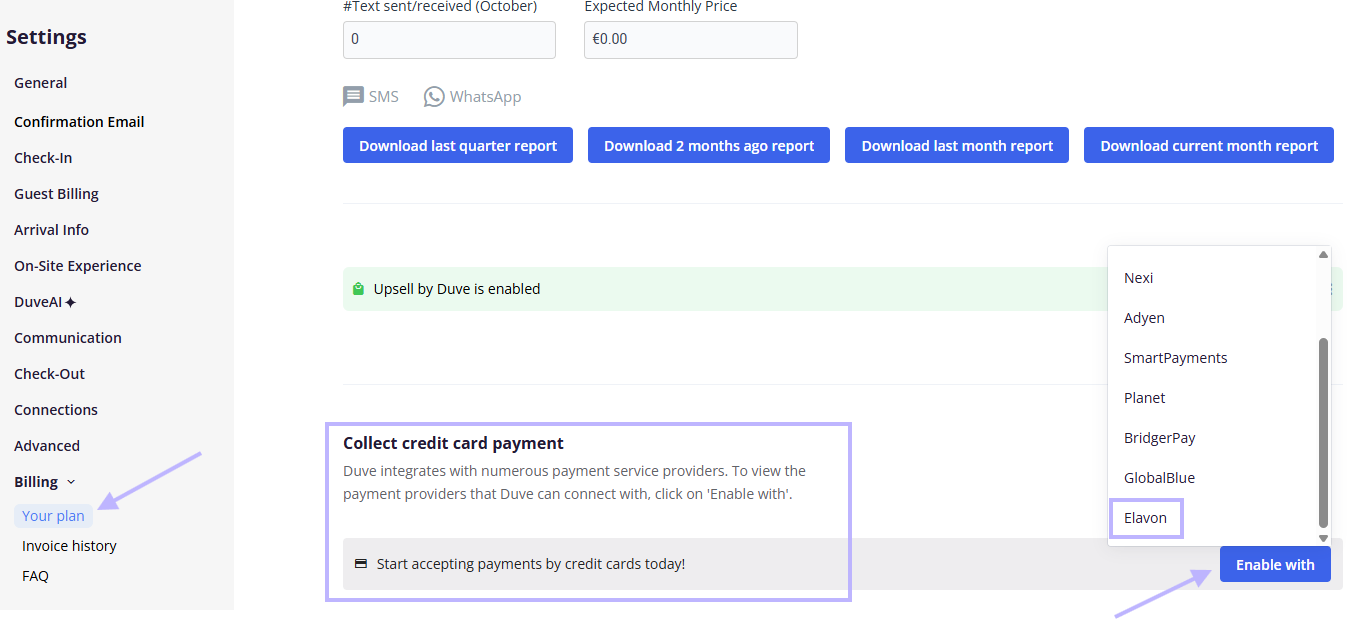
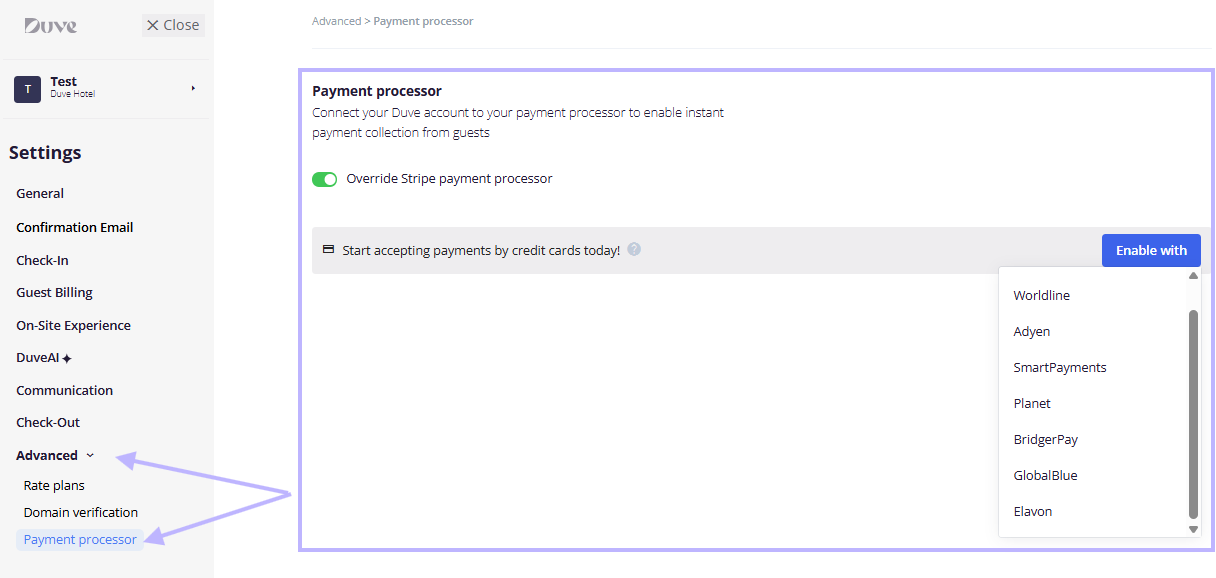
- Go to your Duve settings and open the Billing section, then the payment processor area.
-
Open the provider list and choose Elavon.
-
In the Connect Elavon window, fill in the connection details:
- Merchant alias
- Secret key
- Account ID (optional): A parameter you can retrieve from Elavon that corresponds to a designated brand under your merchant account. Fill it in only if Elavon provided one for the brand this connection should process payments for, and leave it empty otherwise.
- If you are not sure where to find these details, use the Learn more link in the same window. Your Elavon contact can provide them.
- Click Connect. Duve validates the credentials directly with Elavon before activating the connection. If the validation fails, the connection is not activated, and you see an error, so you can correct the details and try again.
- Copy the Elavon webhook URL shown for your account and send it to Elavon's support team. Elavon has to register that URL on your merchant account; otherwise, payment results never reach Duve, and guests stay stuck on the loading state after paying. This step is mandatory.
- Configure guest billing for check-in:
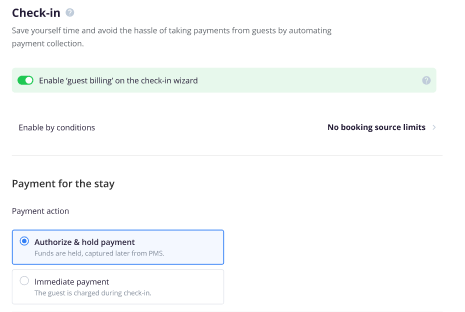
- Enable guest billing on the check-in wizard.
-
Under Payment for the stay, choose Authorize and hold payment or Immediate payment.
- Set the amount as a flat value or a percentage.
- For a hold, set when it fires: on card submission or on the arrival date. Elavon supports both.
-
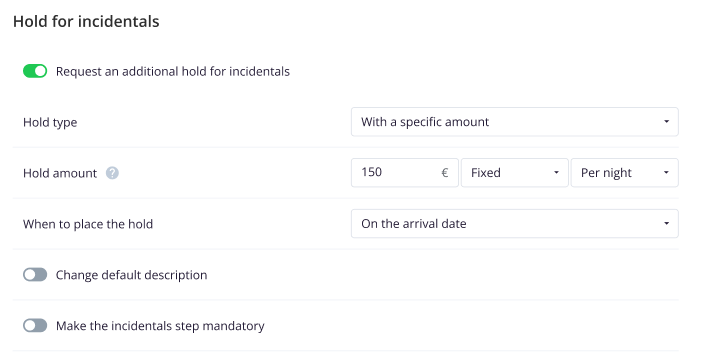
If you want an incidentals hold, enable Request an additional hold for incidentals, then set the hold type, the amount (flat or percentage, per reservation or per night), and when to place the hold. When both the accommodation hold and the incidentals hold are enabled, both fire on the same date.
-
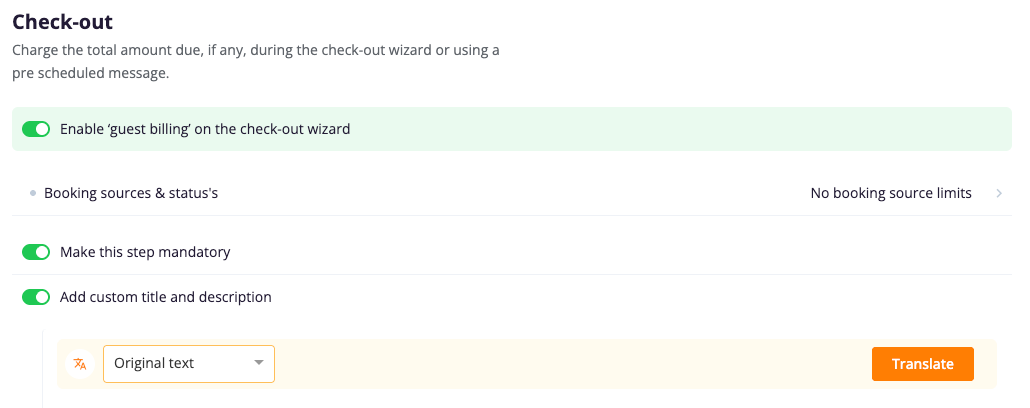
If you want to collect the balance at check-out, enable guest billing on the check-out wizard and set whether the step is mandatory.
- To change or disconnect the account later, reopen the same connection window from Billing settings. Once disconnected, Elavon stops processing.
Host experience
- Elavon appears as your active payment processor once the connection is validated, at the account level or overridden for a specific brand.
- Duve shows the Elavon branding on payment surfaces that display the processor.
- Every order created through Elavon carries a Duve order log, including order created, order refunded, and request approved when a pre-authorized amount was captured.
- When you charge from a deposit or capture available credit on an Elavon reservation, the amount field is disabled and set to the full held amount. This is expected: Elavon captures the full authorization only.
- A capture on Elavon is asynchronous. Elavon acknowledges the request first, and the transaction moves to captured shortly after, so a transaction that still shows as authorized immediately after the capture request is not a failure.
- When you refund, Duve checks the transaction state with Elavon first and issues either a refund or a void automatically. If you ask for a partial refund on a transaction that has not settled yet, Duve blocks it and tells you to try the next business day again. A full refund on an unsettled transaction still goes through as a void.
- For Opera-connected properties, the card reaches Opera at card submission rather than when the order becomes active, so your front desk has a card on file before the guest arrives, even when the hold is deferred to the arrival date.
- When the hold is set to fire on the arrival date, the order stays in a pending authorized state until that day. No charge action appears on the reservation while the hold is only scheduled, and the PMS is updated once the hold is actually placed.
Guest experience
- The guest reaches a payment step in online check-in, in the Guest app, in an order, or at check-out, and taps to pay.
- Duve opens the Elavon Lightbox overlay directly on the page. There is no redirect and no new tab.
- The guest enters card details inside the Elavon overlay. Duve does not handle or retain raw card data.
- If 3D Secure is required, the challenge appears within Elavon's flow.
- After the guest submits the card, Duve shows a short loading state while it waits for Elavon's confirmation, then shows the success message and moves the guest to the next step.
- If the guest closes the overlay before a transaction is created, the payment is simply canceled, and the guest returns to the payment step.
- If a pre-authorization fails at card submission, the error is shown to the guest. If a pre-authorization fails on the arrival date, Duve applies its default arrival-date hold logic.
- When the hold is set to fire on the arrival date, the guest is told at card entry that a small amount is held to validate the card. Duve releases it right after the arrival-day hold is scheduled.
Troubleshooting
- The guest paid, but Duve stays in the loading state, and the order is not marked as paid: The most common cause is that the webhook URL was never registered by Elavon on your merchant account. Send the Elavon webhook URL from your Billing settings to Elavon support and ask them to enable transaction event listening.
-
The connection is not activated after clicking Connect: Duve validates the credentials with Elavon before activating. Check that you used the merchant alias and the secret key that starts with
sk_, and not the public key that starts withpk_. - A partial refund was rejected with "This transaction hasn't settled yet. Try next business day again": Elavon only allows a partial refund once the transaction has settled, and it settles overnight. Wait for the next business day and refund again. If you need to return the whole amount right now, a full refund still works, because Duve voids the transaction instead.
- The incidentals hold was not placed after an immediate stay payment: The hold uses the card saved during the stay payment. If no card was saved with Elavon for that transaction, the hold cannot be placed. Check that the incidentals hold is enabled in the check-in guest billing settings and that the stay payment completed successfully.
- A guest sees a small charge after entering their card, and the hold is set for the arrival date: That is the card verification amount. Duve releases it as soon as the arrival-day hold is scheduled. If the release itself fails, the charge falls off when the authorization expires, and the failure is logged for the Duve team.
Restrictions and limitations
- Partial capture is not available. Captures take the full authorized amount.
- Partial refunds are possible only after the transaction has settled with Elavon, which happens overnight. Before settlement, a partial refund is rejected, and only a full void is available. Elavon has no partial void.
- Elavon rejects a zero-amount authorization, so an arrival-date hold needs a small card verification charge at card entry, which Duve then releases.
- Installments are not supported.
- Standalone security deposits are not available with Elavon.
- The token collected during online check-in is not reused for mid-stay upsells or for online check-out. Those flows ask for payment again through the standard surfaces.
- Automated hold renewals and guest card-recollection emails are not supported.
- Elavon's hosted page cannot be embedded in an iframe, which is why Duve uses the on-page Lightbox overlay instead.
- Webhook signature verification is not performed for Elavon because Elavon has not issued a signing secret. Duve matches the order to the payment provider instead, which is the same approach used for other providers.
Tips and tricks
- Send the webhook URL to Elavon support as part of your onboarding, before you switch guest billing on. It is the single most common reason a new Elavon connection appears to be broken.
- Test one immediate payment and one authorize-and-hold reservation before going live, and confirm that the order in Duve moves to paid or authorized.
- If you plan to use incidentals holds, run a stay payment first and confirm the additional hold appears on the reservation. The hold depends on the card being saved during that stay payment.
- If you use arrival-date holds, let your front desk know about the small card verification charge so they can explain it to a guest who asks.
- Plan same-day partial refunds around settlement. If a guest asks for a partial refund on the day of the charge, tell them it will be processed the next business day.
- Set your default billing currency at the account level and override it per brand only where the operating currency differs. For stay payments, Duve charges in the reservation currency coming from the PMS and falls back to your account or brand default when the reservation has none.
FAQs
Q: Do I need my own Elavon merchant account?
A: Yes. Elavon is a host-owned gateway. You connect your own merchant account, and payments settle into your own banking relationship.
Q: Which credentials do I need to connect Elavon to Duve?
A: Your Elavon merchant alias and your secret key (the one starting with
sk_). The public key starting with pk_ is not accepted for this connection.Q: Why does Duve ask me to send a webhook URL to Elavon?
A: Elavon reports the payment result asynchronously. Elavon only sends those events to a URL registered on your merchant account, and Elavon's support team has to register it. Without it, Duve never learns that a payment succeeded.
Q: Can I capture only part of a hold?
A: No. Elavon captures the full authorized amount, so the capture amount field is disabled for Elavon reservations. To charge less than the held amount, void the hold and take a new charge for the correct amount.
Q: Can I refund only part of a charge?
A: Yes, once the transaction has settled with Elavon. Elavon settles overnight, so a partial refund asked for on the same day is rejected and you are told to try again the next business day. A full refund works at any time, because Duve voids the transaction when it has not settled yet.
Q: Why was my partial refund rejected?
A: The transaction had not settled with Elavon yet, and Elavon cannot void part of a transaction. Duve rejects the request instead of returning the full amount by mistake. Try again the next business day.
Q: Does the guest leave Duve to pay?
A: No. The Elavon payment form opens as an overlay on top of the Duve page. There is no redirect and no new tab.
Q: Does Duve store the guest's card details?
A: No. Card details are entered inside Elavon's hosted overlay. Duve keeps only the token and the non-sensitive card details that Elavon returns, such as the brand, the last four digits, and the expiry.
Q: Does the guest have to enter the card again for the incidentals hold?
A: No. The incidentals hold reuses the card saved during the stay payment as a merchant-initiated transaction.
Q: Can the hold be placed on the arrival date instead of when the guest gives the card?
A: Yes. Elavon supports both timings and you can choose which one to use.
Q: Why is my guest charged a small amount when the hold is set for the arrival date?
A: Elavon does not accept a zero-amount authorization, so Duve verifies the card with the smallest amount Elavon accepts and releases it once the arrival-day hold is scheduled.
Q: Does Elavon work with Opera?
A: Yes. For Opera-connected properties, Duve pushes the tokenized card into OHIP as soon as the guest submits the card, and registers the pre-authorization as a manual authorization once the hold is placed. With an arrival-date hold, this means the card is in Opera before the guest arrives.
Q: Can I connect Elavon for one brand only?
A: Yes. Elavon is connected at the account level, with an optional per-brand override.
Q: What happens if I disconnect Elavon?
A: Elavon stops processing payments. If no processor is connected, every payment surface shows a state asking you to connect a processor first.
Q: Are installments supported with Elavon?
A: No. Installments are out of scope for the Elavon integration.
Comments
0 comments
Article is closed for comments.