
SmartPriority reads every incoming guest message in your Communication Hub and decides how urgent the conversation is. It flags conversations as Low, Medium, or High so the ones that need attention now rise above the ones that can wait.
The decision is not based on sentiment alone. SmartPriority combines three signals: how negative the message is, what the guest is writing about, and where the guest is in their stay. A frustrated message from a guest who is checking in today outranks the same message from someone arriving next month.
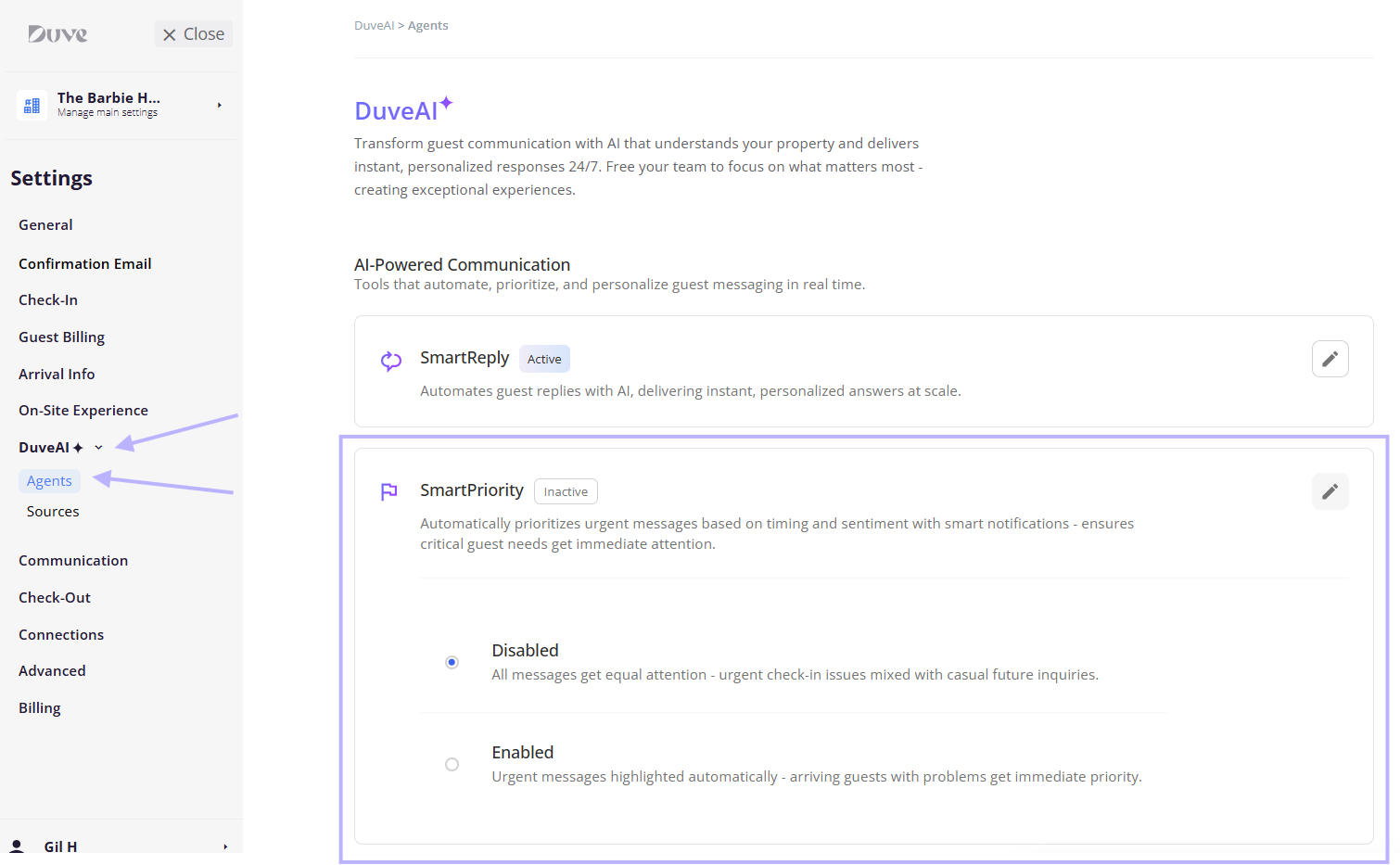
You turn it on in Settings > DuveAI > Agents. Everything after that is automatic, and your team can always override a flag by hand.
Applies to:Accounts with DuveAI on their plan. Without it, the DuveAI page shows an upgrade banner with a Contact us link instead of the settings.
Pricing:SmartPriority is part of DuveAI and is included in your DuveAI subscription. For current pricing, contact Duve Support or your Customer Success Manager.
|
Use cases
- Triage a busy inbox. When 40 conversations are open, the flags tell your team which three to open first.
- Catch an unhappy guest before the review. Strongly negative messages are surfaced immediately rather than sitting in the queue.
- Put in-house guests first. A guest who is currently staying with you outranks a pre-arrival question or a post-checkout message.
- Never miss an emergency or a lockout. Emergencies and access issues carry the heaviest weight of any topic, so they surface even when the guest writes politely.
- Alert the right people automatically. Managers can subscribe to High Priority only and leave the rest to the front desk.
- Give new staff a sense of urgency. A flagged inbox teaches a new team member what to prioritize without a supervisor explaining it.
Before you start
- Confirm SmartPriority is available on your plan.
- Decide whether you are configuring the account or a single brand. Brands have their own Override account settings toggle on their DuveAI page. Turn it on, and that brand uses its own SmartPriority setting instead of the account's.
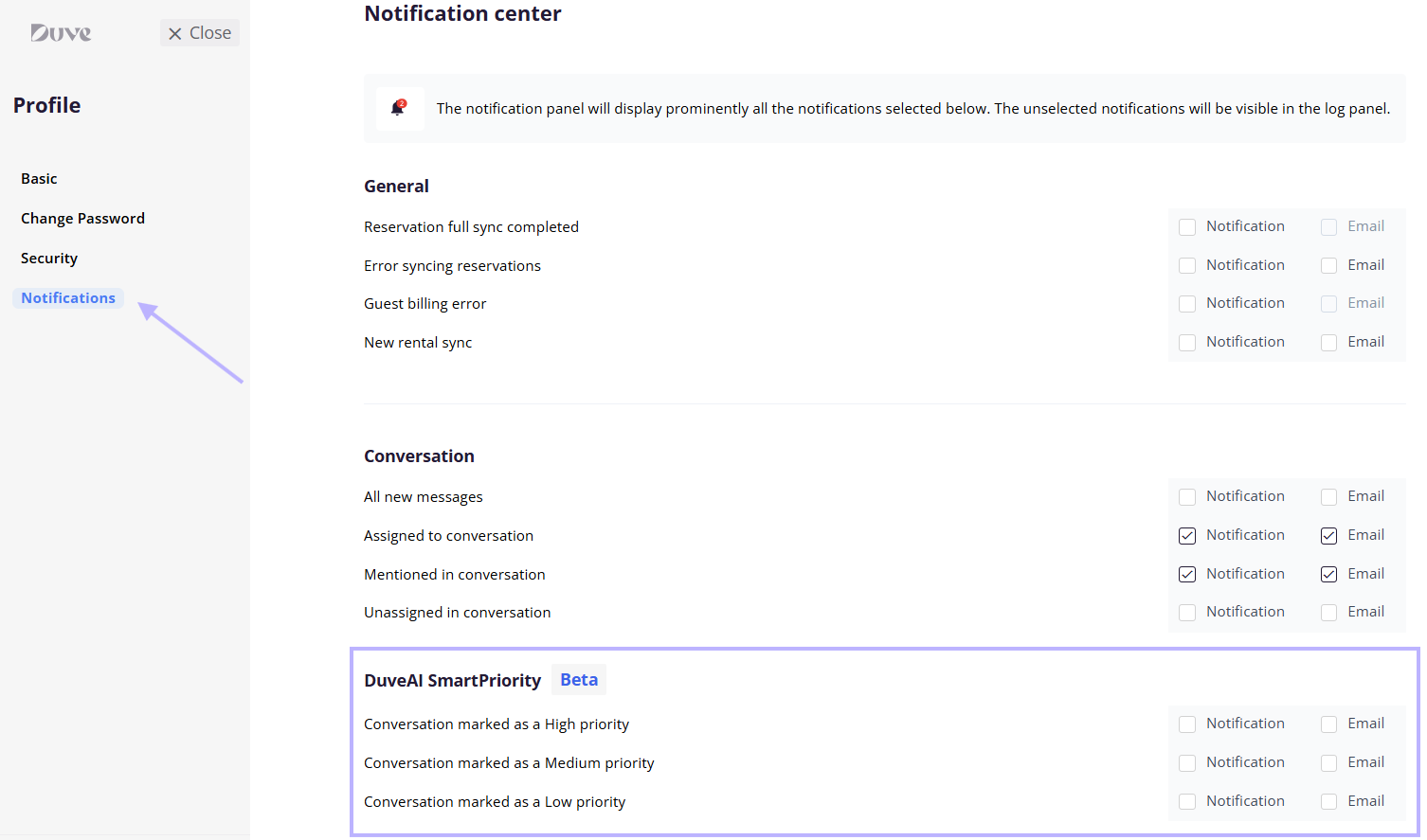
- Tell your team to set their notification preferences. Turning SmartPriority on flags conversations for everyone, but it does not subscribe anyone to alerts. Each user does that in their own profile.
How to set it up and use it
Turn SmartPriority on
- Go to Settings > DuveAI > Agents.
- Click the SmartPriority card to expand it.
- Select Enabled.
- Save.
The card header shows Active or Inactive, so you can confirm the state without expanding it.
Choose your notifications
Notifications are personal, not account-wide. Each user sets their own:
- Open your profile and go to Notification Center.
- Find the Conversation section.
- Under DuveAI Prioritization, turn on the levels you want.
There are three separate toggles, one per level: DuveAI marked the conversation as High, as Medium, and as Low. Each can be delivered in the app and by email. The alert itself reads "Conversation prioritized by DuveAI" and opens the conversation when you click it.
Troubleshooting note: The section only appears when SmartPriority is enabled on the account, and it currently carries a Beta badge.
How the priority is calculated
Every guest message is scored on three factors, each carrying a fixed share of the result:
- Topic of the message: 40 percent
- Sentiment of the message: 35 percent
- Guest journey stage: 25 percent
The combined score maps to a flag:
- 27 and above becomes High
- 18 to 26 becomes Medium
- 7 to 17 becomes Low
- Below 7 leaves the conversation unflagged
Sentiment is graded on seven levels: extremely negative, moderately negative, slightly negative, neutral, slightly positive, moderately positive, and extremely positive. Only the three negative levels add to the score. Neutral and all positive levels contribute nothing, so a cheerful message never raises priority on sentiment alone.
Topic is chosen from the following categories. Listed from the heaviest impact on the score to the lightest:
- Emergencies
- Access issues
- Safety and security, and staff quality of service
- Housekeeping issues
- Food and beverage
- Technical malfunctions, room amenities, and check-in or check-out
- Payment issues
- Hotel amenities
- Transportation
- Legal or regulatory issues, location of accommodations, and room size or layout
- Other, which adds nothing to the score
Guest journey stage is calculated from the reservation, not guessed from the message. During stay carries the most weight, followed by arrival day and departure day, then pre-arrival, and finally post-departure. The stage boundaries use the guest's own estimated check-in and check-out times when those are set, and fall back to your property's earliest check-in and latest check-out times.
Host experience
- A colored flag appears on the conversation in the Communication Hub: red for High, orange for Medium, yellow for Low. Unflagged conversations show no color.
- You can change any flag manually. Click the flag to open the dropdown and pick High, Medium, Low, or Clear.
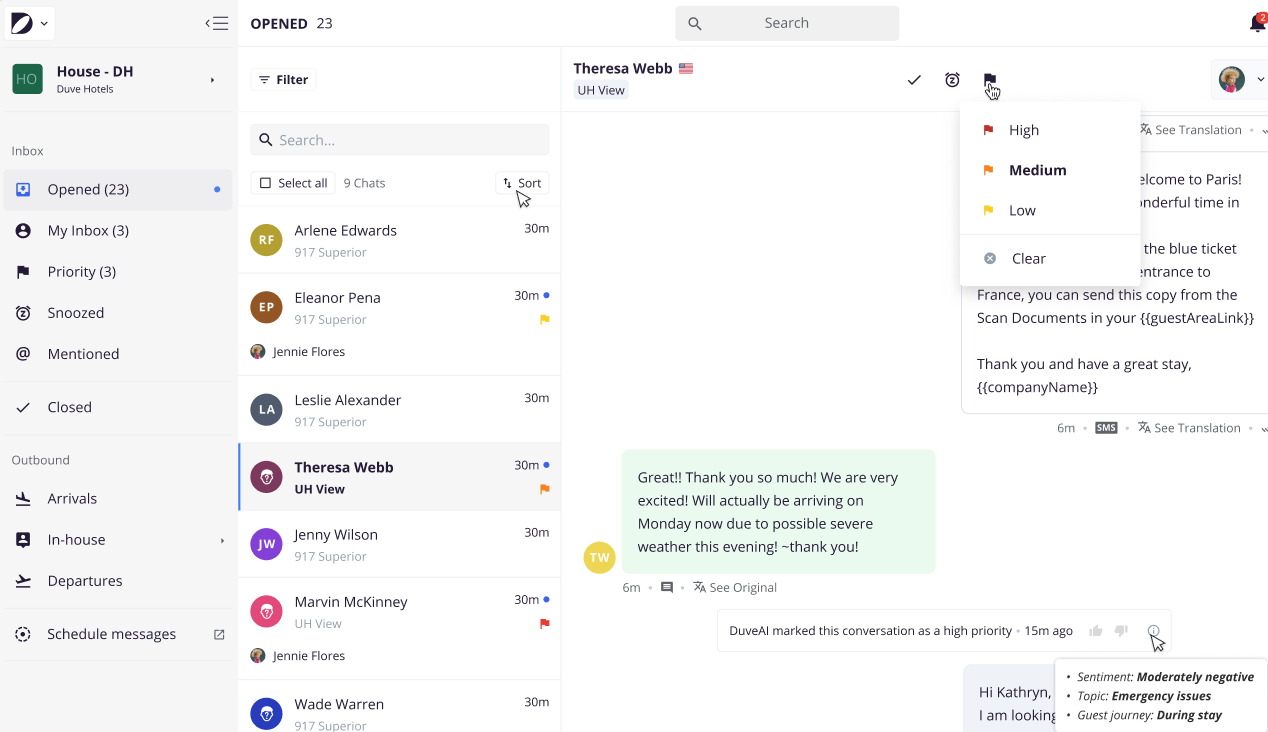
- The thread records what happened. An event is added showing that DuveAI changed the conversation priority, including the previous level, the new level, and the time.
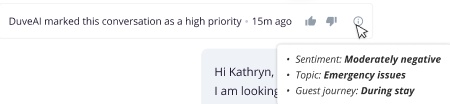
- You can tell DuveAI when it got it wrong. Each prioritization event has a thumbs up and a thumbs down. Choosing one opens a short feedback popup. Feedback can be given once per event.
- You can see the reasoning. Hover the info icon on the event, and a tooltip shows the three inputs behind the decision: the sentiment level, the topic, and the guest journey stage.
- Priority only goes up. SmartPriority raises a conversation's flag but never lowers it, so a later calm message will not undo an earlier High. If a conversation has been handled, lower or clear the flag yourself.
- Closing a conversation clears the flag and returns it to Clear.
Troubleshooting
- A conversation I expected to be flagged was not: Three things commonly explain it. Only negative sentiment adds to the score, so a politely worded problem scores lower than you might expect. Low-weight topics such as location or room layout rarely clear the threshold on their own. And a message sent well before arrival gets the smallest guest journey weight.
- The flag appeared a few seconds after the message: That is expected. Scoring runs shortly after the message arrives, and consecutive messages from the same person within a few seconds are grouped and scored together rather than one by one.
- A guest sent a photo and nothing was flagged: Messages that carry an attachment are skipped because there is usually no text to analyze. The next text message is scored normally.
- The priority went up and never came back down: That is by design. Lower it or clear it manually once the issue is handled.
- I am not getting any alerts: Notifications are per user. Open your own Notification Center and turn on the levels you want. Someone else enabling them does not enable them for you.
- There is no flag dropdown on my conversations: The dropdown appears only when SmartPriority is enabled on the account.
- One brand is behaving differently from the rest: Check whether that brand has Override account settings turned on with its own SmartPriority setting.
Restrictions and limitations
- Only negative sentiment contributes to the score. Neutral and positive messages add nothing to that factor.
- Messages that contain an attachment are not scored.
- The three factor weights, the topics, and the score thresholds are fixed. They cannot be customized per account.
- Priority applies to the conversation as a whole, not to individual messages.
- Feedback on a prioritization event can be submitted once and cannot be changed afterward.
- Notification preferences cannot be set centrally for your whole team. Each user sets their own.
Tips and tricks
- Start with High priority notifications only. Add Medium later once you know what volume looks like on your property. Turning all three on from day one is the fastest way to have your team mute them.
- Use the info tooltip before you disagree with a flag. Seeing that the AI read a message as "slightly negative" about "room amenities" during the stay usually explains a Medium that felt like a High.
- Use the thumbs down when the topic is clearly wrong. That is the most useful signal you can send about the model's accuracy.
- Clear the flag once you have handled the conversation. If old High flags stay on screen, the color stops meaning anything to your team.
- Encourage guests to give you estimated arrival times. Guest journey stage is calculated from those when available, so the timing factor gets more accurate.
FAQs
Q: Do guests see the priority flag?
A: No. Priority is entirely internal. Nothing about it is visible to the guest, and nothing is sent to them.
Q: Does SmartPriority reply to guests?
A: No. SmartPriority only reads and flags. Automatic replies are a separate feature, SmartReply, configured on the same settings page.
Q: Can I change the weights or the thresholds?
A: No. The balance between topic, sentiment, and guest journey is fixed, as are the score cutoffs for Low, Medium, and High.
Q: Why did a polite message get flagged High?
A: Sentiment is only 35 percent of the score. A calm message about an emergency or a lockout during the stay can still clear the High threshold on topic and timing alone.
Q: Why did an angry message only get Low?
A: Most likely the topic carries little weight, and the guest is not currently staying. Anger about room layout from a guest arriving in three weeks scores far lower than the same tone about access on arrival day.
Q: Will SmartPriority undo a flag I set by hand?
A: It will never lower one. It can raise a conversation above the level you set if a later message scores higher.
Q: What clears a priority flag?
A: Setting it to Clear yourself, or closing the conversation.
Q: Can I turn SmartPriority on for one brand only?
A: Yes. Open that brand's DuveAI page, turn on Override account settings, and enable SmartPriority there.
Q: Does my thumbs up or thumbs down change how my account is scored?
A: No. Feedback is recorded for the Duve team to review and improve the model. It does not retrain scoring on your account.
Q: Can I set notifications for my whole team at once?
A: No. Each user sets their own in their Notification Center. Enabling SmartPriority flags conversations for everyone, but it does not subscribe anyone to alerts.
Q: Do I get an email as well as an in-app notification?
A: Each of the three level toggles supports both in-app and email delivery, so you can choose per level.
Q: How quickly does a conversation get flagged?
A: Within seconds of the message arriving. There is a short deliberate delay so that several messages sent in quick succession are scored together instead of separately.
Q: Does it work on every channel?
A: Yes. The message text is what gets scored, so the channel the guest wrote from does not change how the conversation is prioritized.
Q: Is SmartPriority available in a language other than English?
A: The scoring is done by an AI model on the message text and is not limited to English. The flags, labels, and notifications follow your Duve interface language.
Comments
0 comments
Article is closed for comments.