
Overview
The DuveAI Booking Agent answers questions from people who do not have a reservation yet, typically visitors chatting on your website. To quote real rooms and prices it needs live data from your booking engine. Connecting SimpleBooking is what provides it.
SimpleBooking connects one hotel at a time. You enter the hotel's ID along with your SimpleBooking credentials, and Duve pulls that hotel's rooms so the Booking Agent can search availability and hand the visitor a link to book. If you run several hotels on SimpleBooking, you create one connection per hotel.
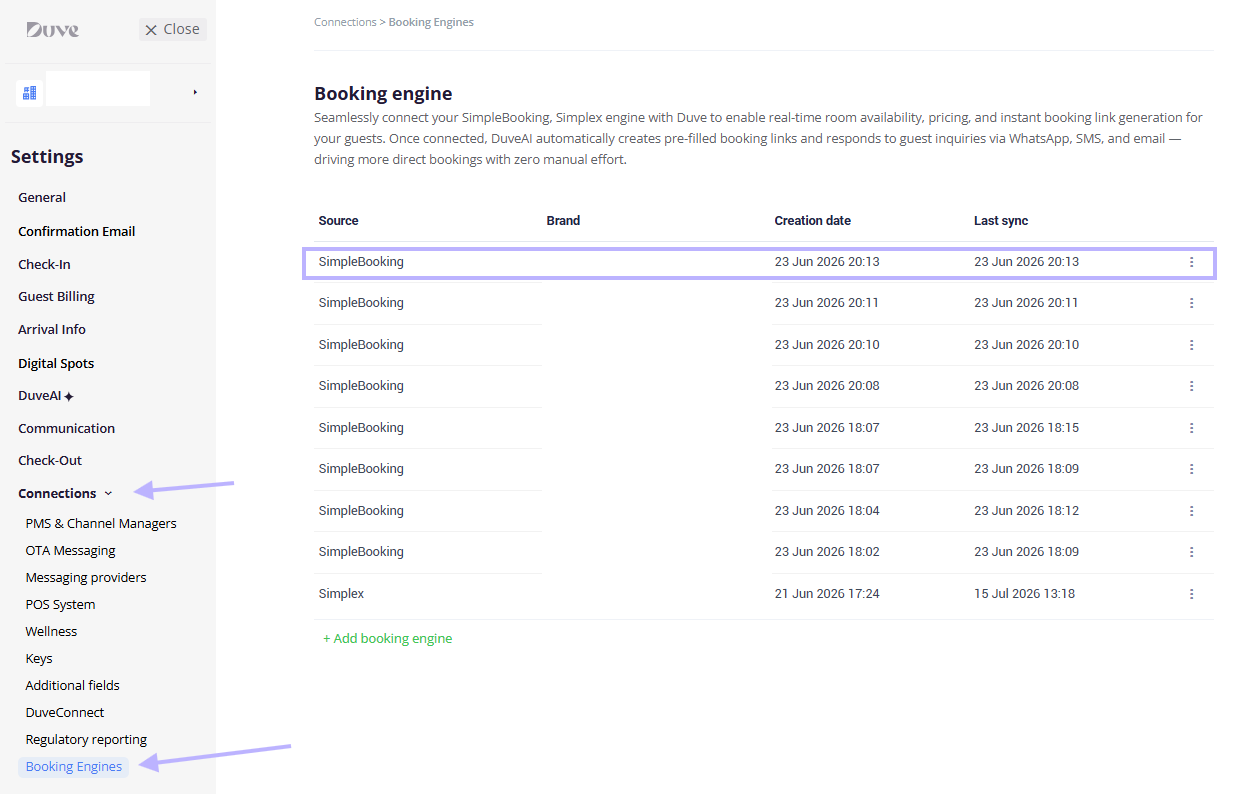
You connect SimpleBooking at Settings > Connections > Booking Engines, then switch on pre-booking replies at Settings > DuveAI > Agents. Both steps are required.
In this article
- Applies to
- Pricing
- Use cases
- Before you start
- How to set it up and use it
- Host experience
- Guest experience
- Troubleshooting
- Restrictions and limitations
- Tips and tricks
- FAQs
- Related articles
Applies to:Accounts with the AI Booking Agent on their plan. SimpleBooking is one of two booking engines Duve currently supports, alongside Simplex. This article covers SimpleBooking.
SmartReply also needs to be active, since the Booking Agent is configured within the same DuveAI settings.
Pricing:The Booking Agent is a paid addition to DuveAI. Connecting SimpleBooking itself carries no separate charge. For current pricing, contact Duve Support or your Customer Success Manager.
|
Use cases
- Answer availability questions when nobody is at the desk. A visitor asks about next weekend at midnight and gets real rooms and prices.
- Turn website chat into direct bookings. Every offer links into your own SimpleBooking engine rather than an OTA.
- Run each hotel on its own terms. With one connection per hotel, each property keeps its own credentials and its own brand.
- Answer the property question and the booking question together. Visitors typically ask about parking or breakfast in the same message as their dates, and both are answered in one reply.
- Sell in the visitor's language. The conversation and the room cards are presented in whatever language the person writes in.
Before you start
- Confirm the AI Booking Agent is available on your plan and SmartReply is turned on.
- Collect three things from SimpleBooking for each hotel you want to connect: the Hotel ID, a Username, and a Password. All three are required.
- Make sure the hotel has a country set in SimpleBooking. Properties without a country are excluded when Duve builds the agent's hotel list, so they will never be offered.
- Decide which Duve brand this hotel belongs to. If your account uses brands, you must pick one during setup.
- Review the hotel's room names, descriptions, photos, and amenities in SimpleBooking. That content is what appears on the cards the visitor sees.
How to set it up and use it
Connect SimpleBooking
- Go to Settings > Connections > Booking Engines.
- Click Add booking engine, or Create new connection if this is your first one.
-
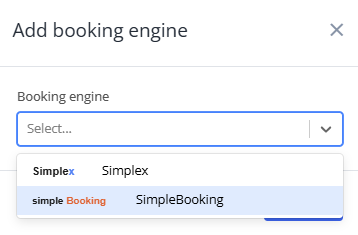
In the Booking engine dropdown, select SimpleBooking.
- Fill in the three fields: Hotel ID, Username, and Password. All three are required. The credentials are stored encrypted.
-
If your account uses brands, choose the brand this hotel belongs to. This is required when brands exist on the account.
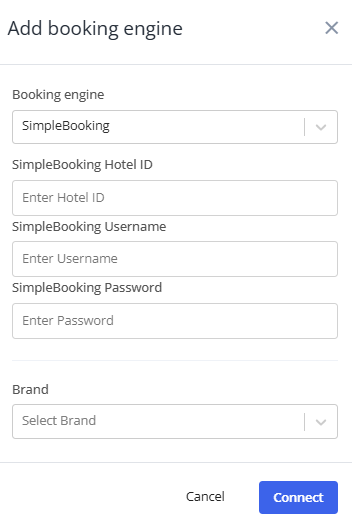
- Click Connect.
Setup note: Duve saves the connection and immediately starts pulling the hotel and its rooms from SimpleBooking in the background. The connection then appears in the list with its creation date and, once the first sync finishes, a last sync date.
Confirm the hotel resolved correctly
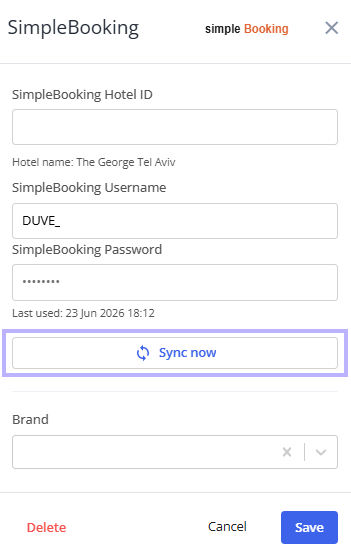
Because you type the Hotel ID by hand, it is worth checking that it landed on the right property. After the first sync, reopen the connection. If the ID you entered matches a hotel that came back from SimpleBooking, the hotel's name is shown underneath the Hotel ID field as Hotel name: [name]. If no name appears, the ID probably does not match a hotel your credentials can reach.
Connect more than one hotel
A SimpleBooking connection covers a single hotel. To cover a second hotel, add another connection and enter that hotel's ID and credentials.
Each connection is assigned to one brand, and the brand is what determines which connection serves a given conversation. Duve will not let you create two SimpleBooking connections with the same Hotel ID on the same account.
Turn on pre-booking replies
Connecting SimpleBooking does not by itself let the AI answer booking questions. To enable that:
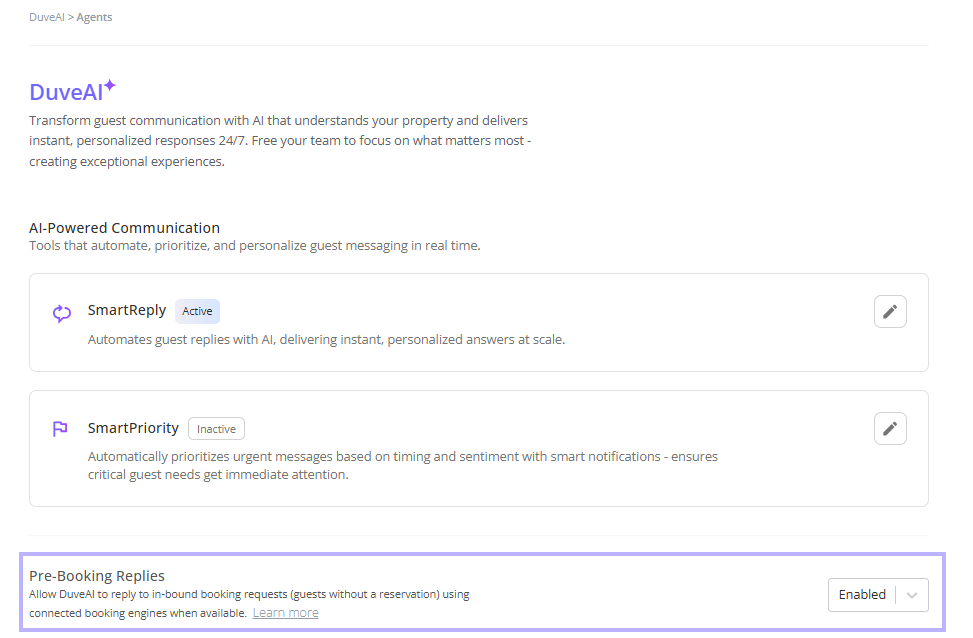
- Go to Settings > DuveAI > Agents.
- Find the Pre-booking replies row.
- Set it to Enabled.
Setup note: Until an engine is connected, this row shows "No booking engine connected" with a Connect to enable link that takes you back to the Booking Engines page.
Keep the connection in sync
Duve syncs automatically when you first connect, and again whenever you change the credentials. To refresh at any other time, open the connection and click Sync now. You will see a confirmation when it succeeds and an error message if it does not.
Sync is how new room types and changed room details reach the agent. If you add or rename a room in SimpleBooking, sync before expecting the agent to offer it.
The Sync now button is unavailable while you have unsaved edits in the credential fields. Save first, then sync.
Edit or remove a connection
Open the actions menu on the connection row and choose Edit or Delete.
In edit mode, you can change the brand and the credentials. The password is masked rather than shown.

Setup notes:
- There is an important quirk to know about editing. Credential changes are only saved when you re-enter the password. If you change the Hotel ID or the Username but leave the password field empty, the credential change is not submitted and the connection keeps its old values. Whenever you edit either of those fields, type the password again in the same save.
- Deleting asks for confirmation and removes the connection along with its synced hotel. If no other engine is connected, the Booking Agent stops being able to answer availability questions.
- If you close the dialog with Cancel immediately after creating a connection, Duve removes the connection it just created rather than leaving a half-finished one behind.
Host experience
- The Booking Engines page lists every connection with its source name, the brand it serves, the creation date, and the last sync date.
- A connection with no brand assigned shows All in the Brand column, meaning it can serve any brand.
- Sync results are confirmed on screen, and the last sync date updates on the row.
- Attempting to add a hotel that is already connected is blocked, and the message names the Hotel ID in question.
Guest experience
Pre-booking conversations happen with people who have no reservation attached, typically through your website chat.
- The agent works out the dates, the party size including children's ages, and how the party splits across rooms, asking follow-up questions when something is missing.
- Because a SimpleBooking connection is a single hotel, the conversation goes straight to rooms rather than asking the visitor to choose a property first.
- Results come back as room cards rather than a wall of text. Each card can carry a photo, the room name, a description, amenities, the meal plan, the price, the total for the stay, and a link to book.
- The cheapest option is presented as the main offer, with other rates for the same room, such as the same room with breakfast, listed underneath along with the price difference.
- Meal plans are shown as Room Only, Bed and Breakfast, Half Board, Full Board, or All Inclusive, depending on what SimpleBooking returns.
- Card text is translated into the language the visitor is using.
- The booking itself is completed on SimpleBooking. Duve presents the offer and the link; it does not take payment or create the reservation.
- Child and infant rules come from your SimpleBooking configuration, including the maximum guest count and the age boundaries for children and infants. The agent will not offer a room to a party the hotel does not accept.
- If the requested dates are full, the agent offers nearby dates where it can and hands the conversation to your team when it cannot verify an alternative.
Troubleshooting
- No hotel name appears under the Hotel ID after syncing: The ID likely does not match a hotel reachable with those credentials. Check the ID in SimpleBooking and re-enter it, remembering to retype the password in the same save.
- The hotel is connected but never offered to visitors: The most common cause is a missing country on the property in SimpleBooking. Add it there, then sync.
- I changed the Hotel ID or Username, and nothing happened: The password field was left empty, so the credential change was not submitted. Re-enter the password and save again.
- Sync fails: Usually invalid credentials or an expired password. Re-enter all three fields and save, which triggers a fresh sync.
- The Pre-booking replies row is disabled: No booking engine is connected yet, or the connection was deleted.
- The agent quotes the wrong room details: Room names, descriptions, capacities, and amenities all come from SimpleBooking. Correct them there, then sync.
- The agent is not offering rooms to a family with young children: Check the child and infant settings for that hotel in SimpleBooking.
- I get an error saying a booking engine with that hotel ID already exists: That hotel is already connected on this account. Find the existing connection in the list rather than adding a second one.
- I cannot save. If your account uses brands, a brand must be selected.
Restrictions and limitations
- Each SimpleBooking connection covers exactly one hotel. Multiple hotels need multiple connections.
- The same Hotel ID cannot be connected twice on the same account.
- Credential changes require the password to be re-entered, even when only the Hotel ID or Username is changing.
- A brand is required when your account has brands, and each connection is assigned to a single brand.
- Properties without a country set in SimpleBooking are excluded from the agent entirely.
- The agent presents offers and links. It cannot create, modify, or cancel a reservation in SimpleBooking.
- Pre-booking replies apply only to conversations with no linked reservation. Guests who already have a reservation are handled by SmartReply.
- Room data is only as current as the last sync, although prices and availability are checked at the time of the question.
Tips and tricks
- Reopen the connection after the first sync and confirm the hotel name appears: It takes five seconds and catches a mistyped Hotel ID before a visitor does.
- When you edit anything in the credentials, fill in all three fields: It avoids the silent no-op on the password rule entirely.
- Treat your SimpleBooking room descriptions as guest-facing copy, because that is exactly what they become.
- Sync after adding or renaming a room type: The agent cannot offer what it has not synced.
- If you connect several hotels, name your brands clearly: The brand is what routes a conversation to the right connection.
- Test with a realistic question before going live: give a date range and a party that includes a child, and check the rooms and prices match what you would have quoted yourself.
FAQs
Q: What credentials do I need from SimpleBooking?
A: Three: the Hotel ID, a Username, and a Password. All three are required, and the credentials are stored encrypted.
Q: Can one connection cover all my hotels?
A: No. SimpleBooking connections are per hotel. Create one connection for each hotel, each with its own Hotel ID and brand. This is the main difference from Simplex, where a single connection discovers multiple properties automatically.
Q: Can I change the credentials later?
A: Yes, unlike Simplex, the SimpleBooking fields stay editable. Just remember to re-enter the password whenever you change anything, or the change will not be saved.
Q: How do I know the Hotel ID is right?
A: After the first sync, the hotel's name is displayed beneath the Hotel ID field. If it is missing, the ID did not resolve.
Q: How often does Duve sync with SimpleBooking?
A: Automatically when you first connect and whenever the credentials change. Otherwise, when you click Sync now.
Q: Are prices live, or from the last sync?
A: Prices and availability are looked up for the dates the visitor asks about. The room catalog is what comes from the sync.
Q: Does the visitor complete the booking inside Duve?
A: No. The agent presents the offer and a link to SimpleBooking. Duve does not handle payment or create the reservation.
Q: Do I have to assign a brand?
A: If your account has brands, yes, and it is required both when creating and when saving changes. If your account has no brands, the brand selector does not appear and the connection works normally.
Q: What happens if I delete the connection?
A: The connection and its synced hotel are removed. Unless another engine is connected, the Booking Agent can no longer answer availability questions.
Q: Can I connect both SimpleBooking and Simplex on the same account?
A: The page supports more than one connection, and each is assigned to its own brand. If you are planning a mixed setup, check with Duve Support first so the brand assignment is correct.
Q: Do pre-booking replies affect guests who already have a reservation?
A: No. Those conversations continue to be handled by SmartReply.
Comments
0 comments
Article is closed for comments.