
Integration Type: 2-Way Integration
1-Way Sync (from PMS to Duve)
🏨 Sync in Room
- Room Name
- Unit Type (Rental Type)
- Unit Description
- Room Number
- Floor
- Street Name
- Street Number
- City
- State
- Country
- Postal Code
- Coordinates
- Room Size
- Location
- Max Number of Guests
- Room Type Features (from the RMS category attributes)
- Room Type Photos (from the RMS category images)
- Property Contact Email
- Property Contact Phone
Room types are created in Duve automatically, and a room type that is missing when a reservation arrives is synced on demand.
🗓 Sync in Reservation
- Reservation Dates
- Assigned Room (Rental Allocation)
- Reservation ID
- Confirmation Number
- Booking Source
- Booking Source Reference (the OTA reference, recognized separately for Airbnb, Booking.com, and Expedia)
- Reservation Status: Confirmed, Unconfirmed, Arrived, Departed, Canceled, No Show, Maintenance, Owner Occupied, Pencil, Quote, Stop Sell
- Rate Plan Name
- Booked On Date
- Guest Name
- Guest Phone (country derived from phone code when no country is set)
- Guest Email
- Number of Adults
- Number of Children
- Number of Infants
- Guest Nationality (used to assign language)
- Guest Comments (from the RMS OTA notes)
- Reservation Notes
- Access Code (read from an RMS reservation custom field named ACCESS CODE)
- Companion Guests (all guests linked to the reservation, not only the primary)
Guest and companion details are fetched for reservations in Confirmed and Arrived status. Companions populate on the initial sync of a reservation.
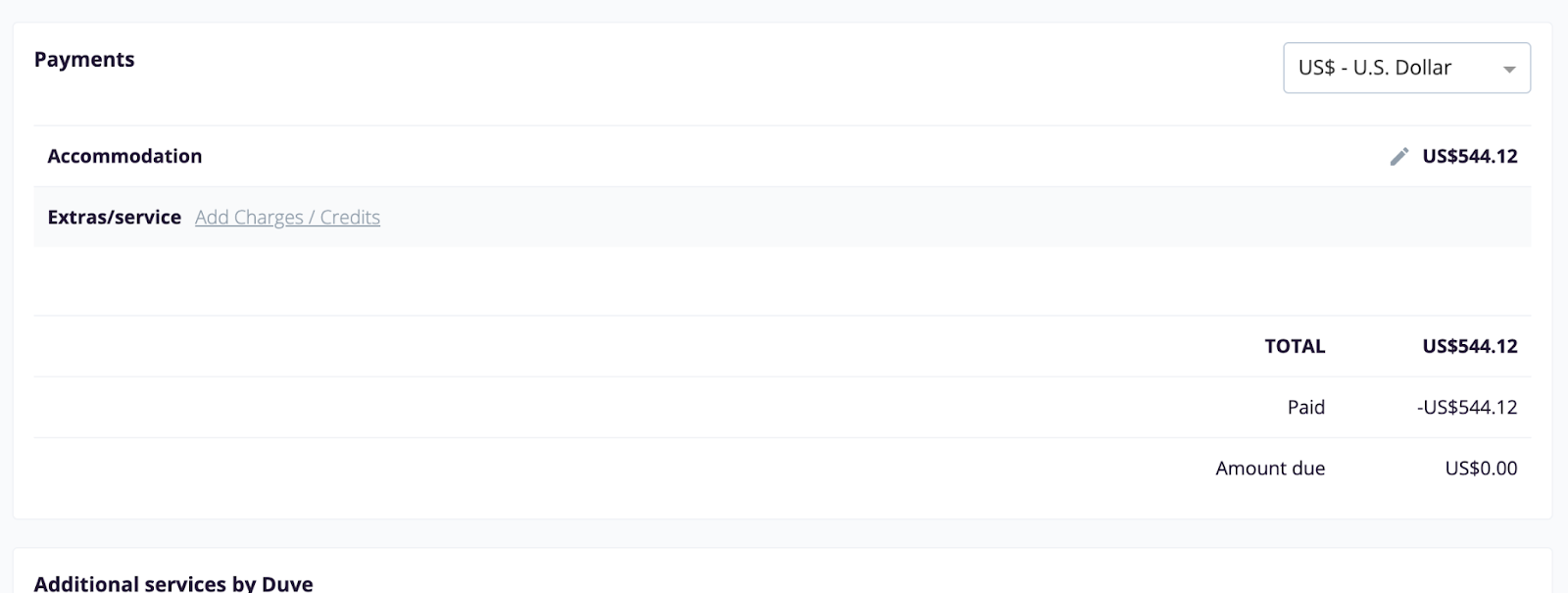
💳 Payments
- Guest Payment for Stay
- Accommodation and Accommodation tax are shown as separate lines
- Extra charges from the RMS folio
- Payments already received against the RMS account
Voided transactions are excluded, and rows routed to another reservation in a group booking are not counted against this reservation.
2-Way Sync (from Duve to PMS)
What We Sync
👤 Guest Profile
Pushed to the RMS guest profile when a guest completes online check-in:
- First Name
- Last Name
- Mobile Phone
- Date of Birth
- Nationality (mapped to the RMS country list)
- Street Address
- City
- State
- Postal Code
- Country (mapped to the RMS country list)
- Gender (male and female only)
- Passport Number (requires a mapped custom question)
- Guest Title (Mr, Mrs, Dr, requires a mapped custom question)
Only fields that have a value are sent, so a field the guest left blank in Duve is never blanked in RMS. Values that RMS does not recognize, such as an unmapped country or a gender outside male and female, are omitted rather than sent.
If the reservation has no guest profile in RMS, Duve creates one, links it to the reservation, sets it as the primary guest, and stores the new RMS guest ID so later updates reach the same profile.
Passport expiry date and passport issuing country are not pushed.
👥 Companion Guests
- Companions added during online check-in are matched to an existing RMS guest profile when one is found
- When no profile is found, Duve creates one and links it to the reservation
- Companion profile fields are the same as the guest profile fields above
- A companion with no last name is skipped, because RMS cannot create a profile without one
🕒 Arrival Details
Pushed to the RMS reservation when a guest completes online check-in:
- Expected arrival time (ETA), in the property's local time with no timezone conversion
- The online check-in note, merged into the RMS reservation notes
- The pre-arrival check complete flag
The note is added inside a single marked block, so it updates in place on a re-push and never overwrites notes your team wrote in RMS. If the existing notes cannot be read, the note is skipped rather than replacing what is there.
💳 Folio and Charges
Requires the Guest orders connection toggle.
- Confirmed upsell orders post to the guest's RMS account as a sundry charge
- The charge uses your configured Upsell sundry ID and charge source, with the upsell name as the description
- Payments Duve processes post to the same account as a receipt, using your configured receipt type and the payment reference from the payment provider
- Cash orders and orders placed on the guest's bill do not generate a receipt, because the property collects those directly
- Products mapped to an RMS add-on post as a reservation add-on instead of a sundry charge, either daily or one time, and are removed if the order is canceled
- Canceled orders void the charge, and refunds reverse the receipt and repost the net amount still paid
- The RMS folio is read back and displayed in the reservation's payments view alongside Duve-generated charges
🔄 Reservation Status
Requires the Allow update reservation status setting.
- Online check-in completed in Duve sets the RMS reservation to Arrived
- Online checkout completed in Duve sets the RMS reservation to Departed
- Runs through the same trigger mechanism Duve already uses for OHIP, Mews, and Guesty
- Only checked-in and checked-out are mapped for RMS
📄 Documents
Requires the Upload documents toggle.
- The documents a guest uploads during online check-in are uploaded to the RMS reservation as real files
- Files appear on the RMS Correspondence tab
- Maximum 20 MB per file, which is the RMS limit
- A file must have a file extension, because RMS types the file by it
A file that is too large or has no extension is skipped, and the rest of the documents still upload
🛏 Room Upgrades
- Duve queries RMS for available rooms and rates when a guest reaches the room upgrade step
- Only rooms RMS returns as sellable for the whole stay are offered
- Upgrade pricing is a live per-night difference between the cheapest sellable target rate and the rate the guest booked
- When the guest buys an upgrade, Duve moves the RMS reservation to the purchased room category
- Canceling the upgrade returns the reservation to its original category
- If the availability or pricing query fails, no upgrade options are shown rather than stale inventory or an incorrect price
- Availability is queried in windows of up to 14 days per call, which is an RMS limit
Real-Time Updates (from PMS to Duve)
🔔 Webhook Subscriptions
Registered automatically when the connection is saved, and removed when the source is disconnected:
- Reservation Creation
- Reservation Modification
- Reservation Status Change: unconfirmed, confirmed, arrived, departed, cancelled, pre-check-in, no show, quote
- Reservation Account Balance Change (refreshes the folio)
- Guest Creation
- Guest Modification
A reservation event re-pulls that reservation in Duve. A guest event fetches the RMS profile once and updates that guest's details across all their active reservations. An event Duve does not recognize triggers a full re-pull rather than a partial update.
Logs
🧾 Reservation Activity Log
Every write-back is recorded on the reservation log:
-
pmsDataSyncSuccesson every successful push to RMS, including profile updates, charges, receipts, status changes, and document uploads -
pmsDataSyncFailedwhen a push fails after Duve has exhausted its retries -
pmsStatusUpdatewhen RMS sends a status change by webhook and Duve re-syncs the reservation
[SCREENSHOT: Reservation activity log showing pmsDataSyncSuccess entries for an RMS reservation]
Limitations
⚠️ Not Supported
- Two-way sync is never enabled automatically on an existing RMS connection
- Duve does not automatically map RMS sundry codes to Duve upsell categories. One sundry ID is used for all upsell charges
- Passport expiry date and passport issuing country are not pushed to RMS
- Passport number and guest title are pushed only when the matching custom question is mapped to the RMS guest field
- Gender is limited to the two values RMS accepts. Any other value is omitted
- Charges cannot post if the reservation has no account assigned in RMS
- Companions pulled from RMS populate on the initial sync of a reservation. Companions added or removed in RMS afterwards are not reconciled
- Availability push, where RMS sends inventory changes to Duve in real time, is a later phase and requires an RMS Service Request raised by the property
Comments
0 comments
Article is closed for comments.