
- The card token, written to the reservation's payment methods in OPERA with
cardOrTokenset toToken, the masked card number (12 X characters followed by the last 4 digits), the expiration date, and the card type code you mapped in your connection settings. - The pre-authorization approval code, registered in OPERA as a manual authorization for the amount Duve already authorized at the PSP. This step runs for hold orders only: "Authorize & hold payment" and additional incidental holds. A card that paid a stay or an upsell outright is tokenized onto the reservation, but no authorization is registered against it.
Two different card type values travel in the same call, and it is worth knowing which is which:
- The payment method code is the OPERA code you map per card brand in the connection settings, with a default used for anything unrecognized.
- The card brand code is a fixed OHIP value Duve fills in itself:
Vafor Visa,Mcfor Mastercard and Maestro,Axfor Amex,Dcfor Diners,Jcfor JCB. It is not configurable, and it is left out for a brand outside that list. Two smaller details, in case the front desk asks: the cardholder name sent to OPERA is the guest's first name only, and the expiration date is sent as the last day of the expiry month.
AUTHORIZATION alert (for Adyen only) is written alongside it only when alerts are enabled on the connection; the comment is always written.In this article
- Applies to
- Use cases
- Before you start
- How to set it up
- Troubleshooting
- Restrictions & Limitations
- Tips & Tricks
- FAQs
- Related articles
Applies to:
|
Use cases
- A guest completes online check-in in Duve and pays for the stay. The front desk needs the card on the OPERA reservation so the remaining balance or incidentals can be settled at the desk.
- You take a pre-authorization hold for incidentals in Duve before arrival, and you want that hold to appear in OPERA as a registered authorization instead of the property placing a duplicate hold on the same card.
- You sell upsells such as early check-in, late check-out, or room upgrades in Duve, and want the card that paid for them available in OPERA.
- A hold you placed before arrival expires or is reversed by the PSP, and the front desk needs to know before check-in that the card is no longer authorized (for Adyen only).
Before you start
- Confirm your payment provider in Duve is one of the seven supported providers listed above.
- Confirm the guest folio window number in the OHIP connection settings. The token and the authorization are attached to that folio window, and window 1 is used if the field is left empty.
- Get the OPERA payment method codes for each card brand from your OPERA administrator, and set a default code for brands you have not mapped. A wrong or missing code is the most common reason OPERA rejects an otherwise healthy push.
- Decide whether you want OPERA alerts as well as comments. Alerts are controlled by a separate setting on the connection; without it the pre-auth expiry notice still reaches OPERA as a reservation comment, but no alert pops up for the front desk.
How to set it up
- Open the PMS connection settings for the OHIP source in Duve.
- Scroll to the OHIP configuration fields. These options only appear after the connection has been created, so if you are creating the source right now, save it first and come back.
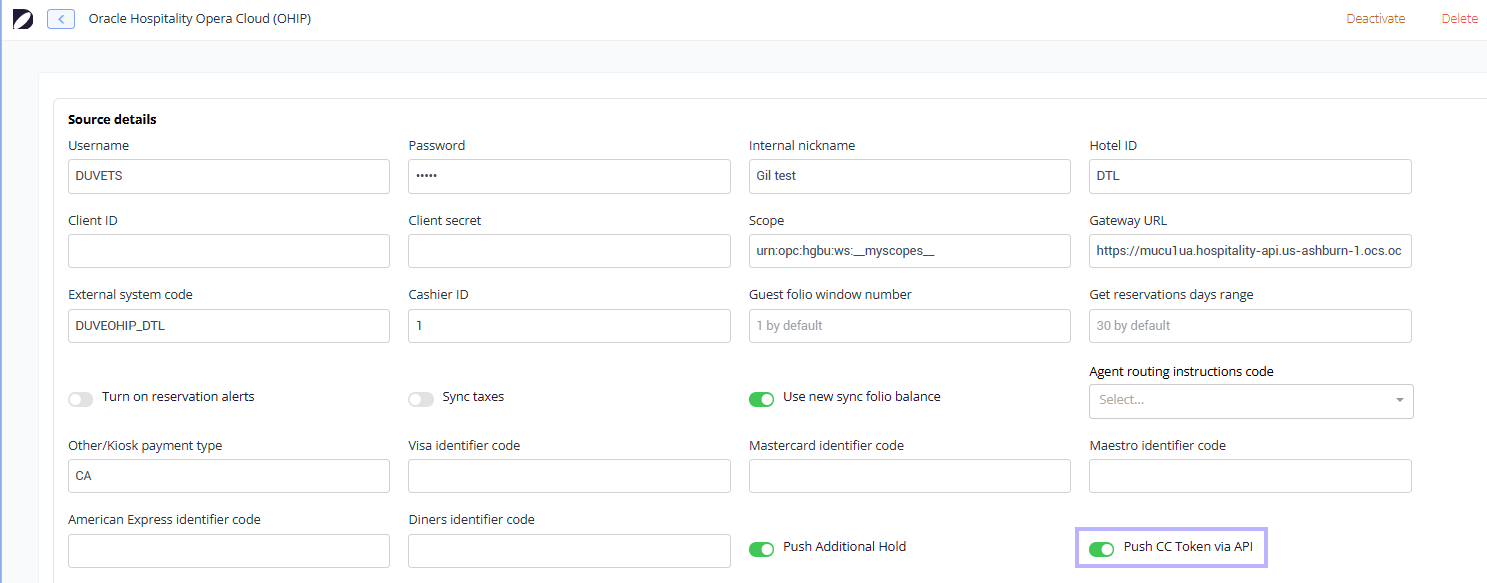
- Turn on Push CC token via API. This is the master switch for sending the card token and the pre-authorization approval code to OPERA. It is off by default. On its own, it already registers the hold in OPERA as a manual authorization for all seven supported providers.
- Leave Push additional hold off unless Duve support asks you to turn it on. It does not control whether holds reach OPERA, because step 3 already does that. It adds a second, separate authorization call, and only for Worldline and Elavon payments. With both switches on, a Worldline or Elavon hold can be registered in OPERA twice.
- Check that the card type identifier fields and the guest folio window number are filled in as described above.
- Turn on alerts on the connection if you want the front desk to get an
AUTHORIZATIONalert, and not only a reservation comment, when a hold ends at the payment provider. - Save the connection settings.
Host experience
- If you collect payment immediately, the card that paid is tokenized and pushed to the OPERA reservation, along with the masked card number, expiration date, card type code, folio window, and the authorized amount and currency.
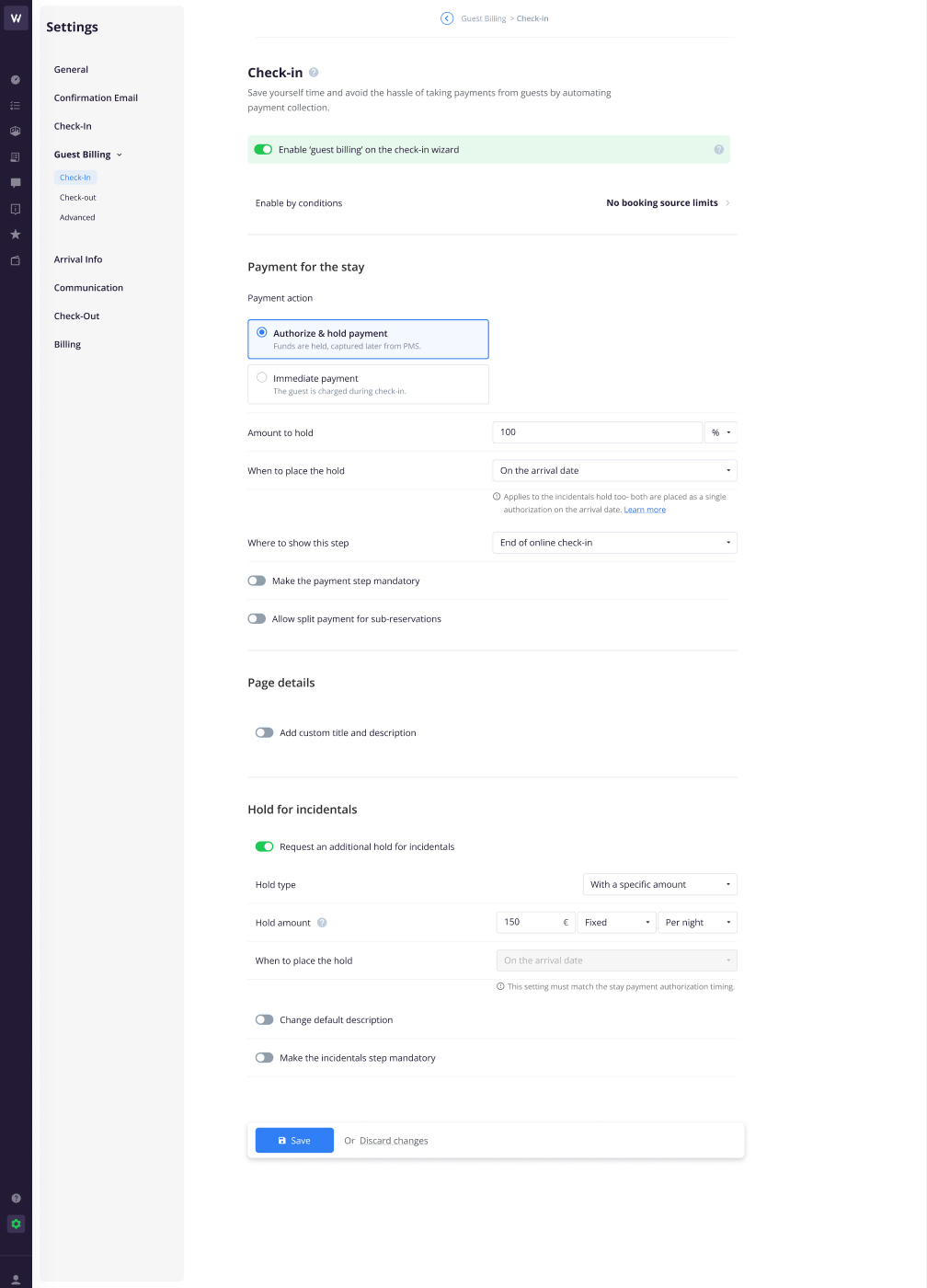
- If you use "Authorize & hold payment", the hold Duve takes at your payment provider is the pre-authorization that gets registered in OPERA against that card, rather than the property placing its own hold.
- If you request an additional hold for incidentals "With zero amount", the guest's card is tokenized without being charged, but nothing is pushed to OPERA for that order: an amount of exactly zero is blocked, because OPERA rejects a zero-value authorization. What does go through is a hold order that carries no amount field at all; there the token is pushed, and the amount is simply left out of the payload.
- If you request an additional hold for a specific amount, turning on Push additional hold registers that authorization in OPERA too. That authorization is already registered by the main switch; the extra flag only adds a second call, for Worldline and Elavon.
- In Duve, the reservation/order logs whether the token push succeeded or failed, with the last 4 digits of the card.
- In OPERA, the card appears as a payment method on the reservation, attached to the guest folio window configured on the connection, with the authorization registered against it.
- If the hold later ends at the payment provider, a comment (and an
AUTHORIZATIONalert, if alerts are enabled) appears on the OPERA reservation so the desk knows before the guest arrives.
Guest experience
- The guest enters their card once, on the billing step of online check-in, exactly as before.
- The guest is never asked to consent to a card being sent to the PMS separately, because no card number leaves Duve. Only a token, the last 4 digits, the expiration date, the cardholder's first name, and the card brand are sent.
- For a zero-amount hold, the guest sees their card saved without a charge. For "Authorize & hold payment", they see the hold amount on the billing step.
- Because the card is already on the OPERA reservation, the guest is not asked for it again at the desk, and they are not charged twice or held twice for the same amount.
- The one case where a guest may still be asked for a card at check-in is when the pre-authorization expired or was reversed at the payment provider before arrival. Duve flags this in OPERA, but the hold itself is gone, and the desk needs a live card.
Troubleshooting
- Nothing arrives in OPERA, and the timeline shows no token push entry: The most common causes are the switch being off for that source, the reservation's payment having been taken by an unsupported provider, or OPI not being active at the property. Check all three in that order.
- You just activated OPI, but Duve still skips the push: Duve caches a negative OPI result for 15 minutes. Wait and retry. The reverse is slower: a positive result is cached for 24 hours, so if you switch the interface off, Duve can keep pushing for up to a day. The cache is held per server, so the two can differ briefly across servers.
- The timeline shows a failed token push: Duve makes three attempts in total, waiting about 10 seconds after the first failure and about a minute after the second. After the third, it gives up, logs the failure, and does not try again on its own: the push is only reattempted if a later event for that order reaches OPERA again, such as a resync. A persistent failure usually points to the OPERA side: an invalid card type code, a folio window that does not exist on the reservation, or a rejected amount. Verify the card type identifier mapping first.
- Nothing in the timeline at all, not even a failure: the card token itself may be longer than 30 characters, which Duve blocks before sending. The push is skipped silently and never retried. Raise it with support, as it needs a change on the Duve side rather than a setting you can fix at the property.
- The card reaches OPERA, but no authorization is registered against it: The authorization step needs an approval code from the PSP. Each provider reports it under a different field, and Duve reads the one belonging to the provider that processed the order. If your PSP did not return an approval code for that transaction, the token is still pushed, but no manual authorization is registered. The other common reason is that the order was simply a payment rather than a hold: an authorization is only registered for "Authorize & hold payment" and additional hold orders.
-
The front desk sees an authorization for a hold that is no longer live: Look for the "Pre-authorization expired at payment provider" or "Pre-authorization cancelled at payment provider" comment (and the
AUTHORIZATIONalert, if alerts are enabled) on the OPERA reservation. Duve writes these as soon as the PSP reports the hold has ended. Only Adyen reports this, so for the other six providers the front desk has no warning in OPERA and should confirm the hold at the PSP if in doubt. - The comment is on the reservation, but there is no alert: alerts are a separate setting on the OHIP connection. Turn them on if you want the front desk to be prompted rather than having to open the comments.
Restrictions & Limitations
- The token must be a string of 30 characters or fewer. Anything longer is rejected before it is sent, which is a safeguard so a raw card number can never be pushed. For Worldline, whose own token is a 36-character UUID, Duve sends the Duve order's internal database ID as the token instead so the push fits inside the limit. That is not the order number that staff and guests see in Duve.
- Only Adyen, Global Blue, Stripe, Planet, Pelecard, Worldline, and Elavon are supported. An order processed by any other provider is skipped, even when the switch is on.
- A charge amount of zero, or a broken amount, blocks the push. An order with no amount at all is allowed through, because hold orders can legitimately have no amount and OPERA accepts the payload without it. A negative amount is not blocked and is sent as it stands.
- The manual authorization is registered for hold orders only. A card that paid a stay or an upsell outright is tokenized onto the reservation, but no authorization is registered against it.
- The push happens per order and is marked as done once it succeeds, so it does not repeat on resync. The token push and the manual authorization registration are marked separately. The extra call made by Push additional hold is not marked, so it can repeat.
- The feature is per connection. If you run several OHIP sources, turn it on for each one you want it on for.
- This is a one-way push. Cards or authorizations added directly in OPERA are not pulled back into Duve.
- The pre-auth ended comment and alert are only sent for "payment for stay" and "additional hold" orders. They are raised for Adyen payments only, and the alert additionally requires alerts to be enabled on the connection.
- The notice is written in English only, and shows the amount as a plain number with the three-letter currency code, for example "EUR 150".
Tips & Tricks
- Test on a single property first. The switch is per connection, so you can validate the card type mapping and folio window on one hotel before rolling out.
- Get the card type codes from your OPERA administrator. A wrong code is the single most common reason a technically successful integration produces a rejected push.
- Use the Duve reservation/order logs as your first diagnostic. It tells you whether Duve attempted the push at all and whether OPERA accepted it, which narrows the problem to either the Duve side or the OPERA side immediately.
- If you use incidental holds, the main token switch already registers them in OPERA. Only add Push additional hold when Duve support asks you to, and check for duplicate authorizations in OPERA afterwards if the property runs Worldline or Elavon.
- If you want front desk staff to be prompted when a hold lapses rather than having to read reservation comments, enable alerts on the connection at the same time, and remember this only fires for Adyen today.
FAQs
Q: Does Duve send the guest's actual card number to OPERA?
A: No. Duve sends a token supplied by your payment provider, flagged to OPERA as a token rather than a card number, together with a masked card number showing only the last 4 digits and the expiration date. There is also a hard length check that blocks anything longer than 30 characters from being sent, which a real card number would exceed.
Q: What else about the guest reaches OPERA?
A: The guest's first name, as the cardholder name on the stored card. No other guest detail is added by this flow.
Q: Will this create a second hold on the guest's card?
A: No. That is the reason the approval code is sent. Duve registers the pre-authorization it already took at the PSP as a manual authorization in OPERA, so OPERA recognizes the existing hold rather than initiating a new one. The guest's card is never held twice. Note that OPERA itself can show the same authorization twice if the property runs Worldline or Elavon with Push additional hold switched on; that is a display duplicate in OPERA, not a second hold on the card.
Q: What happens if OPI is not active at my property?
A: Nothing is sent. Duve checks for an active EFT (Electronic Funds Transfer) interface at the hotel before every push and skips silently if it does not find one. Activate OPI in OPERA and allow up to 15 minutes for Duve to pick up the change. Going the other way takes longer: after you deactivate it, Duve can keep pushing for up to 24 hours.
Q: My payment provider is not on the supported list. Can I still use this?
A: Not today. The supported providers are Adyen, Global Blue, Stripe, Planet, Pelecard, Worldline, and Elavon. Orders processed by any other provider are skipped.
Q: What happens if the pre-authorization expires before the guest arrives?
A: For Adyen payments, Duve posts a comment on the OPERA reservation stating that the pre-authorization expired at the payment provider and the hold is no longer active, including the currency and amount, so the front desk can ask the guest for a card at check-in. An AUTHORIZATION alert is added as well when alerts are enabled on the connection. For the other six providers, Duve has no signal that the hold ended, so nothing is written to OPERA.
Q: Where can I see whether the push worked?
A: On the Duve reservation/order logs. Duve records a payment token push success or failure entry for each attempt, showing the last 4 digits of the card involved.
Q: Does turning this on change anything for reservations that were already synced?
A: The setting is additive and applies to payments processed from the moment it is on. Orders that have already been pushed are marked as done and are not resent.
Q: Can I turn it on for some properties and not others?
A: Yes. The switch lives on each OHIP connection, so it is set per source.
Comments
0 comments
Article is closed for comments.