
Overview
- Immediately: the hold is placed the moment the guest submits their card, even if they never finish check-in.
- On the arrival date: the card is saved and authenticated during check-in, but no funds are held until 00:00 (local property time) on the guest's arrival date.
Note: the arrival-date option is offered only for payment providers that support it, and the supported-provider list is being confirmed per integration during rollout.
In this article
- Who this is for / Applies to
- Use cases
- Before you start
- How to set it up
- Host and Guest experience
- Restrictions and limitations
- Tips and tricks
- Troubleshooting
- FAQs
- Related articles
Who this is for / Applies toWho this is for:
Every other provider, including Nexi, Concardis, BridgerPay, Smart Payments, Global Blue, Credit Guard, and Mews Payment. These cannot defer a hold, so the When to place the hold control is not shown at all, and holds are placed at card submission as before.
Applies to:
|
Use cases
- You want an immediate guarantee, so funds are secured the second the guest submits their card, even if they abandon check-in halfway through.
- You do not want to tie up a guest's funds for days or weeks before arrival, so you defer the hold to the arrival date.
- Your authorizations expire after a fixed number of days, and long lead times mean a hold placed at booking would no longer be valid at check-in.
- Your payment provider supports only one of the two timings, and you want Duve to behave correctly and tell the guest the truth without extra configuration.
- You take an incidentals hold as well as a stay hold, and you do not want two authorizations landing on the guest's card on two different days.
Before you start
- Connect a payment provider and enable payment collection for the account.
- Confirm Guest Billing is available in your plan.
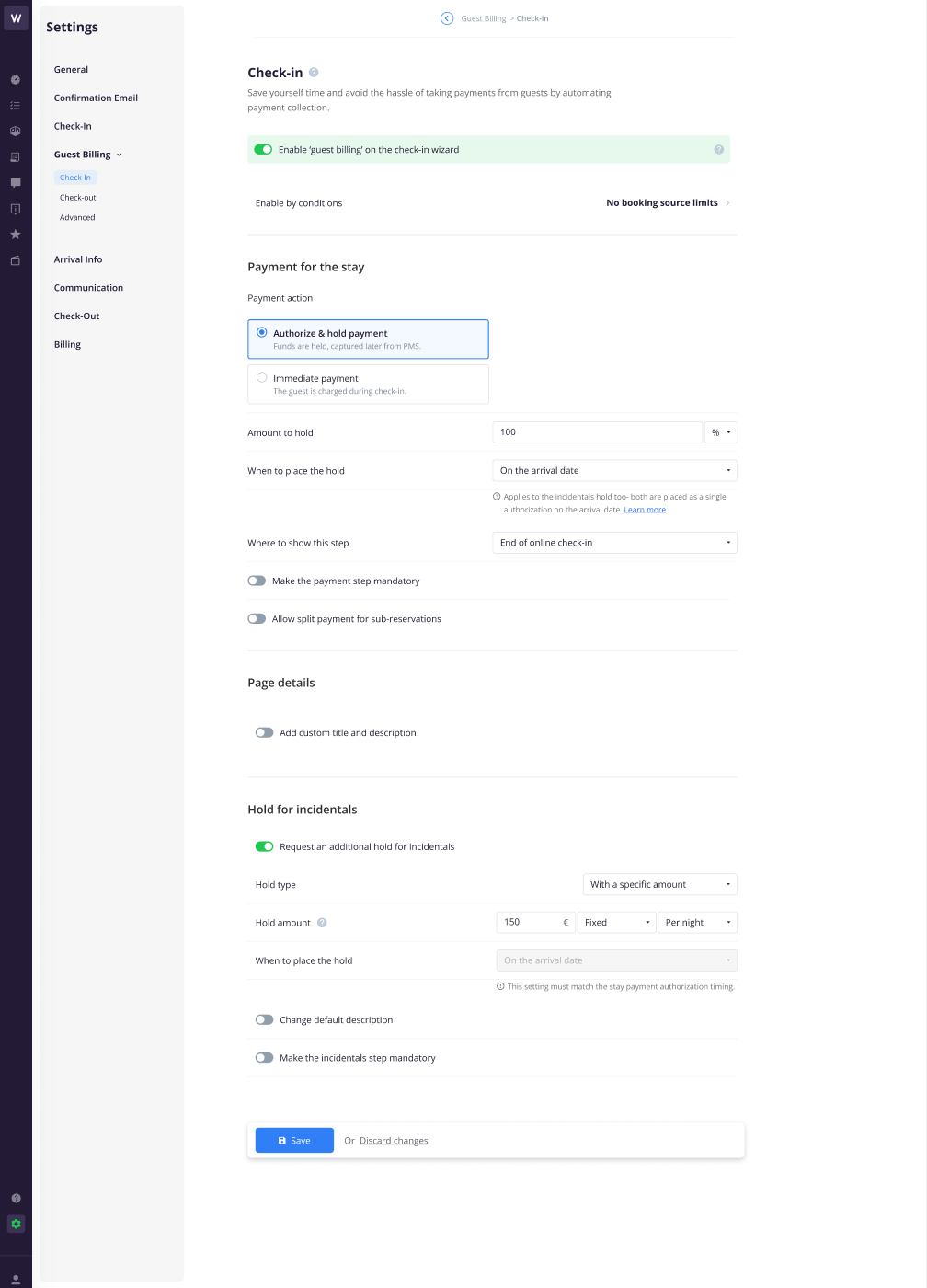
- Enable 'guest billing' on the check-in wizard in Settings > Guest Billing > Check-in.
- Confirm your property type. Authorize & hold payment is offered to hotels, and the incidentals hold is offered to hotels and vacation rentals.
How to set it up
- Go to Settings > Guest Billing > Check-in and turn on Enable 'guest billing' on the check-in wizard.
- Optionally use Enable by conditions to limit which reservations are asked to pay, for example by booking source or reservation status.
- Under Payment for the stay, choose a Payment action:
- Immediate payment: the guest is charged during check-in.
- Authorize & hold payment: funds are held and captured later manually.
-
Authorize & capture on arrival: funds are held when the guest submits their card, then captured automatically on the arrival date. This option appears only on Concardis setups that also have the new payment collection option feature enabled. If a company has it selected and later loses eligibility, the screen falls back to Immediate payment.
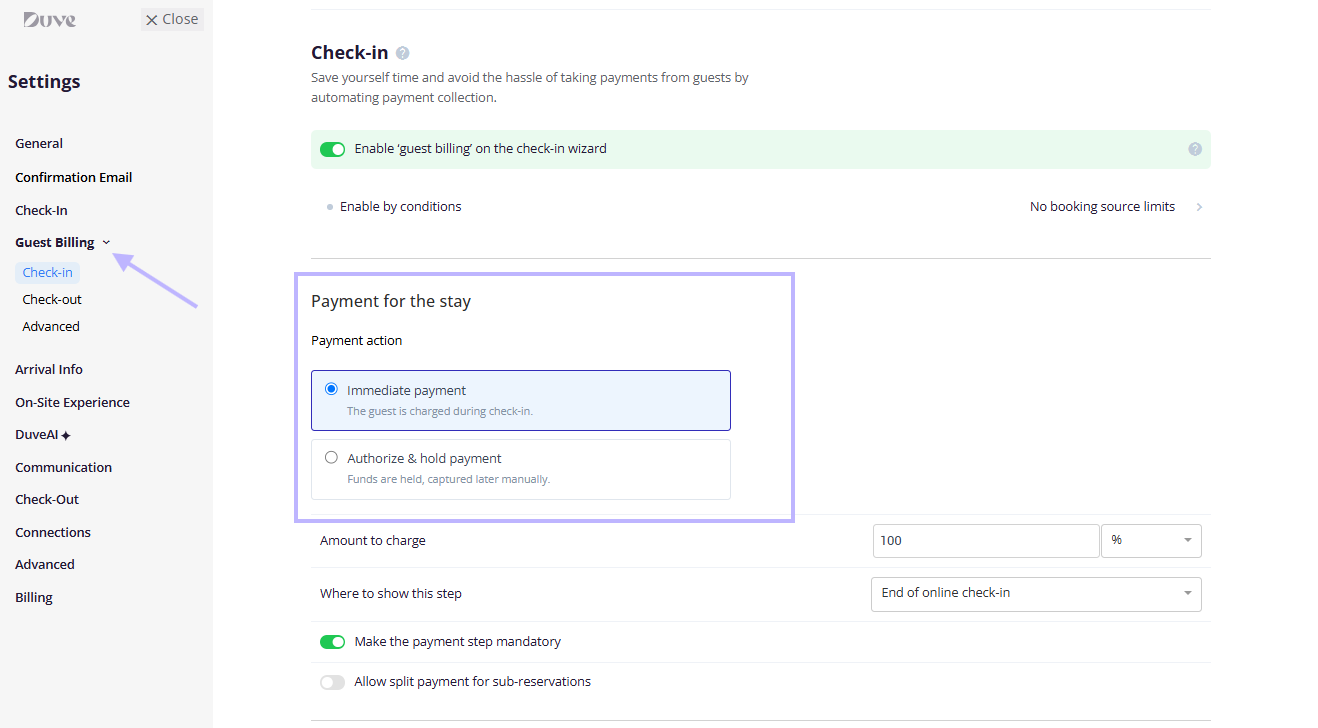
- Set the amount. With Immediate payment, the field is Amount to charge; with Authorize & hold payment, it is Amount to Hold. Either can be a percentage or a fixed amount.
- Set when to place the hold. This row appears when the payment action is Authorize & hold payment and your provider supports arrival-date holds:
- Immediately: "The hold is placed the moment the guest submits their card, even if they never finish check-in. Applies to the incidentals hold too."
-
On the arrival date: "Applies to the incidentals hold too; both are placed as a single authorization on the arrival date."
Note: A short note appears under the dropdown describing exactly what the guest will be told, with a Learn more link beside it.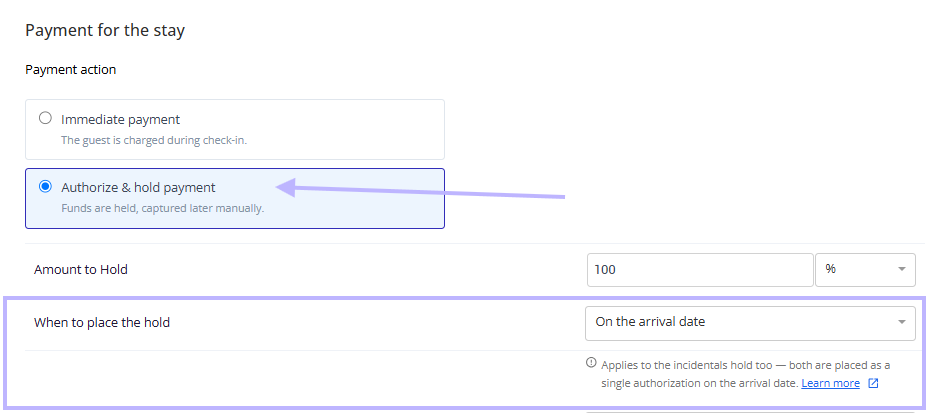
- Choose where to show this step in the online check-in journey, and decide whether to make the payment step mandatory and whether to allow split payment for sub-reservations. These behave exactly as before.
- Under Page details, optionally turn on Add custom title and description to replace the default wording the guest sees.
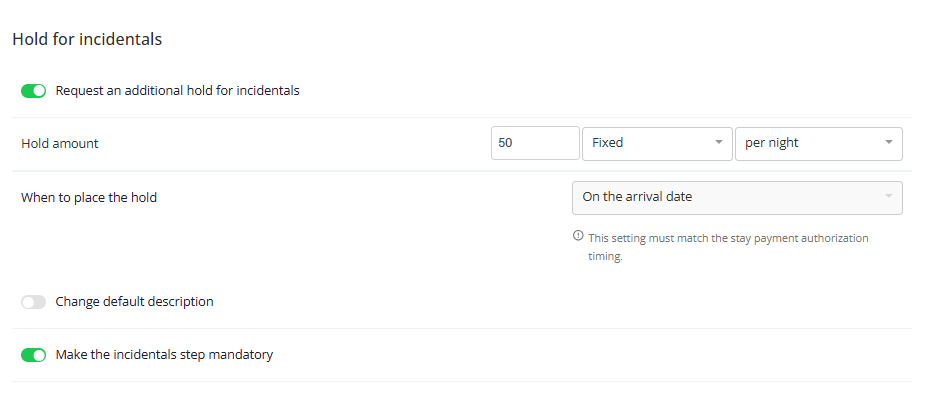
- Under Hold for incidentals, turn on Request an additional hold for incidentals if you want a second hold, then set:
- Hold type: a specific amount, or a zero amount where your setup supports it. The hold type field is offered on Stripe setups and on setups where authorize-only payments are not allowed.
- Hold amount: a fixed fee or a percentage, calculated per reservation or per night.
-
When to place the hold: the timing for the incidentals hold.
- Note how the two timing fields relate to each other:
-
If the stay payment is Authorize & hold payment, the incidentals timing is locked to match it and shows the note "This setting must match the stay payment authorization timing." Both holds are then placed as a single authorization.
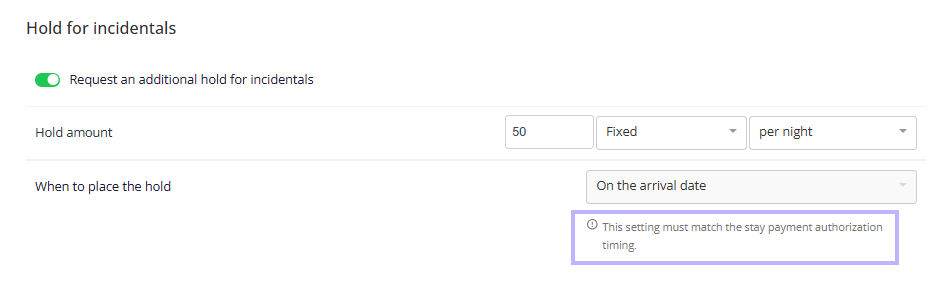
- If the stay payment is Immediate payment, there is no stay hold to match so you can set the incidentals timing on its own.
-
- Optionally turn on Change default description and Make the incidentals step mandatory. Neither has changed.
- Save your settings.
Host and Guest experience
Host experience
- Until the hold actually lands, the order sits in a pending authorized state. Nothing has been charged or held, and no funds have moved. On the reservation, this order is labeled Pending.
- Hold orders cannot be edited from the order page, the same as any other hold order.
- The order is not pushed to the PMS while the hold is only scheduled. The push happens once the hold is placed, so the PMS never receives a payment that has not happened.
- On the arrival date, at 00:00 in the property's time zone, Duve places the real hold. When it succeeds, the order moves to the paid state, which is shown to you as Active; the hold is reflected on the reservation, an order log is written, and the order is pushed to the PMS.
- Before placing the hold, Duve re-checks that today really is the arrival day in the property's time zone, and that the reservation has not been canceled. A canceled reservation, or a reservation whose arrival date moved, is skipped rather than authorized on the wrong day.
- If the authorization is declined on the arrival date, the order is marked as failed, and the stay payment is reopened for the guest so they can pay or provide another card. Duve also raises a failed check-in-day payment notification so the property is told, rather than only writing it to the logs.
- Scheduled holds that never fire, for example after an infrastructure issue, are swept periodically (every six hours). The sweep picks up holds that are still scheduled and holds that already failed, cancels them with the reason Expired, and reopens the guest's stay payment. Holds that were already in flight are deliberately left alone, because the provider may have authorized before Duve lost track of them.
- The arrival-day hold writes an updated entry to the order log, and the hold itself is reflected on the reservation. Order logs for a hold that is only scheduled show no authorization, because none has happened yet.
- Order logs record the outcome:
- Successful authorization: "Authorization of {{amount}} was created for card ending with '{{last4}}'"
- Failed authorization on the arrival date: "Authorization of {{amount}} for card ending with '{{last4}}' failed"
- Released authorization: "Hold was released by {{name}}."
- If a failed pre-authorization happens during card entry, the guest sees the provider's error immediately, and the behavior is unchanged from today because that flow is still handled by the payment provider.
Guest experience
- Stay charged immediately: "{{amount}} is charged now for your stay."
- Stay held immediately: "{{amount}} is held for your stay now."
- Stay held on the arrival date: "{{amount}} is held for your stay on your arrival date."
- Incidentals held immediately: "{{amount}} is held for incidentals now - not a charge."
- Incidentals held on the arrival date: "{{amount}} is held for incidentals on your arrival date - not a charge."
Note: On deferred holds with providers that cannot authorize a zero amount, a validation sentence is shown first, before the stay and incidentals sentences: "A minimal hold may be placed on your card for validation." That small validation amount is released as soon as the arrival-date hold is scheduled. Providers that can save a card without charging it do not show this sentence. - When the stay amount is charged at submission, no validation sentence is shown, because the guest's card is already being used.
- When the stay request is 0%, and only an incidentals hold applies, only the incidentals sentence is shown.
- Confirm & Pay {{amount}} appears only when money is actually charged.
- Confirm & Continue appears whenever the amount is only held, so the guest is never asked to "pay" an amount that is never taken.
- A guest who has already submitted their card for a deferred hold is not asked to pay again before arrival. The stay payment step stops being offered until the hold resolves.
- The stay payment page stays closed for those guests, including when they open the link directly, so they never land on an empty or stuck payment screen.
- If the arrival-date authorization is declined, or the scheduled hold expires without being placed, the stay payment becomes available to the guest again.
Restrictions and limitations
- The arrival-date option is available only where the payment provider supports it. Where the provider supports one timing only, the dropdown shows that option alone, and where the provider cannot defer, the control is hidden.
- Pelecard has a fixed timing you cannot change: the hold is always placed on the arrival date. That is how the Pelecard integration has always worked, and nothing about it changes with this feature.
- Choosing Immediate payment on a Pelecard setup automatically turns the incidentals hold off, because Pelecard cannot hold and capture at the same time.
- Global Blue does not support the incidentals hold at all, so the Hold for incidentals section is not shown on Global Blue setups. Like every other provider outside the supported list, it also cannot defer a stay hold, so holds are always placed at card submission.
- Mews Payment does not allow authorize-only payments, so Authorize & hold payment is not offered there, and there is no stay hold to time.
- The provider always wins over the saved setting, in both directions. If an account is set to Immediately but the reservation runs on a provider that can only hold on the arrival date, the hold is placed on the arrival date, and the guest is told so. If an account is set to On the arrival date but the reservation runs on a provider that cannot defer, the hold is placed at submission instead.
- The stay hold and the incidentals hold cannot be given different timings when both are active. They are placed together as a single authorization.
- A zero-amount incidentals hold has nothing to defer, so it is not scheduled for the arrival date.
- If the guest arrives on the same day they complete check-in, there is nothing to defer and the hold is placed straight away.
- If the arrival date is changed after a hold was scheduled, Duve verifies the day before placing the hold and does not authorize on the wrong day.
- Holds already in flight are never retried automatically, because a retry cannot tell an authorization that never happened from one that happened but was not recorded. Those cases are handled manually.
- The Authorize & capture on arrival payment action behaves differently. It holds at card submission and captures automatically on the arrival date, and it is available only on Concardis setups with the relevant feature enabled.
- An arrival-date hold is a new authorization against the saved card, not an extension of anything taken at card entry. Captures and releases are pointed at the new authorization automatically.
Tips and tricks
- Use on the arrival date for long lead times, and immediately when you need a guarantee at check-in.
- Check the note under the dropdown before saving. It states exactly what the guest will be told.
- If you only need an incidentals hold and no stay payment, set the stay amount to 0% and keep the incidentals hold on. The guest then sees only the incidentals message.
- If your provider adds a small validation hold, mention it in your custom description so front desk staff can answer questions about it.
- Review the hold timing whenever you change payment providers, since the available options depend on the provider.
- On multi-brand accounts, check the timing again after changing whether a brand overrides the company payment provider, because the available options follow the provider that actually applies.
Troubleshooting
- The When to place the hold row is missing: The payment action is not Authorize & hold payment, or your payment provider does not support arrival-date holds.
- The dropdown is grayed out: Either your provider does not let hosts choose the timing, payment collection is not enabled, or you do not have permission to edit Guest Billing settings. In the incidentals section, the field is also locked when it must match the stay payment timing.
- The dropdown shows only one option: Your provider supports only that timing.
- The order shows as pending, and no funds are held: This is expected for a deferred hold. The authorization is placed at 00:00 on the arrival date in the property's time zone.
- The guest was not asked to pay: If a card was already submitted for a deferred hold, the stay payment step is not offered again until the hold resolves.
- The hold failed on the arrival date: The order is marked as failed, and the guest can pay again. Ask the guest to complete the payment step or provide another card.
- The guest says a small amount was taken: Some providers cannot authorize a zero amount, so a small validation hold is placed while the card is saved and released once the arrival-date hold is scheduled. This applies to Worldline and Elavon.
- The Hold for incidentals section is missing: Either the property is not a hotel or vacation rental, or the provider is Global Blue, which does not support the incidentals hold.
- A scheduled hold shows as canceled with the reason Expired: The hold was never placed, so the cleanup sweep canceled it and reopened the stay payment for the guest.
Comments
0 comments
Article is closed for comments.