
Overview
Guests often ask for complimentary items (towels, pillows, toiletries, a welcome pack) in a message rather than in the Guest app. Until now, DuveAI answered those messages with a link to the order page, which added friction and caused orders to be dropped.
With Free Items, the Upsell Agent (shown in your settings as the Sales agent) handles those requests conversationally. It reads the upsells you have configured in Duve, understands what the guest is asking for, asks only the questions your upsell configuration requires, creates the order in Duve on the guest's behalf, and confirms it back to the guest in the channel they wrote from.
Key points:
- Works for free upsells only: free Menu upsells and free Custom upsells (single and multiple items).
- Covers every channel DuveAI supports (WhatsApp, SMS, Email, Duve Chat, web chat).
- Paid upsells are not ordered by the agent. When a guest asks for a paid product, the agent replies with that product's own booking link so the guest can order it themselves.
- Orders created by the agent look and behave exactly like orders placed manually, with an indication that DuveAI placed them.
In this article
- Who this is for
- Applies to
- Pricing
- Use cases
- Before you start
- How to set it up
- Host experience
- Guest experience
- Troubleshooting
- Restrictions & Limitations
- Tips & Tricks
- FAQs
- Related articles
Who this is for
Applies to
Pricing
|
Use cases
- A guest asks for a free item from a Custom upsell with a single item through chat and receives it without leaving the conversation.
- A guest asks for a free item from a Custom upsell with multiple items and the agent asks which one, then places the order.
- A guest asks for a free item from a Menu upsell, and the agent identifies the right menu item.
- A guest asks for several items in one message and the agent handles each of them in the same conversation.
- A guest stops mid-conversation and replies later, and the agent picks up where the conversation left off instead of starting over.
- An anonymous guest asks for an item and receives the link to order in the Guest app.
- Your team wants to see AI-created orders with the same details as manual orders so they can fulfill them normally.
- Your team wants to measure automation adoption by tracking which orders were created by DuveAI.
Before you start
Make sure the following are in place:
- DuveAI/SmartReply is enabled on the account or brand. The Sales agent cannot be turned on while SmartReply is disabled.
- The AI Ordering Agent feature is enabled on your account. Without it, the Sales card stays locked.
- Your free upsells are configured and enabled in Duve (Sales > Manage). The agent reads your live upsell configuration, so only enabled products that are available for the guest's reservation can be ordered.
- Required fields are set correctly on each upsell: quantity limits, date or time selection, and mandatory custom questions. The agent collects exactly what the product requires and will not create an order until every required field is filled.
- Brand overrides are considered. If a brand overrides AI settings, that brand's own Agents configuration is what applies to its reservations.
How to set it up
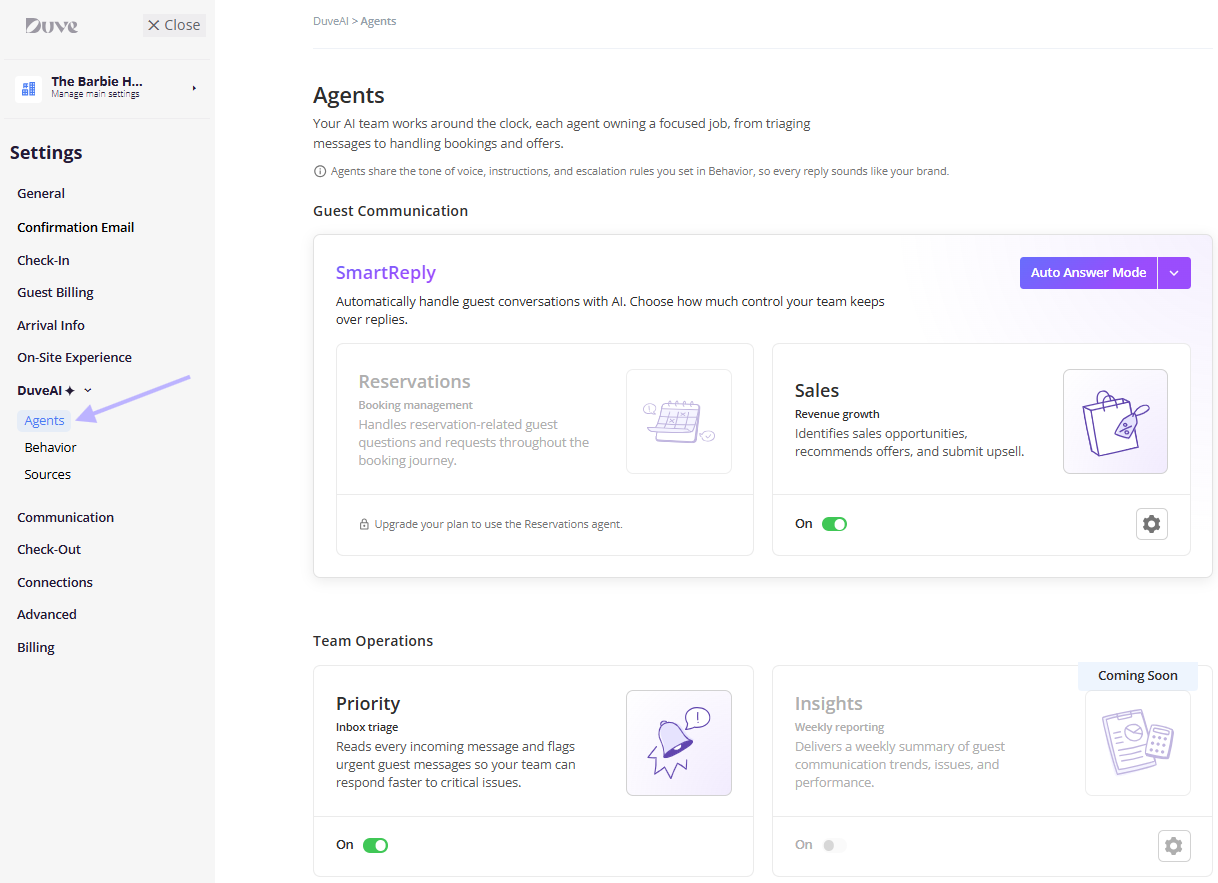
- Go to Settings > Communication > DuveAI > Agents.
- Under Guest Communication, confirm that SmartReply is active and set to the mode you want. SmartReply supports four modes:
- Disabled: SmartReply is completely off, and all guest conversations are handled manually by your team. The Sales agent does not work in this mode: it is locked in the Agents screen and cannot be turned on, and if it was already on, it stops handling free item requests until SmartReply is enabled again.
- Test Mode: SmartReply replies to guests for selected reservations only, which is useful for testing in a real setting.
- Suggestion Mode: SmartReply drafts a response for every incoming message, and your team reviews, edits, and sends it.
- Auto Answer Mode: SmartReply responds instantly and manages conversations end to end.
-
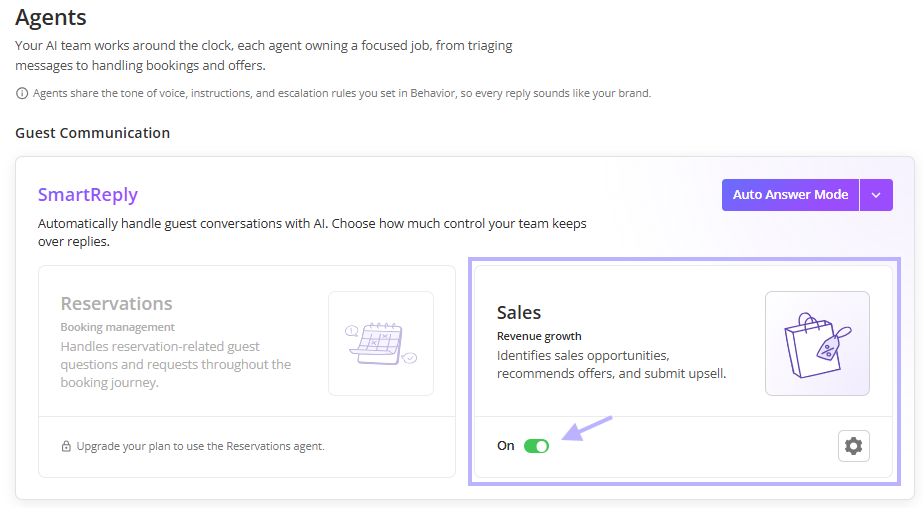
Turn the Sales agent "On". The Sales card is the Upsell Agent: it identifies sales opportunities, recommends offers, and submits upsells.
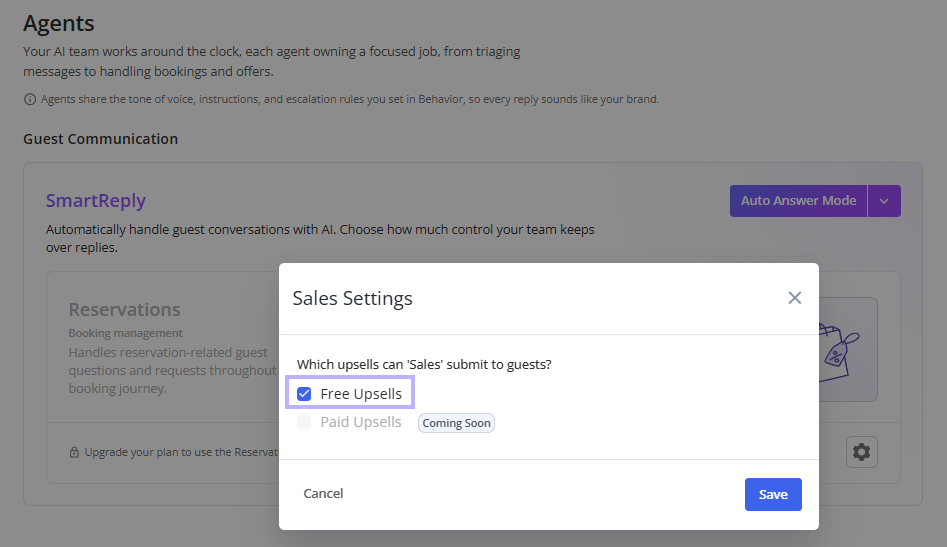
- Click the settings (gear) icon on the Sales card to open Sales Settings.
- Under Which upsells can 'Sales' submit to guests?, keep Free Upsells selected. Paid Upsells is marked Coming Soon and cannot be selected in this version. At least one option must stay selected to save.
- Click Save.
Notes on behavior of these settings:
- Turning the Sales agent on for the first time automatically sets its permission to free upsells.
- If SmartReply is switched off later, the Sales and Reservations agents are locked again and stop working.
Host experience
- Orders arrive like any other order: An order created by the agent appears on the Orders page and in the guest's reservation with the same structure as a manual order: product, quantity, selected items or pricing option, custom field answers, special requests, delivery date and time, guest name, and guest phone.
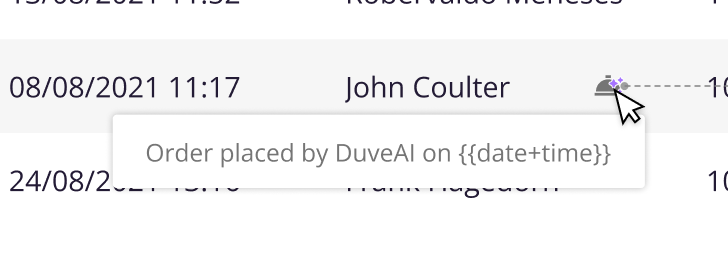
- AI attribution is visible: Next to the guest name column on the Orders page, an icon with the tooltip "Order placed by DuveAI on {date and time}" marks orders the agent created. The same indication appears on the inner order details page.
- Order Logs record the creation: The order log shows an Order created entry. For an order the agent created, the entry names the guest and the automation, in the form "{guest name} using SmartReply". A manually created order shows the standard "Order created" entry.
- Analytics: AI-created purchases are reported with the platform value AI, and the channel the guest used to make the request (for example, WhatsApp) is recorded on the order as the source referral, so you can measure automation adoption and accuracy per channel.
- PMS and notifications are unaffected: AI-created orders are pushed to the PMS or external API, booking confirmation emails are sent to the guest, and host and supplier notifications go out exactly as they do for manual orders.
- Escalations reach your team: When the agent cannot complete a request, it hands the conversation to your team with an internal note explaining what stopped it, so an agent can pick it up with full context.
Guest experience
- Intent recognition: When a guest with a reservation asks for something, the agent checks whether it matches a free upsell available to that reservation. For example, "I want to order a towel" starts the free item flow.
- Clarification when the request is vague: If the request is not clearly an order, the agent asks. For example, the guest writes "I need a towel," and the agent replies "Would you like me to order one for you?"
- Choosing between similar products: If more than one free upsell matches, the agent explains the difference and asks the guest to choose. For example, "We have big or small towels. Which towel would you like?"
- Collecting only what the product requires: The agent asks for quantity only when the product is sold in units, asks for a date or time only when the product requires scheduling, and asks every mandatory custom question defined on the upsell. It never asks "how many" for a product that is ordered as itself.
- Limits are enforced, not announced: The agent does not mention limits upfront. If the guest exceeds one, it explains and offers a valid value. For example, "Unfortunately, the maximum to order is 6. Would you like me to order 6 towels?"
- Follow-up questions on unclear answers: If the detail the guest gives is ambiguous, the agent asks again rather than guessing. For example, the guest says "I want less than 6," and the agent asks "Are you okay with ordering 3 towels?"
- Multiple items in one message: If a guest asks for several free items at once, the agent resolves each of them in the same conversation. For example, "I want a towel and a toothbrush" leads to "Which towel would you like? And would you like 1 toothbrush?"
- Free and paid mixed in one message: The agent continues with the free item and hands over the link for the paid one. For example, "I want a towel and wine" leads to "Which towel would you like? And feel free to order the wine through this link."
- One item unavailable: If one requested item cannot be provided for any reason, the agent processes the available item and escalates the other. For example, "Which towel would you like? I'll be happy to arrange that for you. Regarding the toothbrush, I'm unable to process that request directly, but I'll flag it to the team right away."
- Order confirmation: Once the order is created, the agent sends a summary of what was placed, for example, "I've placed your requests for 2 towels and 1 toothbrush."
- Orders that need approval: If the upsell requires approval, the order is submitted, and the guest is told it is pending approval and that they will be notified once it is approved, for example, "I've submitted your request for 2 hand towels. This requires approval from our team, and we'll let you know as soon as it's confirmed."
- Context persistence: If the guest leaves mid-conversation and comes back, the agent keeps the items discussed, the details already collected, and the step the conversation reached. Context is preserved for up to 10 hours from the guest's last message, after which the conversation resets. When the guest returns within that window, the agent briefly recaps where things left off, for example, "Welcome back! We were in the middle of ordering 2 hand towels for you. Would you still like to proceed?"
- Anonymous guests: A guest with no reservation attached to the conversation receives the standard link to order in the Guest app instead of a conversational order.
Troubleshooting
- The Sales card is locked: Check two things in order: the AI Ordering Agent feature on your account, and whether SmartReply is enabled. The card is locked by plan first, then by SmartReply being off.
- The agent does not offer an item it should: Confirm the upsell is enabled, is not deleted, is free, and is available for that reservation's dates. A disabled product is dropped from the catalog the agent reads, and a product the hotel cannot deliver during the stay is not offered.
- The agent offers a link instead of ordering: This is expected for paid products, and for products that are paid and carry their own booking link.
- The agent hands the conversation to a human instead of ordering: The most common reasons are that no product matches the request, the clarification question did not narrow it down, the product requires approval or carries a condition that only a person can settle, the hotel cannot deliver it during the stay, or the order could not be created in Duve.
- A requested quantity was not respected: Check the quantity limits on the product itself and on the specific inventory item or pricing option. The agent validates against both.
- An order was created from a product you deactivated: Changes to the upsell catalog are picked up on a short refresh cycle, so give it a couple of minutes after a change and confirm the product is disabled rather than only hidden.
Restrictions & Limitations
- Free upsells only: Paid upsells are not submitted by the agent in this version. Paid Upsells in Sales Settings is marked Coming Soon.
- Reservation required: Orders cannot be created for anonymous guests.
- Menu and Custom product types only: Other product types are not created by the agent.
- No delivery-time commitments: The agent only confirms that an order was placed or that it is waiting for approval. It never promises a delivery time.
- No changes or cancellations through chat: The agent only creates new orders. A request to change or cancel an existing order is escalated to your team.
- The agent never invents information: If the guest asks something about the product that the product's record does not answer, the question is escalated rather than answered.
Tips & Tricks
- Start in Suggestion Mode: Reviewing drafted replies for a few days is the fastest way to see how the agent phrases confirmations before letting it answer end to end.
- Use Test Mode on a handful of reservations to validate your upsell configuration with real guests at low risk.
- Write product names the way guests speak: The agent matches on name, description, highlights, and the items inside a Menu product, so clear item names reduce clarification questions.
- Set quantity limits and mandatory questions on the product, not in your instructions. The agent reads those settings per product and enforces them automatically.
- Mark the products that genuinely need review as requiring approval: Those requests reach your team instead of being auto-fulfilled.
- Filter the Orders page by the DuveAI indication to review what the agent placed and spot gaps in your upsell setup.
FAQs
Q: Does it work with paid upsells?
A: No. Paid items still use the link-based order flow. The agent shares the product's booking link so the guest can order it themselves.
Q: What if the guest has no reservation?
A: The Upsell Agent shares the standard link to order in the Guest app. Orders can only be created for a guest with a reservation.
Q: Can we promise delivery times?
A: No. The agent only confirms that an order was placed, or that it was submitted and is waiting for approval.
Q: Can a guest request several items at once?
A: Yes. The agent identifies every item in the message, asks whatever each one still needs, and confirms what was ordered.
Q: Which upsell types are supported?
A: Free Menu upsells and free Custom upsells, including Custom upsells with a single item and with multiple items.
Q: Do we need SmartReply for this?
A: Yes. The Sales agent cannot be activated while SmartReply is disabled, and it stops working if SmartReply is switched off later.
Q: Where do I limit what the agent can order?
A: In Sales Settings, opened from the gear icon on the Sales card. In this version, only Free Upsells can be selected.
Q: How do I tell which orders DuveAI created?
A: An icon next to the guest name on the Orders page, and on the order details page, shows "Order placed by DuveAI on {date and time}". The Order Logs also record the creation.
Q: Does the agent ask for quantity on every product?
A: No. It asks only when the product is sold in units. A product ordered as itself defaults to one, and the guest is never asked how many.
Q: What happens when the agent is not sure which product the guest means?
A: It asks a clarification question. If the answer still does not narrow it down, the conversation is handed to your team.
Q: Can a guest cancel or change an order through the chat?
A: No. Cancellations and changes are escalated to your team.
Q: Are AI-created orders sent to our PMS?
A: Yes. They are pushed to the PMS or external API, and confirmation and notification emails are sent exactly as they are for manual orders.
Q: Does the guest know they are talking to AI?
A: That depends on your AI conversation disclosure setting in DuveAI settings, which applies to all agents.
Q: What happens if the order fails to be created in Duve?
A: The agent does not confirm the order. The request is escalated to your team with a note that the order could not be created.
Comments
0 comments
Article is closed for comments.